The owner of an online coffee shop in Almaty sends you a screenshot: a customer paid 15,000 ₸ for an order, then received a "You forgot to finish your purchase" email at 11:00. The shop's own flow re-reads the order in the CRM before sending, as in the lesson on trigger flows, and would not have sent it. The email came from the messaging platform's built-in abandoned-cart scenario, which sends the list compiled at 10:00 and does not re-read the status. The contractor suggests buying a CDP to bring the data together. First, though, work out what data each system sees at the moment it sends. This is the shop from the customer value calculation, with the same economics; the example numbers are illustrative.
What the system needs to know before sending
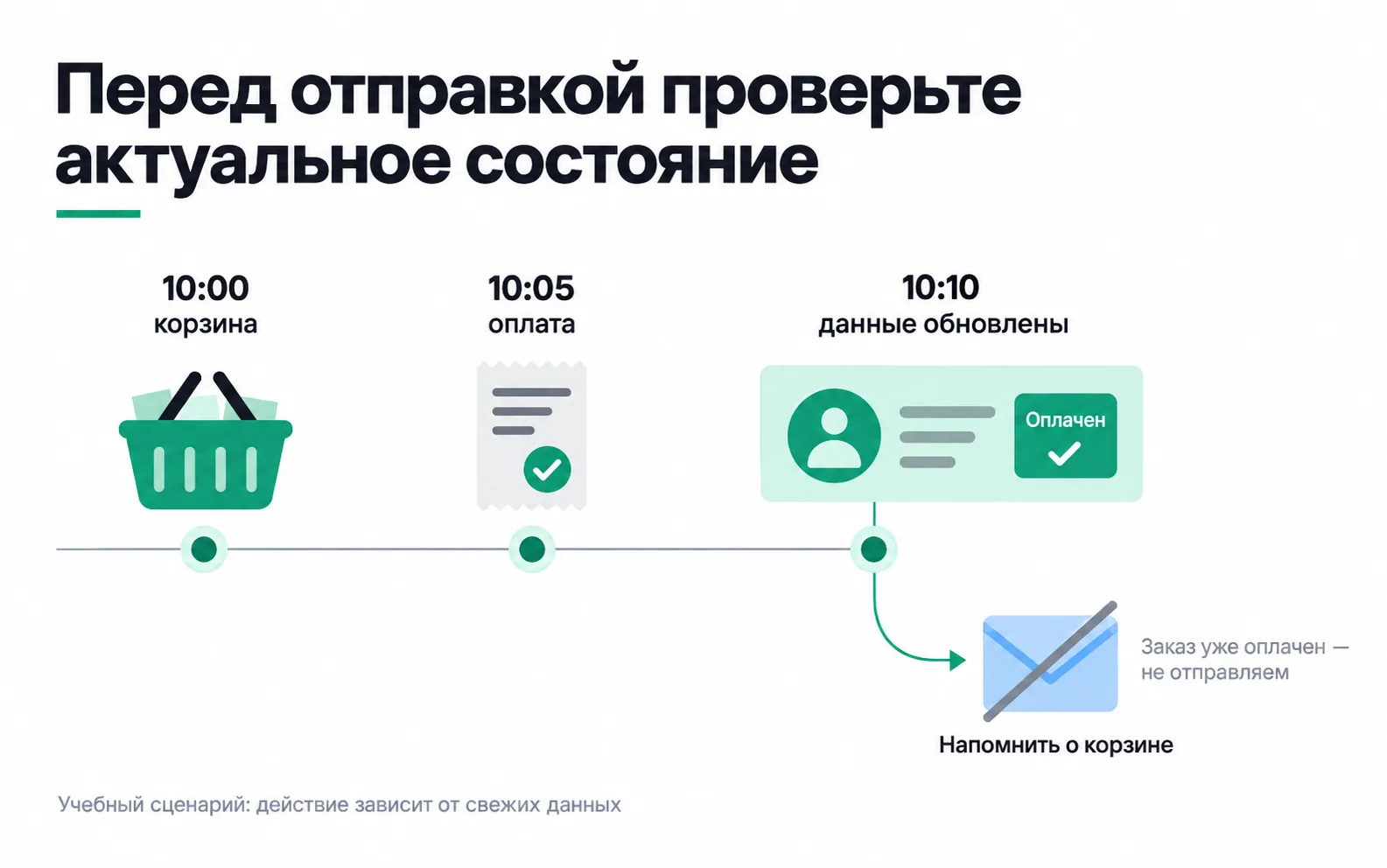
The customer started checkout at 10:00, paid by card at 10:05, and the payment reached the messaging system at 10:10. Under the shop's rules, the reminder is scheduled for 11:00, after a one-hour wait. If the system reads the order status again at 11:00, it removes the email from the queue. The built-in scenario does not: it sends everything queued at 10:00, and the customer is asked to pay for an order already paid for.
The picture shows the first three moments: the cart, the payment and the profile update. The crossed-out envelope marks the cancelled reminder.
The roles of CRM, CDP and the messaging platform
The CDP Institute defines a Customer Data Platform through a persistent, unified customer record that other systems can access. It can bring together website activity, orders and messaging permissions. The CDP links the records; the workflow uses them to choose an action.
Those are separate jobs. You can link the profile correctly and still send an email from an old list. You can also manage without a separate CDP if the CRM receives every required status and passes it to the messaging system in time.
For one reminder, the shop assigns responsibility as follows:
| Information | Where it comes from | Who owns the rule |
|---|---|---|
| Checkout start and cart ID | Website | Website developer |
| Order, payment method and delivery status | CRM receiving website and manager-entered orders | Shop owner |
| Confirmed payment | Payment records linked to the order | Person responsible for payments |
| Channel consent and its withdrawal | Consent form and the system receiving the unsubscribe | Marketer |
| Sending, delivery and the reason for a skipped message | Messaging platform | Marketer and integration developer |
Product names are secondary here. If one application stores orders and sends emails, people still own both rules. If data lives in an external store, the specification must explain how the workflow gets it. The point of a profile is to give systems a consistent customer history they can use, beyond putting another customer card on a dashboard.
Knowing which records belong to the same person
A shop customer might browse on a phone, order on a laptop and later message a manager. Linking these actions requires a clear connection between the website record and the CRM record. In this scenario, a confirmed account login provides it: the website passes the customer ID along with the cart ID.
A similar name or shared IP is not enough for that link. Several people can order from one home computer, and a family can share a phone number. A phone-based merge needs testing against these cases too, rather than being treated as accurate from the start.
The specification records the evidence used to merge records and who can reverse a mistaken link. Once someone signs out, the next user's activity must not automatically be added to their account. During acceptance testing, two staff members sign in to different test accounts on one device and check where the carts end up.
A reminder needs customer, cart and order IDs, statuses, update times and channel permissions. It does not need passport details or the free text of conversations. Agree access and retention periods before connecting systems: extra data adds work and increases the consequences of mistakes.
An event has two times
Payment at 10:05 and receipt of the information at 10:10 give a five-minute delay. Keeping only the receipt time makes the report look as though the customer paid later. Keeping only the payment time makes the integration delay harder to investigate.
Keep the time zone with both timestamps. Store both the time of the action and the time of receipt. For exports, also record the point up to which the source has supplied changes. A complete, successfully imported overnight order file is still too old for a reminder sent within an hour.
Arrival order can mislead too. A delayed "checkout started" record arrives after "paid". The workflow must not return the order to unpaid just because that record arrived last. The developer uses the source record's version or reads the current state again, and documents how corrections are handled. A refund after payment is a new change that also needs processing.
The shop's flow reads the current order from the CRM before sending, so a late record will not mislead it.
Check permissions and limits at the moment of action
Being in the unpaid segment at 10:00 is enough to start the wait. It is not enough to send at 11:00: the person may have ordered, unsubscribed or opened a complaint. What the flow checks before an email, from the order to message frequency, is covered in the lesson on trigger flows.
This lesson adds one case: the CRM is unavailable, so the current order cannot be read. The promotional reminder is then paused and the reason recorded. Once the connection recovers, the conditions are checked again; the backlog must not go out all at once to customers who have already ordered.
When a separate CDP is worth considering
Ask the contractor to demonstrate one path: cart, order, current profile, email cancelled. If the existing CRM and messaging platform can complete it, that job does not require another product. If the website, app and CRM contain many unlinked records and each new workflow needs another matching process, compare two options: extend the existing connection or maintain a shared profile through a CDP.
The budget includes connecting sources, resolving duplicates, support, service subscriptions and handling errors. One product's subscription price covers only part of the cost.
Suppose the monthly budget allows 60,000 ₸ for services and another 60,000 ₸ for support, a total of 120,000 ₸. The shop keeps 6,000 ₸ per order, so covering that amount needs 120,000 / 6,000 = 20 additional orders a month. Any separate one-off launch cost comes on top.
Twenty orders after emails are not yet twenty orders because of the emails. Some customers would have returned without a message. A comparison with a group receiving no reminder helps estimate the increase, with duration and sample size set before launch. A CDP purchase can also be justified by less manual work, but then the calculation needs the team's hours and the cost of that work.
Task: accept one workflow before buying a platform
Take a reminder from your own project. Your deliverable is a data table and an acceptance record that you can use to discuss implementation.
Suppose costs are 120,000 ₸ and you find 14 orders placed after reminders. Even if all were additional, they would contribute 14 × 6,000 = 84,000 ₸, leaving a 36,000 ₸ shortfall. A sending report cannot close that gap. Continuing the investment needs other demonstrated benefits or lower costs.
If the manager-entered order test produces an abandoned-cart email, the acceptance work has already found something useful: the order never reached the exclusion rule. The record should name where it failed and who will fix it. A new platform makes sense once you can explain which part of that work it will take on.
Video: CRM, ESP and CDP
As you watch, map the systems' roles to your table: where the order is stored, where messaging permission is held and where the sending decision is made.