An online school in Almaty is enrolling a new cohort for its analytics course. Each week it spends 120,000 ₸ on Instagram ads and 80,000 ₸ on Google search, and the admin also posts in the school's Telegram channel (the numbers in this lesson are made up). A week later the owner opens GA4 and sees the rows instagram / cpc, inst / paid, t.me / referral and (direct) / (none). The media buyer and the contractor each tagged the ads their own way, and the Telegram posts went out with no tags at all. A report like that can't tell you how many leads each channel brought in.
UTM tags are labels on a link. You add them to the end of the address to say where the link sits, what kind of traffic it is and which campaign it belongs to. When someone follows the link, GA4 reads those labels and files the visit under them instead of guessing from the previous page's address.
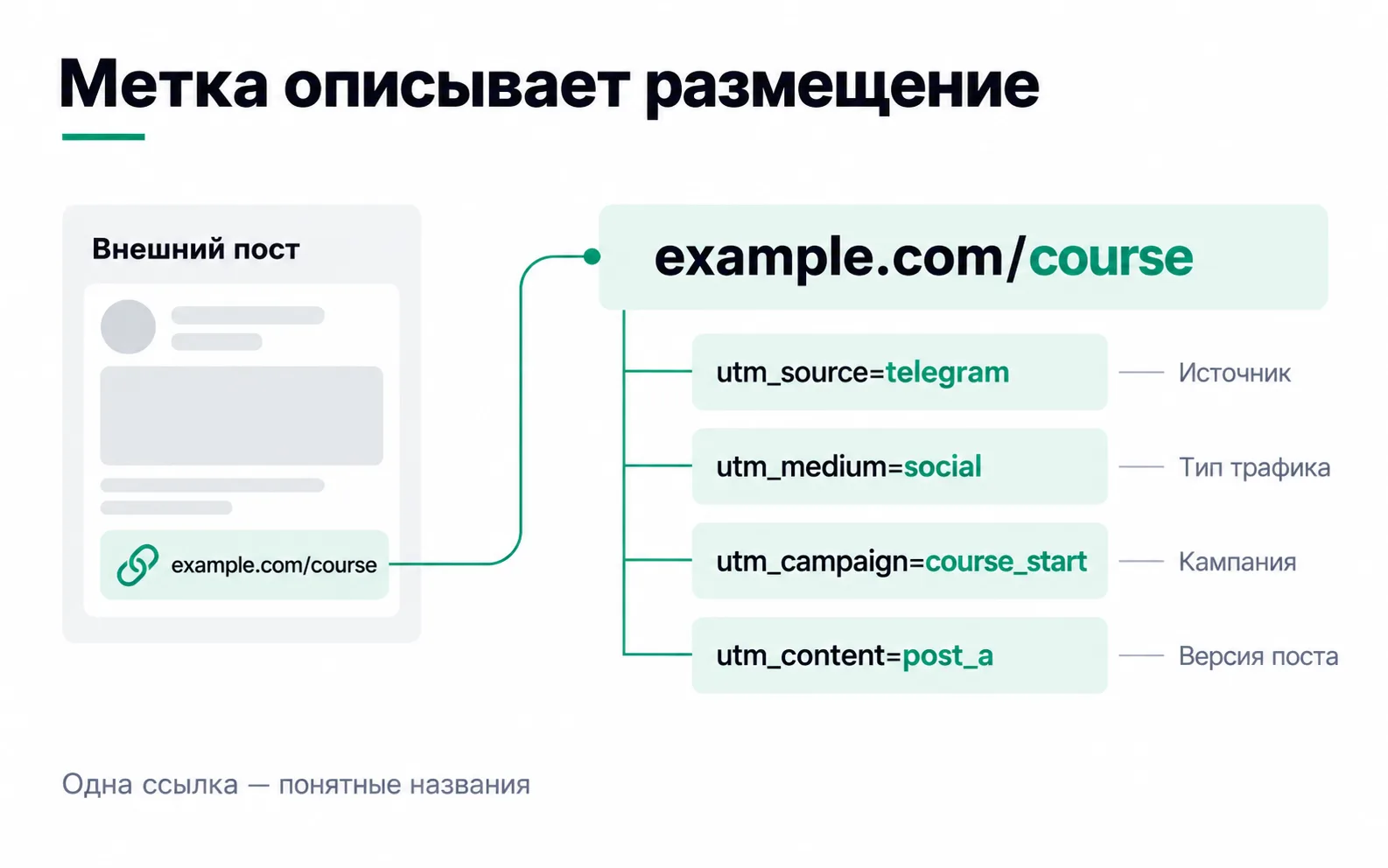
What a tagged link is made of
From the site's point of view, a post in the school's Telegram channel is external, and the link in it looks like this:
The tags start after the ? and are separated by &. Each one has its own job:
| Tag | In the example | What it labels |
|---|---|---|
utm_source | telegram | The site or platform where the link sits |
utm_medium | social | The traffic type: social, paid ads, email |
utm_campaign | course_start | The campaign, here the cohort enrolment |
utm_content | post_a | The post or creative within the campaign |
Google says to always set the first three: if one is missing, reports show (not set) in its place. utm_content earns its place when a campaign has several ads or posts you want to compare. There are also utm_term for the keyword and utm_id for a campaign ID, but four tags are enough to start.
Rules to agree on up front
Tags break when everyone writes them their own way. The media buyer types Instagram, the SMM specialist types instagram, the contractor types inst, and one channel ends up as three rows in the report. Google states plainly that values are case sensitive: to GA4, utm_source=google and utm_source=Google are two different sources.
Before the first link goes out, the team agrees on a few things:
- Lowercase Latin letters and digits only. Cyrillic gets encoded into strings like
%D0%BA%D1%83, which nobody can read at a glance and which break easily when copied. - Words are joined with an underscore:
course_start, notcourse-startorcourse start(the space turns into%20). - One campaign has one name in every channel. The cohort launch is
course_starton Instagram, on Google and on Telegram, so the campaign report shows which channel did better. utm_contentholds whatever makes the ads different from each other: the creative idea, the format, the post number.- No names, phone numbers or email addresses. Google forbids sending personal data to Analytics, and that covers both the URL path and its parameters.
- The reference lives in one shared sheet with a named owner. A new value goes into the reference first and into a link second.
A reference for Meta, Google and Telegram
For the school in our example, the reference looks like this. You will build the same table for your own project in the task at the end of the lesson.
| Channel | utm_source | utm_medium | utm_campaign | utm_content |
|---|---|---|---|---|
| Meta ads | {{site_source_name}} | paid_social | course_start | {{ad.name}}, with ads named by the rules |
| Google Ads, search | google | cpc | course_start, and the Google Ads campaign has the same name | ad group: search_brand, search_course |
| School's Telegram channel | telegram | social | course_start | post: post_a, post_b |
| Paid post in someone else's channel | telegram | paid | course_start | channel name in Latin letters |
For Meta you write one string for every ad in the campaign. Meta fills in the values in curly braces itself: the platform where the ad was shown and the ad's name.
The string goes into the ad, in the Tracking section, in the URL parameters field. If you leave the field empty, Meta may append tags of its own (a Facebook or Instagram source and paid), but it won't fill in the campaign and ad by your rules. You can also build it in the UTM builder: the Meta preset fills in {{site_source_name}} and {{ad.name}} with the braces intact. Then set your own campaign and paste the part of the link after ? into the field.
We type the campaign by hand, course_start, rather than using {{campaign.name}}. Meta captures names at the moment of first publishing: rename the campaign and the tag keeps the old name, with any spaces arriving as %20. For the same reason, ads get named by the reference rules before they are published, since {{ad.name}} fills in the name the ad went live with.
With two ads on Meta, two ad groups on Google and two posts on Telegram, six links like these reach the site (Meta's after substitution):
Why these exact words
The names are not a matter of taste. GA4 assigns the channel group by its own rules: it checks whether the source is on its list of social networks and search engines and whether utm_medium fits a known pattern. If it recognises neither the source nor utm_medium, the visit lands in Unassigned, no matter what your team agreed internally.
- In place of
{{site_source_name}}Meta putsfb,ig,an,msgorth.fbandigare listed as social networks in the GA4 source list. GA4 treats a medium as paid if it starts withpaid, containscpas incpc, or equalsppcorretargeting, so together withpaid_socialthose visits go to Paid Social.an,msgandtharen't on the list, and those visits end up in Paid Other. Nor is the wordmeta: withutm_source=meta, all your Meta ads would land in Paid Other. telegramisn't on that list either; onlyt.meis. For the school's own channel,utm_medium=socialsaves the day: GA4 recognises that value without any help from the source and files the visit under Organic Social. A paid post taggedpaidlands in Paid Other. That's fine as long as you know where to look, and if you want Telegram as its own row, GA4 lets you build a custom channel group.- A tag like
utm_medium=telegram_postmatches no rule at all, and those visits end up in Unassigned.
Google Ads: tags on top of auto-tagging
Google Ads has auto-tagging: it appends a gclid parameter to every click. Through it GA4 pulls data from the ad account that tags can't carry: the ad group, the keyword, the search query. If a link carries both gclid and UTM tags, GA4 takes source, medium and campaign from auto-tagging. So the course_start in the tag never reaches the GA4 report; the campaign name from Google Ads shows up there instead. Name the campaign itself course_start in the ad account, by the same rules, or Google will sit apart from the other channels in the campaign report. Auto-tagging stays on.
You still tag Google Ads links, because GA4 isn't the only thing reading the tags. If the site stores the UTM values with each lead and passes them to the CRM, the sales manager sees google / cpc on the client card, while a gclid means nothing to them. The tags don't go into every ad but into the Final URL suffix: one for the whole campaign, or one per ad group if the groups have different utm_content.
Measure internal banners with an event
A banner on the home page leads to the course page, and it's tempting to tag it utm_source=home_banner to count clicks. Don't. The visitor is already on the site, and they have exactly one source: wherever they came from.
GA4 does not start a new session when it sees a new campaign, and it ties the banner's tags to the events after the click. The session stays credited to Instagram, while a lead submitted after the banner click goes, partly or fully, to the source home_banner in attribution reports, which means to your own site.
For internal promos GA4 has recommended events: view_promotion when a banner is shown and select_promotion when someone clicks it. The banner's name and position go in as event parameters, and the visit's source is not overwritten.
Walk every link before launch
The builder will assemble a link without typos, but it can't know what happens to the link along the way. Every link gets walked by hand before launch:
- Open the link on a phone from the app it will live in: from Telegram, from the ad preview.
- Look at the address of the page you land on. The tags have to survive to the end. A misconfigured redirect can drop them: from
httptohttps, from the bare domain towww, or through a link shortener. - A link-in-bio page such as Taplink is a separate site. Tags on the link to it don't travel any further, so they go on the buttons inside it.
- If the address contains
#, the tags go before it. Everything after the hash is an anchor on the page as far as the browser is concerned, not a parameter. - Open the link in GA4 debug mode and find
page_viewin DebugView. Thepage_locationparameter should hold the address with the tags. - The next day, open the Traffic acquisition report and switch the table to Session source / medium. Your test visit should be there under your names.
What tags will and won't show
After a week with tags, the school's picture looks like this: Instagram and Facebook together brought 40 leads for 120,000 ₸, or 3,000 ₸ per lead; google / cpc brought 20 leads for 80,000 ₸, 4,000 ₸ each; telegram / social brought 9 leads with no ad budget. Now the budget argument can be about numbers.
But tags answer one question only: where the person came from. What the click cost, whether they bought the course and whether they asked for a refund is beyond them. Costs come from the ad accounts, payments from the CRM, and end-to-end analytics ties it all together. And a cheap lead isn't necessarily a cheap customer: comparing channels all the way to payment is the next step after tagging.
Task: a reference and six links for your own project
Take your own project or a test site and three campaigns: on Meta, on Google and on Telegram.
The reference works if the seventh link matches, character for character, the one you would have built. If it doesn't, find the spot where they hesitated: capitalisation, a hyphen instead of an underscore, an ad name that breaks the rules. That's where the missing rule goes.
The opposite happens too: on someone else's project, one campaign lives in the report under three names, course_start, Course_Start and course-start. To GA4 these are three separate campaigns. If it really is one launch and not three placements with similar names, pick one spelling, put it in the reference and rebuild the live links. Renaming won't fix the data already collected; for past weeks you'll have to add the rows up by hand.