The online analytics school that tagged its links with the UTM scheme has run a week of ads: 120,000 ₸ went to Meta and 80,000 ₸ to Google search (the numbers in this lesson are made up). The next cohort starts in two weeks, and the owner wants to know which ads paid off. The ad accounts have the spend and the cost per lead; the CRM knows which of the people who signed up actually paid for the course. The answer sits between the two, and connecting them is your job.
What end-to-end analytics is
End-to-end analytics is a report that shows, for every ad campaign, its spend, leads, payments and revenue, and from those its contribution after ads and its ROMI. To build it, the data is linked into a chain: campaign spend, a click carrying UTM tags, a lead in the CRM, a payment. Identifiers passed from one system to the next hold the links together, so from any payment you can walk back to the campaign.
You can buy a service such as Roistat, but it joins the data on the same tags and numbers that you set up. Here is the chain for one buyer who came from the teacher's video on Instagram:
| Link | Where it lives | What is recorded | How it connects to the next |
|---|---|---|---|
| Spend | Ads Manager | campaign course_start, ad video_teacher, daily spend | the names match utm_campaign and utm_content |
| Click | course page URL | utm_source=ig, utm_medium=paid_social, utm_campaign=course_start, utm_content=video_teacher | the form copies the tags into hidden fields |
| Lead | CRM | lead 058, the tags, a phone number | the lead number is stored in the order |
| Order | school website | course_order_57 for 25,000 ₸, lead 058 | the order number goes to the payment service |
| Payment | payment service | course_order_57 paid | the notification comes back with the order number |
You do not need one ID across every system; each has its own numbers. What you need is for every link to remember the one before it: the lead keeps the tags, the order keeps the lead number, the payment notification keeps the order number. Break one link and the payment lands in the report with no source.
Tags are saved with the lead
You start with the form on the website. It gets hidden fields, a script fills them with the tags from the page URL, and the CRM stores them on the lead card next to the phone number. If there is no CRM yet, the same columns go into a lead spreadsheet.
Write down in the report notes which visit's tags the form saves. If the tags come from the URL of the page where the form was submitted, the lead gets the last visit before it. If they are stored in a cookie on the first visit, it gets the first tagged visit. That decides which row of the report a person lands in when they first clicked the video and then signed up from search.
A website lead with no tags is recorded exactly that way: "no tags". A manager who types "Instagram" by guesswork does more damage than an empty field, because a guessed source can never be told apart from a real one afterwards.
Calls and WhatsApp carry no tags at all. In the lead spreadsheet a call gets phone and a personal recommendation gets referral, but neither value says where the person found the number. A click on a WhatsApp button is not a lead yet: the person may open the chat and never write. To carry the source into the conversation, the button opens a link with a pre-filled message that contains a campaign code, or each channel gets its own number to message and call. Matching a chat or a call to a click by time is a guess, and those leads are marked separately in the report.
The lead number travels to the payment
Next, the lead is tied to the money. The manager agrees terms with the person and sends a payment link. At that moment the website creates order course_order_57 and writes lead number 058 into it. The payment service knows only the order number and the amount, and it sends those back in a "paid" notification. The server verifies the payment notification, finds the order by its number and the lead through the order, and the lead in the CRM gets the status "Paid" and the amount.
Some of the school's students pay by Kaspi transfer, and then the manager sets the status: the deal stores the lead number, and "Paid" goes on when the money has reached the account.
Matching a payment to a lead by name, amount or time is guesswork. The course costs 25,000 ₸ for everyone, so two payments on the same evening cannot be told apart by amount. A phone number is more reliable once it is normalised to +7 and ten digits, but a husband and wife can share one number, so those matches are marked separately.
Spend is exported from the ad accounts by campaign
That leaves ad spend. Export it by day, broken down by campaign and ad. The Ads Manager table can be exported to CSV or XLSX, and in Google Ads the download icon above the statistics table saves it to a file or to Google Sheets. Both exports can be scheduled.
Spend is joined to leads by name, so the names in the ad accounts match the tags: the campaign is called course_start in both Google Ads and Meta. In Meta, utm_content fills itself through {{ad.name}}, but Meta inserts the name the ad had when it was first published. Rename it after launch and the export shows the new name while the leads carry the old one. If the names have already drifted apart, keep a small mapping table: the name in the ad account and the tag.
Bring spend and revenue into one currency and one time zone. If the ad account runs in dollars, convert spend at the rate agreed with the accountant and state that rate in the report.
The report: revenue and contribution by campaign
Once the tags, the lead number and the spend are in place, the report comes together like this: group the CRM leads by their tags, pull in payments by lead number, and put the campaign's spend for the same week alongside. The school counts payments on that week's leads up to the start of the cohort.
Contribution needs one more number. From a 25,000 ₸ sale, after the payment service fee and the curator's pay, the school keeps 15,000 ₸. That is the contribution of one sale, and a campaign's contribution after ads is the contribution of all its sales minus its spend.
| Campaign | Spend | CRM leads | Payments | Revenue | Contribution after ads |
|---|---|---|---|---|---|
Meta, paid_social, course_start | 120,000 ₸ | 34 | 6 | 150,000 ₸ | −30,000 ₸ |
Google Ads, cpc, course_start | 80,000 ₸ | 18 | 6 | 150,000 ₸ | 10,000 ₸ |
The school's Telegram channel, social | 0 ₸ | 8 | 2 | 50,000 ₸ | 30,000 ₸ |
| No tags | 0 ₸ | 5 | 1 | 25,000 ₸ | 15,000 ₸ |
| Total | 200,000 ₸ | 65 | 15 | 375,000 ₸ | 25,000 ₸ |
On cost per lead, Meta looked respectable at 120,000 / 34 = 3,529 ₸, but in money it is below break-even (how break-even is worked out is in the marketing effectiveness analysis): to break even it needs 8 payments a week, and it got 6.
What this report cannot tell you
Take the student from the attribution models walkthrough: she clicked a video on Instagram, found the school in search six days later and submitted the form. The school's form saves the tags of the last visit, so her payment sits in the Google Ads row. How many payments would have been lost without Meta ads, the report cannot say: it sorts money by link, it does not test what would have happened without a campaign.
The numbers are also small: six payments against six, and a single payment shifts a campaign's contribution by 15,000 ₸. So nobody switches Meta off on the strength of one week; the report is collected over several weeks. If the campaign is still in the red by then, whether the school needs it is a question for a test with a control group.
Where the join breaks
When tables are joined, two mistakes inflate the numbers and a third hides them.
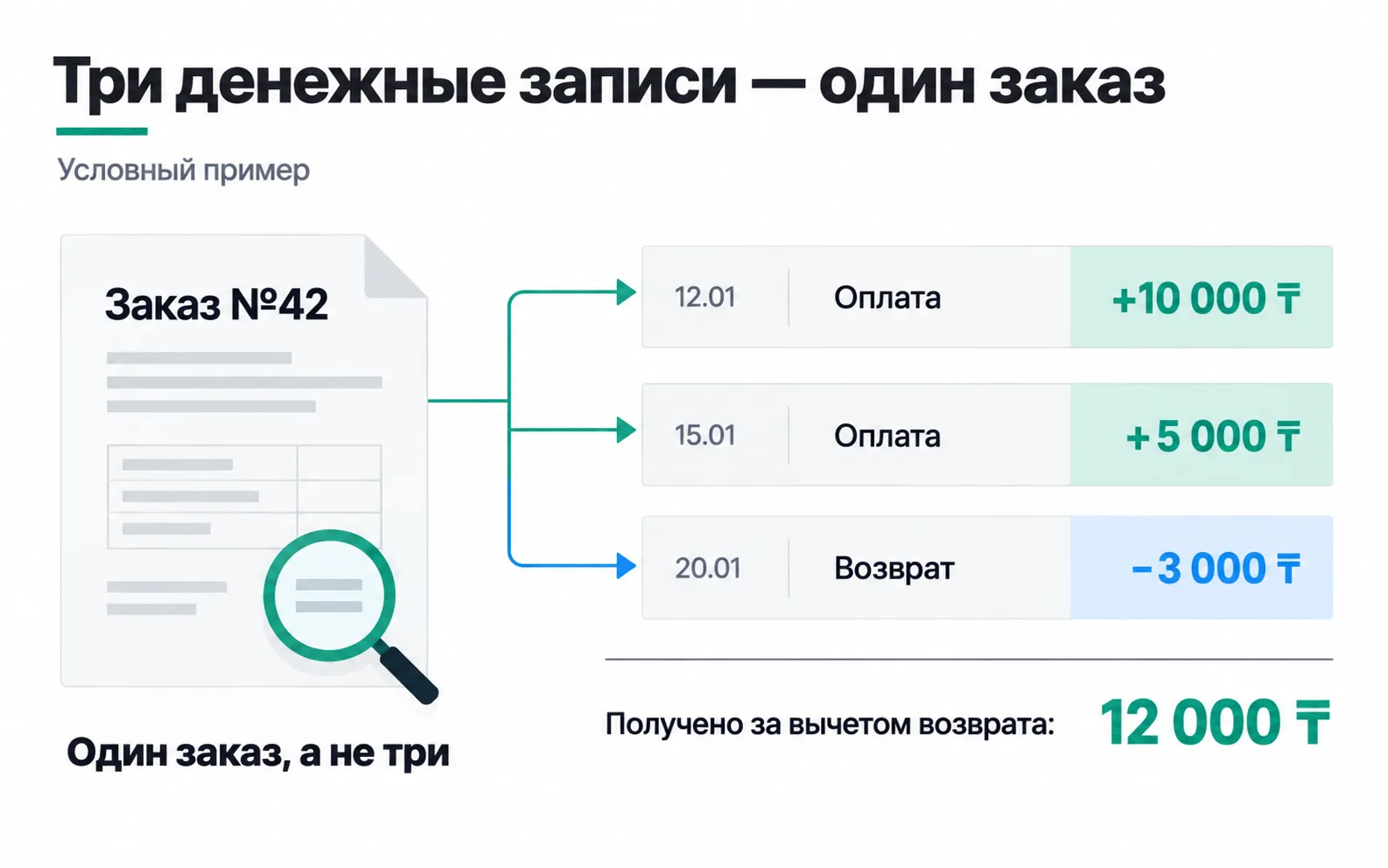
One sale, several money rows. An order may be paid in instalments, topped up later or partly refunded. The payment service export then has several rows for it, and if you attach them to the lead as they are, one sale turns into two or three. So the money is first rolled up to one row per order, payments minus refunds, and only then joined to the leads.
A week's spend on every lead. Attach the campaign's weekly spend to each of the 34 Meta leads, sum the column, and you get 4,080,000 ₸ instead of 120,000 ₸. Sum spend separately, by campaign and period, and put it next to the lead totals.
Records without a match. Leads without tags and payments with no lead found stay in the report. At the school that is the "No tags" row: five leads and one payment. Filter it out and the revenue in the report falls below what reached the bank, and a month later someone decides payments are going missing. If that row grows, look for the form or link that stopped passing tags.
Once a week, reconcile three totals with the source systems: spend in the report against the sum from both ad accounts, leads against the CRM's lead count for the week, and revenue together with any payments that found no lead against everything received for this cohort. At the school that is 200,000 ₸, 65 leads and 375,000 ₸, with no unmatched payments. Until the totals agree, draw no conclusions about campaigns.
Spreadsheet, BigQuery or an off-the-shelf service
For first projects, Google Sheets is enough: a sheet of leads from the CRM, a sheet of spend from both ad accounts, and a report sheet that pulls them together with formulas. Refreshing the exports once a week takes half an hour.
When there are dozens of campaigns and hundreds of leads a week, hand-built exports stop coming out clean, and the data moves into a database. GA4 exports its events to BigQuery on its own; CRM leads, spend and payments are loaded there separately.
There are also ready-made services. Bitrix24 has its own end-to-end analytics section: spend there is taken from a connected ad account or entered by hand, and the result appears in its ad payback report. Roistat says on its site that it gathers spend and revenue in one place. Before you pay, find your ad accounts and your CRM in the service's list of integrations, and reconcile the three totals exactly as you would with a spreadsheet.
Exercise: an end-to-end report on your own test
Take the week 2 test from the Start track and the spreadsheet you set up for tracking leads. If you have not run the test yet, submit three leads on your test site through links with different utm_content values and build the report on those.
If the totals do not agree, start with the second item. When the lead spreadsheet says utm_content=problem and the export shows the ad under a different name, it was renamed after launch. Add the pair to the mapping table, and in the next test name your ads before publishing.
A report like this will not tell you which ad is best: after its test the IELTS prep centre had 11 leads and three people at the trial lesson. The exercise is done when every lead has found its ad and every payment its lead. Once leads run into the hundreds, the same report will start answering the owner's question.
Video: GA4 export to BigQuery
The video is in English: how to connect the GA4 event export to BigQuery.