An online analytics school that tags its links with UTM parameters spends 120,000 ₸ a week on Instagram ads and 80,000 ₸ on Google search (the numbers in this lesson are an example). The owner opens the weekly ad report and sees that the brand ad group search_brand, where ads show for the school's name, spent 20,000 ₸ and brought in 15 leads, 1,333 ₸ each, while Instagram brings them in at 3,000 ₸. He wants to cut Instagram and move the money to search. The media buyer objects: the people googling the school's name are the ones who first saw the school's video on Instagram.
Both could be right, and the report won't settle it. Here is one student's path:
- on 3 October she tapped the school's sponsored Instagram post with a teacher's video, scrolled through the syllabus and closed the tab;
- on 9 October she typed the school's name into Google, clicked the ad and submitted the form;
- on 12 October she opened an email with the start date, followed the link and paid 25,000 ₸ for the course.
Which channel sold the course depends on the rule you count by and on who is doing the counting.
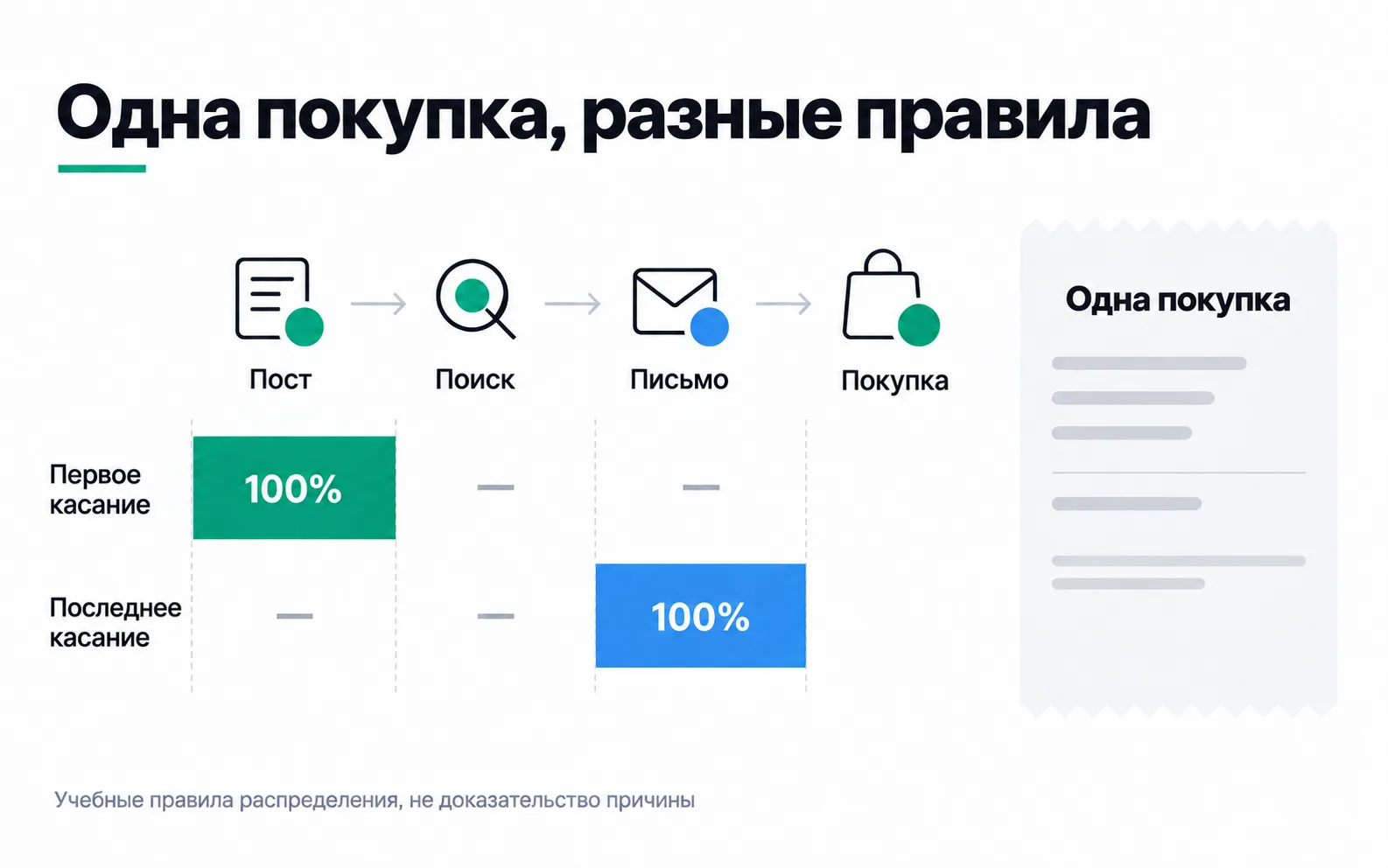
Attribution splits credit, it does not find the cause
Attribution is a rule for dividing a lead or a sale among the touchpoints a system saw. A first-touch rule gives the purchase to the Instagram post, because that is where it all started. A last-touch rule gives it to the email, because she paid right after it. A linear rule cuts the purchase into three equal parts. All three describe the same 25,000 ₸ payment, and you can't add them up into three sales.
The owner needs to know something else: would she have bought the course without the video? Maybe a friend had already told her about the school and the ad just reminded her. Or maybe without the video she would never have heard of it. A three-click path looks exactly the same in both cases.
Which models are left in GA4
Articles about attribution still draw first touch, linear and time decay. GA4 no longer has them: since November 2023, attribution reports offer three models.
- Data-driven attribution. Splits the value of a key event across touchpoints using a machine learning model trained on converting and non-converting paths. Google computes the shares, and you can't reproduce them by hand.
- Paid and organic last click. Everything goes to the last channel that got a click. Direct visits are skipped.
- Google paid channels last click. Everything goes to the last click on a Google ad. If the path has no such click, the model falls back to the previous one.
A direct visit gets no credit in any model unless the whole path is direct visits. If, after the email, she had opened the site from a bookmark and paid, last click would still go to the email. The school tagged the email with utm_medium=email, so GA4 puts it in the Email channel.
For our student the models split the lead and the payment like this:
| Model | Lead on 9 October | Payment on 12 October |
|---|---|---|
| First touch (no longer in GA4) | ||
| Paid and organic last click | Brand search | |
| Google paid channels last click | Brand search | Brand search |
| Data-driven attribution | Shares for Instagram and search | Shares for all three |
You pick the reporting model in Admin under Data display → Events → Attribution settings, and you need the Marketer role or higher. The default is data-driven attribution. The same screen holds the key event lookback window: 90 days for leads and purchases, which you can cut to 60 or 30, and 30 or 7 days for the first visit to the site. Changing the model recalculates past data too, while a new lookback window only applies from the day you set it.
Where to compare models in GA4
The comparison lives in Advertising, under Attribution → Attribution models. The report used to be called Model comparison, and Google's Russian-language help still uses that name, so if you see it in the interface, it's the same report.
The report has two "Attribution model (non-direct)" columns, where "non-direct" means direct visits are left out. You choose a model in each column. Choose the key event as well: by default the report adds all key events together, and leads get mixed in with payments. Rows start out as primary channel groups, and you can switch them to Source/medium, Source, Medium or Campaign. The % Change column shows how much the second model added to a channel or took away from it.
Here is the school's week for generate_lead:
| Channel group | Paid and organic last click | Data-driven attribution | % Change |
|---|---|---|---|
| Paid Social | 40 | 44.6 | +11.5% |
| Paid Search | 20 | 15.1 | -24.5% |
| Organic Social | 9 | 9.3 | +3.3% |
| Total | 69 | 69 | 0% |
The data-driven model took about five leads from search and gave them to social ads. On paths where both channels appeared, it weighs the video more than the click on the school's name. The total is the same in both columns, 69: the model moved leads from one row to another and left their number untouched. So it only tells you how to split the leads.
The second report, Key event attribution paths, opens from the Key events dropdown in the same Advertising section. It shows which channels people went through and how many touchpoints came before the lead, in the Touchpoints to key event column. If a path has one touchpoint, that touchpoint gets the whole lead under any model. You'll need this when the columns match on your own test.
Recent numbers in the data-driven column will still move: Google can reattribute conversions for up to seven days after they happen. Look at last week's comparison no earlier than next week.
Last click gave the sale to brand search
Back to the argument. The Google paid channels last click model credited the student's payment to search_brand. One thing follows from that: under the chosen rule, brand search got the credit. Whether it brought in a sale that wouldn't have happened without it, the report doesn't say.
Brand search shows this most clearly. The people searching for the school's name already know it. Without the ad, some of them might have clicked the site's link in the regular results just below, and the lead would have come in anyway. No model will show how many such people there are, because every model has to hand out the whole lead to the channels in the path. On top of that, only people who typed the school's name themselves see the brand ad. Money taken from Instagram won't make people search for the school more often.
A channel's extra effect is tested separately, with an experiment. For example, you switch the brand ads off for a while in a randomly chosen half of the regions and compare search leads, paid and organic together, with the other regions. The school gets about 20 search leads a week, roughly ten per half of the regions, so the test has to run for several weeks before a difference shows. Its duration, metric and stopping rule are set before launch, as in any A/B test.
Why ad accounts and GA4 count differently
GA4 only knows about visits to the site. If on 5 October the student saw another of the school's videos and scrolled past it, GA4 will never hear of it. The Meta ad account does know about views: by default it credits the ad with a lead if the person clicked a link in the ad within seven days before it or saw it within a day. A third window can be switched on too: a day after the person clicked the ad but not its link, or watched the video for at least 5 seconds. And the result lands on the day of the impression, not the day of the lead.
The student clicked the video six days before her lead, so Meta will credit the lead to its ad. Google Ads will credit the same lead to the brand ad group, since there was no other Google ad in the path. The CRM has one lead, the two ad accounts have two. Had the Instagram click been 20 days before the lead, with no ad seen afterwards, Meta would no longer count it, while GA4, with its 90-day lookback window, would still see that click in the path.
That's why leads and payments are counted from the CRM and linked back to ads through end-to-end analytics, while ad account numbers are used to compare ads within one platform.
Even inside GA4 there are three kinds of source. First user source / medium shows where a person first came from, session source / medium shows where a visit started, and plain source / medium in attribution reports shows who got the key event under the chosen model. The first two don't depend on the model. So leads by channel in Traffic acquisition and in Attribution models may not match, and nothing is broken.
Exercise: last click and data-driven on your own test
Take your week 2 test from the Start track and wait a week after it ends, so the data-driven numbers stop moving.
The exercise is done when the screenshot shows both models on your own test data and three sentences explain where they diverge and why.
On a small test the columns may almost match, and that's a normal result. The IELTS prep centre had 11 leads after its Meta test. Last click gave 7 of them to ig / paid_social, 3 to fb / paid_social and 1 to an / paid_social. The data-driven model kept the same 3 and 1 for fb and an and gave ig 6.6: one person had visited the site from Google search before clicking the ad, and 0.4 of a lead went to google / organic. The centre's three sentences read like this:
"Last click gives Meta ads all 11 leads, the data-driven model 10.6: the models diverge on just one lead, where a visit from Google search came before the ad click, and the model gave search 0.4 of it. The other ten paths are a single ad click, and on such a path no model has anyone else to give the lead to. Eleven leads with paths this short say nothing about the contribution of search or about whether to switch models: one lead here is 9% of the whole result."
If your leads aren't in the report, start in two places. Attribution reports only show key events, so generate_lead has to be marked as a key event. And the UTM tags have to reach the page: without them, Instagram visits end up in other rows and there's nothing to compare.
Video: attribution models
The video is in Russian and covers attribution in general. Of the models it discusses, only the three described above are available in GA4 today.