A bank takes applications for a business account on its website (the bank, the applications and the IDs in this lesson are made up). The marketer asked the developers to "put a conversion on the form". The front-end developer sent a conversion event when someone clicked Submit, the back-end developer sent conversion when the application was saved, and the CRM integration sent it when the account was opened. All three put the application number into event_id. A month later GA4 has added the three events up into one number, while Meta, which merges a browser event and a server event with the same name and event_id, has thrown some of them away as repeats. Neither system shows how many accounts the ads brought in.
Each of them read the task their own way, and each had a point. To avoid this, you do not order an event in one line. You order it with a specification: for every event it says what the event means, when it is sent, with which parameters, where it goes and where you can see it. The developer writes code from that document, you accept the work against the same document, and the argument about who was right ends the moment someone opens it.
What the dataLayer is and where the spec comes in
The dataLayer is an array on the page where the site's code drops messages and GTM reads them (Google's dataLayer guide). A message with an event key fires triggers; the other keys become values for variables. Names are case-sensitive: a form_name variable will not read a Form_Name key, so the spec spells them exactly as the code does.
A specification is broader than the dataLayer. The dataLayer only carries what happened in the browser to GTM, while the spec also covers events the browser never sees. The bank opens the account later, when the page with the form is long closed, and the server reports it. Such events reach GA4 and ad accounts through server-side tracking, and in the spec they get the same fields as browser events.
Facts first, names second
Before you invent event names, agree on which facts you count and what confirms each one. The bank has three:
- application accepted: the server saved it and issued a number;
- phone confirmed: the person entered the code from the SMS and the server checked it;
- product opened: in the bank's system, the business account for this application got the status "open".
A button click, a code that was typed but not yet checked, and the thank-you screen are not facts. People click the button with an empty field, codes are wrong, and the thank-you screen gets reopened from the browser history. If an event hangs on any of these, the report counts attempts rather than results. That is what the tag counted when the online school's previous contractor hung it on the button in Google Tag Manager.
Two identifiers: the application and the event
To link the three facts of one application without mixing them up, you need two numbers. lead_id is the application number, the same at every stage. event_id is the number of the fact, and each stage has its own.
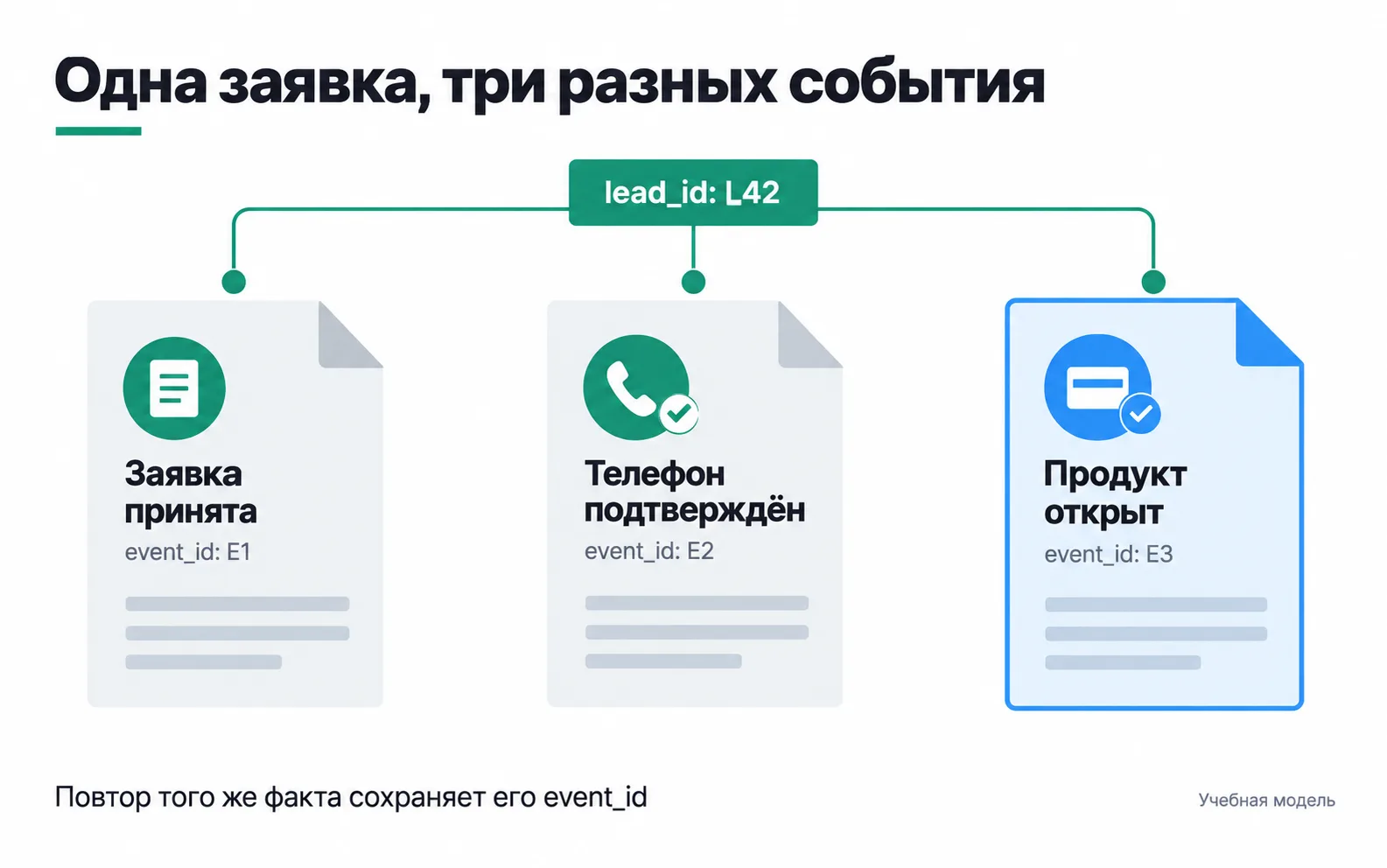
If sending E2 failed on a network error and the server retried, the retry goes out with the same E2, because it is the same fact. If the same person files a second application a month later, it gets a new lead_id and new event_id values. Customer number, application number, order number and event number are four different fields, and you must not merge them into one.
Back to the start of the lesson. There, all three stages went out as conversion with the application number in event_id. GA4 added them up into one number, and to Meta the same name and event_id mean a copy, so it threw some of the events away. The fix is simple: L42 stays as the shared lead_id, and the stages get their own names and the numbers E1, E2 and E3.
Each receiver spots a repeat in its own way. GA4 drops duplicate purchase events with the same transaction_id, and only in web streams (how GA4 deduplicates purchases). Meta merges a browser event and a server event when their name and event_id match and the second arrives within 48 hours of the first (deduplication in the Conversions API). You set up this merging together with the Conversions API. That is why the spec says, for each receiver, which field it uses to tell a repeat from a new event.
What an event looks like in the dataLayer
Here is the bank's first event. The site sends it when the server replies that the application is saved. The team made up the field names; this is not a ready-made format for an ad platform.
eventis the name the GTM trigger waits for.schema_versionis the version of the event description. When the meaning of a field changes, the version goes up, and the data shows from which day the new rules apply.event_idandlead_idare the fact number and the application number. E1 and L42 are test values. On a live site the server issues the numbers and the page code takes them from its response: a constant in the code would give every application the same number.product_idis what is being opened, a business account here.occurred_atis when the fact happened, with a time zone. Delivery time is stored separately: after a retry the two times will differ.
There is no phone number, IIN (the Kazakh personal ID number) or SMS code in the event, and the section below explains why they must not be there.
The event card template
Each event in the spec is described by a card with the same fields. Here is the card for application_accepted; the bank's other two events use the same fields.
| Field | application_accepted |
|---|---|
| What it means | The bank saved the business account application and gave it a number |
| When it fires | The server replied that the application is saved |
| When it does not fire | A form error, a server rejection, reopening the thank-you page |
| Parameters | schema_version, event_id, lead_id, product_id, occurred_at |
| Repeat | A repeat of the same fact goes out with the same event_id; a new application gets new lead_id and event_id |
| Receivers | For each: the event name, the set of fields and the field it uses to filter repeats |
| Where to check | GTM Preview, DebugView, the application with the same lead_id in the CRM |
| Owner | Meaning: product team; code: developer; checking: analyst |
The most useful row is "When it does not fire". Without it the developer has no reason to give up the button event: it is quicker, and everything fires in Preview. The "Where to check" row tells you when the work is done: until the event shows up there, the task is not delivered.
There is no value row on the card, and that is a decision, not a gap: an account application has no amount. If the team wants to send a forecast of revenue from the customer, the forecast needs a version, and the report must not call it revenue. Setting value to 1 just to fill the field is wrong for the same reason as in GA4: the reports would show a price that does not exist.
Purchase: what the developer will ask
If the client sells online, the developer's first question will be when to send purchase. Take the online school from the GA4 lesson: its 25,000 ₸ course is paid for on the site. The purchase card needs four things.
- The moment of purchase. The payment system confirmed the payment. Not the thank-you page opening and not a click on Pay: people land on the thank-you page after a declined card, and from their browser history.
- Parameters.
valueis the total for the items, 25,000 here.currencyisKZT; Google asks you to send it together withvalue.itemsis what was bought (GA4 ecommerce schema). - The order number.
transaction_idis the number from the school's system, unique to each order, for examplecourse_order_42. GA4 treats purchases with the same number as duplicates, so an empty string or one number for every order will collapse different purchases into one. - Repeats. If sending failed and goes out again, the number stays the same and the purchase is counted once. A refund goes as a separate
refundevent with the sametransaction_id.
With these four points, whoever writes the code and whoever checks it work from one contract, and the risk of double counting shows up in the spec rather than in a report a month later. A screenshot of the report the client wants to see will not replace them: it shows the result but says nothing about where the numbers come from or when the event fires.
What must not be in the dataLayer
Names, phone numbers, emails, IINs, account numbers and SMS codes do not go into the browser analytics layer. Google forbids sending Analytics any data that could identify a person, including in the page URL and its parameters (Google Analytics rules on personal data). GTM will send any field someone puts into a tag, so the safest setup is one where that field is simply not in the dataLayer.
For a bank the list is longer. Meta forbids sending financial information about people through its tools: account and card numbers, one-time codes, credit limits, account balances, loan approvals or denials. The ban covers URL parameters and custom event names as well (about prohibited information). Which of the bank's events and fields go to ad accounts is decided with the bank's lawyer before development, and the decision is written into the Receivers row.
A consent key in a plain push does not turn on consent mode: it is set with gtag('consent', ...) commands or with a consent management platform template in GTM (consent mode guide). The spec records which receivers wait for cookie consent and who sets this up.
A dry run with one application
When the developer says it is done, walk application L42 from start to finish and find it at every stage the spec lists: the event in GTM Preview, the record in the CRM, events E1, E2 and E3 at the receivers. Then break it in four ways:
- submit the form with an error:
application_acceptedmust not appear; - reload the page after submitting: there must be no new event;
- ask the developer to resend the phone confirmation: the repeat must arrive with the same E2;
- file a second application: it must get new
lead_idandevent_idvalues.
The event name, the parameters and the absence of duplicates are checked together: an event with the right name and an empty lead_id is as useless as a duplicate. If the meaning of a field changes later, bump schema_version and write down the date of the switch. Otherwise the old report keeps working but starts counting something else, and nobody notices for a long time.
Exercise: a spec for three events on your site
Take the test site from week 1 of the Start track, the one that already has a form, GA4 and the Meta pixel.
The track step counts as done when each of the three events has a firing condition, parameters and a place to check. Here is what the page could look like for the online school from the GTM and GA4 lessons, with a WhatsApp button added to its site:
| Field | form_start | generate_lead | whatsapp_click |
|---|---|---|---|
| What it means | Someone started filling in the form | The server accepted a course application | Someone clicked the WhatsApp button. This is a click, not a lead |
| When it fires | GA4 sends it on its own at the first interaction with the form | The site sends lead_submit_success after the server responds; a GTM tag turns it into generate_lead | A GTM tag on a click on the WhatsApp link |
| When it does not fire | Another interaction in the same session | A form error, a page reload | Someone messaged on WhatsApp without visiting the site |
| Parameters | GA4 takes form_id, form_name, form_destination from the form's HTML | form_name = course_signup; value = 5000: a 25,000 ₸ course paid for by one lead in five, as in the GA4 setup; currency = KZT | link_url, the link address |
| Repeat | Comes again in a new session | A double click gives one lead and one event | Every click is a separate event |
| Receivers | GA4 | GA4 (generate_lead), Meta pixel (Lead) | GA4 (whatsapp_click) |
| Where to check | DebugView | Tag Assistant, DebugView, Test Events in Events Manager | DebugView |
| Owner | You: turn on enhanced measurement | Developer: the push; you: the tag and the check | You: the trigger and the tag in GTM |
The form_start card is not there for show. GA4 collects this event on its own (which events enhanced measurement collects), and the developer has nothing to do for it. But GA4 cannot see a form inside an embedded widget (iframe) from the page, and that belongs on the card too. And if the spec does not say the event is already collected, someone will add their own form_start tag in GTM and the form starts in the report will double.