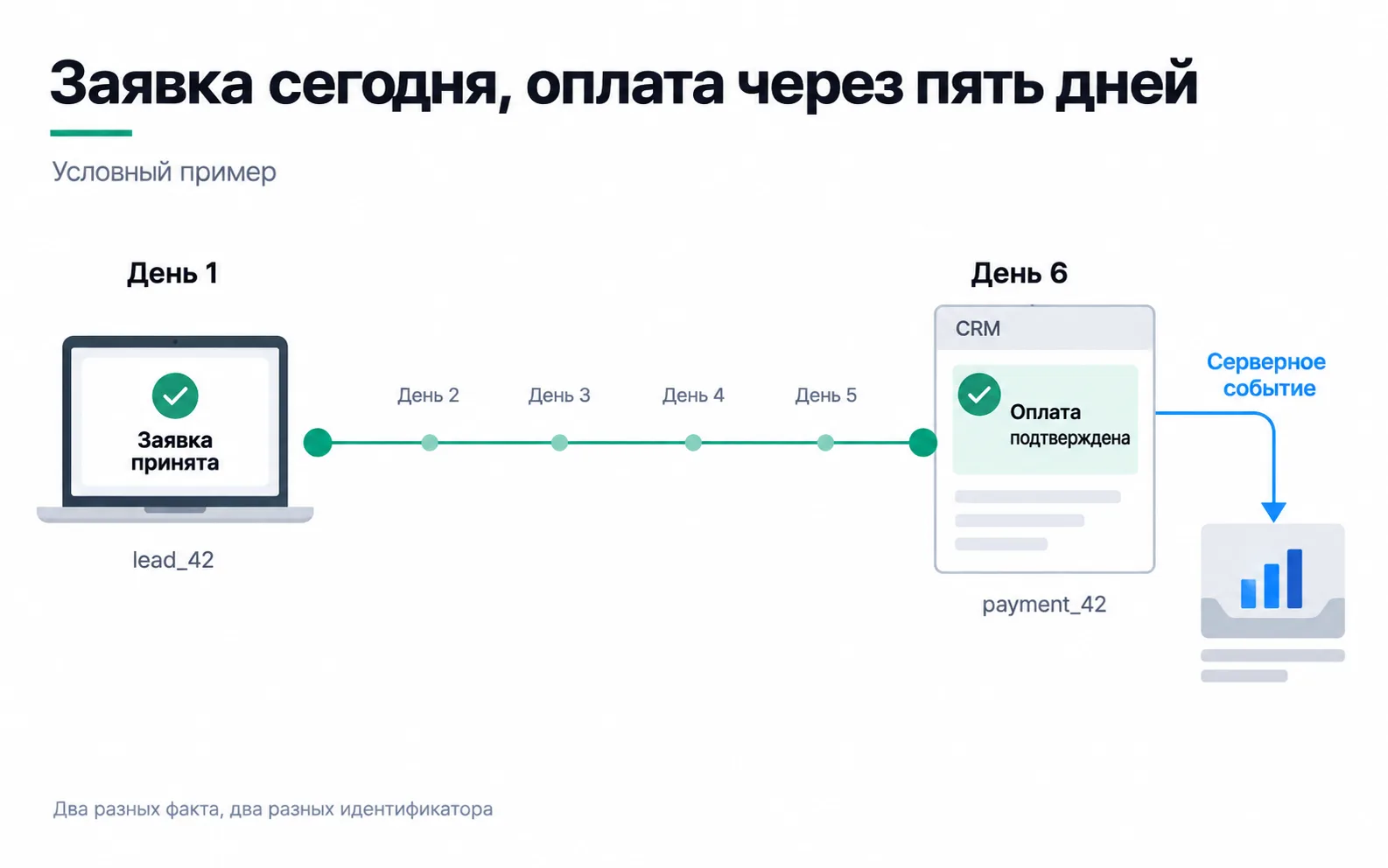
An IELTS prep centre in Almaty advertises a free trial lesson on Instagram. On Monday someone clicks the ad and submits the form on the site, and the Meta pixel records a Lead. On Saturday, after the trial lesson, they pay the first month of the three-month course, 45,000 ₸, through Kaspi, and the manager marks the deal as "Paid" in the CRM (the numbers in this lesson are made up). The form page was closed on Monday and there is no pixel in the CRM, so Meta will only hear about the payment if a server tells it.
Server-side and S2S: two different routes
People use "server-side" for two different setups, so on the first call with a client find out which one they mean.
In the first, the browser still sends the events, only to your own server instead of straight to Google and Meta: for example, a server-side GTM container on the subdomain data.example.com. The server decides what to forward and to whom. Google describes this container as a complement to the web container: it takes some of the work off the page and, once you configure it, gives you full control over which data goes to third parties. But in this setup the container only receives what the page sent. Saturday's payment never happened on the page, so it will never reach this server either.
In the second, your backend or CRM creates the event and the browser plays no part. The deal moves to "Paid", and a script on the server sends Purchase to Meta through the Conversions API and purchase to GA4 through the Measurement Protocol. This is S2S, server-to-server: the request goes from your server to the platform's server. A payment that follows a lead is sent this way.
The pixel stays on the site. Meta recommends running the Conversions API alongside the pixel, and Google says the Measurement Protocol adds to regular collection and needs a tag on the site to work. The page reports what happened on the page; the server reports what happened afterwards. In the week 2 test the ad account saw 11 leads, while only the manager knew that three people made it to the trial lesson. Those are exactly the facts a server sends.
What to save when the lead comes in
On Saturday the server knows the amount and the deal number, but not which ad the person came from. That link exists only on Monday, in the browser. Here is what the form has to write into the lead along with the phone number:
- the
_gacookie, which holds theclient_idGA4 uses to tie a server event to the user; - the
_fbpand_fbccookies (thefbpandfbcparameters): Meta takes them as they are, unhashed. If there is no_fbccookie, save thefbclidfrom the URL and the time it arrived:fbcis built from them asfb.1.<time in milliseconds>.<fbclid>; - the browser's IP address and user agent: Meta uses them for matching, and for website events the user agent is required;
- the
gclidparameter from the URL: Google Ads asks you to store it with the lead and send it back later with the sale details. On the same page Google advises new setups to start with enhanced conversions for leads, and from 15 June 2026 it moves these uploads from the Google Ads API to the Data Manager API. This is covered in Google Ads offline conversions; - the UTM tags from the shared tagging scheme and the lead number.
This is done with hidden form fields that a script fills from the cookies, the page URL and the request headers. Meta also uses the phone number for matching, but only as a SHA-256 hash and after normalising it: country code included, no plus sign, spaces or brackets. A number written locally as 8 701 123 45 67 becomes 77011234567, because the leading 8 is not the country code. If none of this is saved, you can still send the payment, but the ad platform will have almost nothing to match it on.
GA4 comes with a caveat. A Measurement Protocol event only picks up that visit's location and device data if it carries a session_id and arrives within 24 hours of the session start. Events meant to join up with browser events should reach Google within 48 hours, and Google warns that later ones may not be processed as expected, especially for conversion attribution. A payment five days later misses both limits, so in GA4 it will most likely not inherit the source of the ad visit. For a payment like this, take the channel from the CRM instead: the UTM tags are stored on the lead, and the lead is linked to the deal.
Event description
Before the developer writes the script, agree on what counts as a payment and what goes into the event. For the prep centre the description looks like this:
| Field | Lead | Payment |
|---|---|---|
| Event ID | lead_42, created when the site saves the lead | payment_42, created when the deal moves to "Paid" |
| Event time | Monday, the moment the lead was saved | Saturday, the moment the payment was confirmed, not the moment it was sent |
Where it happened (action_source) | website | other: paid by transfer, not on the site |
| Source of the fact | the site's server confirming the lead was stored | the deal status in the CRM, which the manager sets only after the money is in the account |
| Who sends it | the Meta pixel and the GA4 tag in the browser | a server script triggered by the deal status change |
| Retries | one event per saved lead | on a timeout or a temporary error, with the same payment_42, up to five attempts |
| Amount | not sent | 45,000 ₸ for the first month, currency KZT |
| Link to the ad | cookies and tags from the browser | the values the form saved in lead lead_42 |
Meta requires action_source on every server event and gives a list of values: there is no separate option for a Kaspi transfer, so other fits. A status set by the manager works as a source as long as it is set when the money arrives, not when the client promises to pay. In an online shop with card payments, the source is the payment provider's confirmation instead, as in S2S payment tracking.
The lead and the payment have different IDs because they are two separate facts. The link between them lives in the CRM: the deal records the lead number. An ID belongs to a fact, not to a person. When the same student pays for the second month, that is a new event with a new number. Give every event from one customer the same ID and the second payment becomes indistinguishable from a repeat of the first, both in your own log and for any recipient that removes duplicates by ID.
The event time is the moment of payment, and it is sent separately from the moment of sending, because recipients have a cut-off. Meta accepts an event_time up to seven days old at the time of sending, and if a request contains even one older event it rejects the whole request. GA4 lets you backdate an event by no more than 72 hours; by default it still accepts an older event but stamps it at 72 hours ago. If the script crashes on Saturday and nobody restarts it until Wednesday, the payment lands in GA4 with the wrong time, and a few days later Meta will refuse it too. Someone has to be named to watch the queue of unsent events.
Attribution rules come into it as well. By default Meta credits an ad with events within seven days of a link click and one day of a view, and the click window can be shortened to one day. The click was on Monday and the payment on Saturday, five days later: it falls inside the default window but outside a one-day one. Had the student taken two weeks to decide, no server integration would have credited this payment to the ad. One more detail that trips people up when reconciling: Ads Manager reports a conversion on the date of the ad impression, so on Monday, while the CRM has the payment on Saturday.
A retry must not double the revenue
Say that on Saturday the script sends the payment, gets no response and sends it again, this time with a new ID. The ad account ends up with two purchases worth 90,000 ₸. Take the whole month: the campaign spent 60,000 ₸ and there were three first-month payments of 45,000 ₸ each. The real ROAS is 135,000 / 60,000 = 2.25. One duplicate like that and the account shows 180,000 ₸ and a ROAS of 3, and you end up advising the client to raise the budget on money that does not exist.
That is why a retry always carries the same payment_42: Meta removes redundant server events with identical event_name and event_id. How to build the queue, the retries and the error review is covered in detail in S2S payment tracking.
Monday's lead and Saturday's payment are not duplicates, though. They are different stages of one deal and must never be merged.
What to test before launch
A "200 OK" from the recipient only means the request was accepted. The GA4 Measurement Protocol returns no error even for a malformed event, and new events are first run through its validation server at /debug/mp/collect. In Meta, individual events are visible only in Test events, which also shows which ones were dropped as duplicates. The Events Manager totals do not remove duplicates; whether deduplication works on live traffic shows in the Event deduplication tab and in Ads Manager.
Take one test deal and put it through five situations:
- A normal payment. One event goes out with the right amount, currency and time. Send test events with the
test_event_codefrom Test events: Meta does not drop them, so keep the amount small and remove the code before launch. - The manager makes a mistake, moves the deal back out of "Paid" and then in again. There is still only one event.
- The recipient's server is down. The script retries with the same ID, and after the last attempt the event lands in the review queue.
- A refund. No second
Purchasegoes out. Decide with the accountant in advance how refunds are recorded: GA4 has arefundevent for this. - The person declined advertising cookies. The server route respects that choice just as the browser does.
The fifth case is easy to miss: the cookie banner lives on the site, while the payment script lives in the CRM and knows nothing about the banner. The person's choice is saved with the lead and checked before every send. The article on consent and server-side GTM covers where else this breaks, and the lesson on privacy and cookieless covers what you may send at all.
Exercise: an event description for your own project
Take your test site or a client project:
If the lead has no browser identifiers at all, start with the hidden form fields, not with the sending script. If payments arrive after the attribution window closes, the ad account will not credit them to ads however carefully the server works, and the client should hear that before the work starts.
Now a question you will be asked. A month later the client sees payments in Ads Manager and asks: "So the ads optimise for payments now?" What do you say?
No. The optimisation event is chosen in the ad set, and a Purchase showing up in the dataset does not change it. Even if you switch the ad set to payments, with three payments a month it will be stuck in learning. Meta marks an ad set as learning limited when it is unlikely to get about 50 optimisation events in a week, and in that case advises choosing an event that happens more often. What the client got is different: the report shows which ads led to payments within the attribution window, and ROAS is calculated on money instead of leads. Optimising for payments is worth revisiting once there are dozens of them a week.
Video: the general shape of server-side tracking
The video covers the first setup, server-side GTM. How it works is shown with server-side GTM.