An online coffee shop in Almaty, order O42 for 15,000 ₸, paid by card on the site (the shop and its numbers are made up for this lesson). This is the next step after the lesson on the Conversions API Gateway: the shop has done its quick start with the gateway, the Meta Pixel now fires only after payment, and a newly hired developer sends paid orders from the CRM via the server. In the first version each side invented its own ID, and Meta counted one payment twice. A week later the owner notices that Ads Manager shows twice as many purchases as before the server went live, while the CRM has no more payments, and asks which numbers to believe.
Why a server when you already have the Pixel
The Conversions API (CAPI) is the channel your server uses to tell Meta about events directly: a POST request to https://graph.facebook.com/{API_VERSION}/{PIXEL_ID}/events with an access token. The Pixel lives in the browser and only sees what happens while the page is open. If the buyer pays and closes the tab before the thank-you page loads, the browser says nothing, while the shop's server knows the payment went through and can send the event itself: that is what server-side tracking is built on.
Meta's advice is not to choose between the two but to send the same events through both the Pixel and CAPI. Its help center calls this a redundant event setup: the server picks up what the Pixel lost to a network failure or a page that did not load properly (Conversions API best practices). The setup has a price. Every purchase reaches Meta twice, and you need it counted once.
First find every source of Purchase
Before you write the server-side send, find out who already sends Purchase to this pixel. It could be code in the site template, a GTM container, the store module, a partner integration, a Meta-enabled Conversions API that someone switched on, the Conversions API Gateway or somebody's home-made script. Our shop's gateway from the previous step is on that list. If it stays on, the server becomes the third sender, and you have to find out whether all three share the same keys. The developer switched the gateway off: the server knows about every payment anyway.
For each sender, write down four things: when it fires, where it takes the amount from, where it takes the ID from and which pixel it sends to. After that review our shop was left with two senders:
| Sender | When it fires | Amount | ID | Pixel |
|---|---|---|---|---|
| Pixel on the thank-you page | The page opened after the card payment was confirmed | From the dataLayer | Order number | The shop's pixel |
| Shop server | The order got the "paid" status in the CRM | From the order in the CRM | Order number | The same pixel |
In this shop a purchase means confirmed full payment for an order. A thank-you page that opens without checking the order status is not a purchase: people come back to it from browser history or land on it after the bank declined the card. And if the browser never saw the confirmation because the tab was closed, the server sends the purchase on its own, with no browser pair. There is no need to invent a browser event for symmetry.
One purchase, one ID
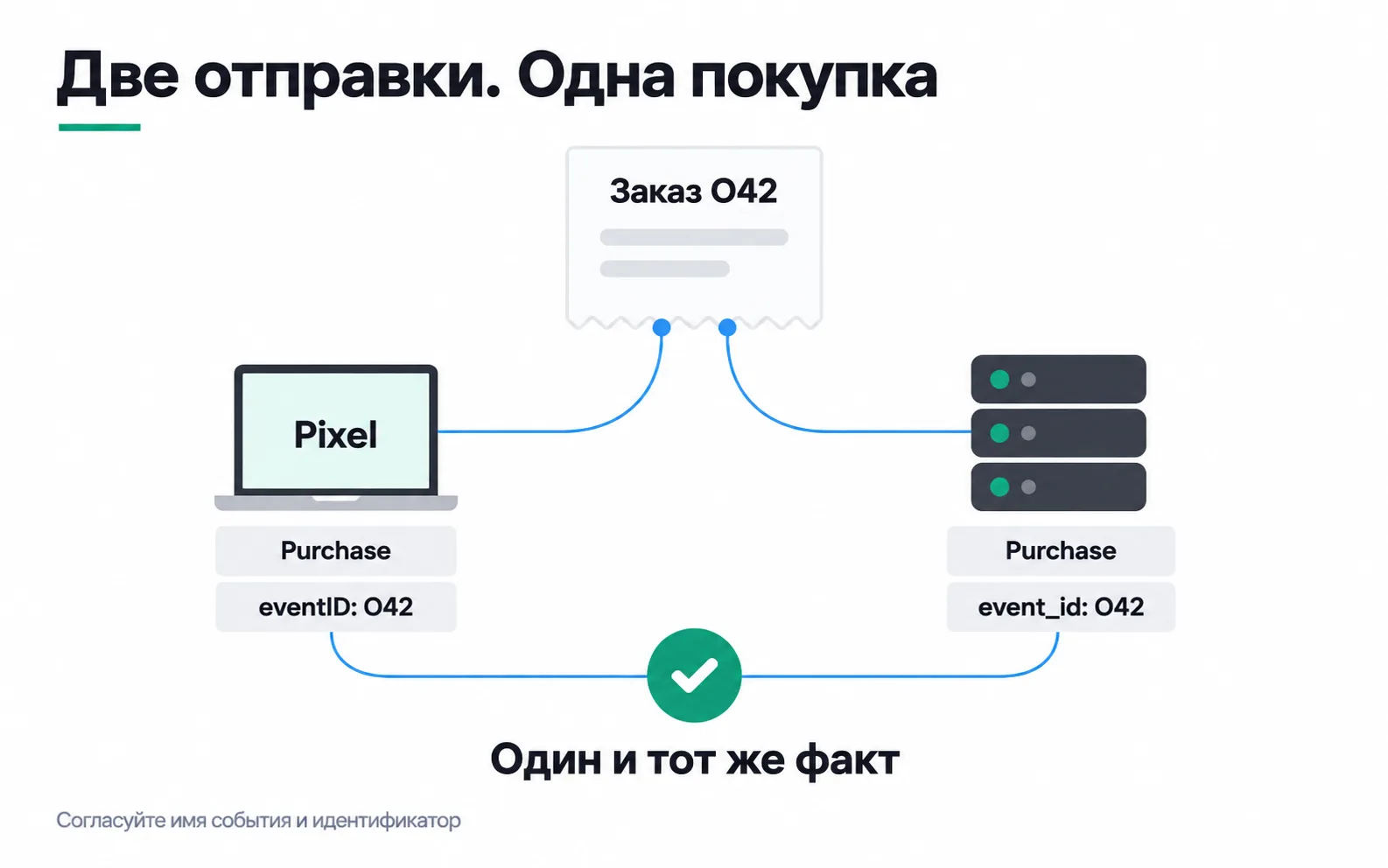
Meta merges the browser copy and the server copy when two things match: the event name (event in the Pixel, event_name on the server) and the identifier (eventID in the Pixel, event_id on the server). Both copies have to reach the same pixel, and merging works within 48 hours of the first event with that ID (deduplicating Pixel and Conversions API events). So the browser send and the server send of one purchase carry one name and one ID. In the Pixel the identifier goes in the fourth argument:
Meta itself suggests what to use as the ID: the order number or transaction ID. If a customer places two orders, each pair of sends carries its own number, and Meta sees two purchases rather than four (server event parameters).
| Send | Name | Key |
|---|---|---|
| Browser | Purchase | eventID: O42 |
| Server | Purchase | event_id: O42 |
| Server retry after a timeout | Purchase | event_id: O42 |
| The same customer's next order | Purchase | event_id: O57 |
The ID belongs to the purchase, not to the HTTP request. If the server got no answer and sent O42 again, the retry goes out with the same key: Meta discards repeated server events with the same name and ID as duplicates (about deduplication), while with a new ID the retry becomes a second purchase. A CRM customer ID will not do, because it is the same for every order that person places.
Agree separately on partial payments. Say a coffee machine for 240,000 ₸ is bought with a 50,000 ₸ deposit and the rest paid on delivery. You can send one purchase, O77, for 240,000 ₸ once the order is fully paid. Or you can send each payment as its own purchase for its own amount with its own ID, O77-1 and O77-2, accepting that the ad account will show more purchases than orders. What you cannot do is send a Purchase for the full 240,000 ₸ after each payment (revenue in the ad account doubles) or put O77 on both payments (Meta may take the second payment for a copy of the deposit).
Event time and action source
event_time is when the purchase happened, in Unix seconds, not when the request was sent. Meta accepts events up to seven days old, and if a batch contains even one older event, the whole request comes back as an error (server event parameters). Meta also recommends sending events as soon as they happen, ideally within an hour (sending events with the API). That gives a retry queue two rules. A retry keeps the original event_time. Events that sat in the queue for more than a week come out of the batch, or they drag the fresh ones down with them.
action_source says where the action took place, not where the request came from. A purchase on the website stays website even when the server sends it. For website events Meta also requires event_source_url, the address of the page where it happened, and client_user_agent.
Here is the full server-side send for order O42:
The event_time here is 12 October 2026, 12:30 Almaty time, when the payment confirmation arrived. value and currency are required for Purchase. You create the access token in Events Manager, in the pixel's settings under Conversions API (Generate access token), and keep it on the server only. It does not belong in page JavaScript, in the dataLayer or in a screenshot for support.
What to hash and what to leave alone
Contact details are normalised first and then hashed with SHA-256. Email: trimmed and lowercased. Phone: digits only, and always with the country code, so +7 701 123-45-67 becomes 77011234567. First name, last name, date of birth, gender, city, region, postcode and country must be hashed the same way, and external_id is recommended for hashing (customer information parameters).
fbp, fbc, client_ip_address and client_user_agent are never hashed: Meta expects them as they are. So you cannot run the whole user_data object through one SHA-256 function. Also find out whether your SDK or server tag already hashes contacts itself: a hash of a hash will not match anyone.
fbc is the ad click identifier. It lives in the _fbc cookie, and if the cookie is missing you build it from the fbclid parameter in the page URL, in the format fb.1.<time in milliseconds>.<fbclid>. The fbclid itself is copied unchanged, because it is case-sensitive (fbp and fbc). If the person did not come from an ad and there was no fbclid, the event has no fbc either. Building one from a random string or a campaign ID means inventing a click that never happened.
client_ip_address is the IP of the buyer's browser, and Meta asks for the real address. The server-side event goes out when the order gets the "paid" status in the CRM, and at that moment the server only has its own IP or the payment provider's. Put that in and every purchase in the shop looks as if it came from one computer. So the IP, user agent, _fbp and _fbc are saved to the order at checkout, while the buyer is still on the site, and read from there when the event is sent.
What not to send at all
A hash hides a string, but it does not give you the right to send it. Meta prohibits sending health information, financial information and other sensitive data through its business tools: diagnoses and medication, loan approvals or denials, credit limits, account balances (about prohibited information). The ban covers URL parameters and custom event names too. For a microlender, an event called "loan approved for 300,000 ₸" is out, and so is an event named after a clinic service such as "endocrinologist appointment", even though the request goes through technically. With clients like these, agree the list of events and fields with their lawyer before any development starts.
A person's choice applies on the server as well. Meta requires your tools to respect consent where the law requires it, and for the Conversions API it says plainly: do not send events about people who have not given consent (privacy and data use requirements). A refusal of advertising cookies has to stop both the immediate send and the retry queue.
EMQ: a diagnosis, not a target
In Events Manager, server-side website events get an Event Match Quality (EMQ) score from 0 to 10. Meta calculates it over the last 48 hours from the customer information sent with the event and the share of events it managed to match to accounts (about Event Match Quality). The same page ranks the fields: email and click ID are high priority, phone, external ID and browser ID are medium, first name and city are low.
Use the score as a diagnosis. If Purchase scores noticeably lower than your other events, open the Event matching tab and see which fields are missing: perhaps the server is not sending fbc or the email even though the order has them. A target like "get EMQ to nine" does harm. It is easy to hit by collecting personal data you do not need, and it adds no sales. The score only says that Meta worked out whose event it is. EMQ will not tell you whether the order was paid, whether it was counted twice or whether the ad brought it in: that takes a reconciliation with the CRM and lift tests.
Testing before launch
Start by sending events with a test_event_code. The Test Events tab in Events Manager gives you the code, server events show up there shortly after you send them, and test data stays for 24 hours (testing server events). The same tool shows which events Meta accepted and which it discarded as duplicates (about deduplication). Production requests must not carry the code.
After launch, the Event deduplication tab shows which keys you are sending (monitoring your Conversions API setup). The total on the dataset page counts browser and server events without deduplication, so doubled numbers there are normal. Ads Manager counts purchases after merging (differences in event counts).
Then run eight scenarios:
| Scenario | What should reach Meta |
|---|---|
| A normal payment for O42 | Pixel and server, both with O42, ending as one purchase |
| The server got no answer and retried | The same O42 with the same event_time |
| The same customer bought again | A new pair with O57 |
| Paid and closed the tab | Only the server event for O42 |
| The bank declined the payment | Nothing |
| A deposit on the coffee machine | Whatever your partial payment rule says |
| Advertising cookies refused | Nothing, including from the retry queue |
| The queue was stuck for eight days | Old events stay out, fresh ones go in a separate batch |
For troubleshooting, log event IDs, times, the schema version and API responses. The full user_data has no business in ordinary logs.
Exercise: one customer bought twice
A developer set event_id to the customer's CRM ID for all of that customer's purchases, and the Pixel sends the same ID. The name and the key match between browser and server. Is deduplication set up?
No. The first purchase will merge correctly, but every later purchase by the same person carries the same key, and Meta cannot tell them apart. An order paid within 48 hours of the first one will be taken for a copy and not counted. The key should be the order number: shared by the browser and server sends of one purchase, unchanged on retry and different for different purchases. After the fix, test two purchases by the same customer in a row, not a single test order.
Now on your own project, a test shop or a client's:
If even one sender takes its ID from anything other than the order number, start there. While the key is wrong, the other checks tell you nothing.
Video: an introduction to CAPI
An overview by PIRATE CPA for a first look. The field names and limits in this lesson were checked against Meta's documentation as of October 2026.