An online coffee shop in Almaty has been sending purchases through the Meta Pixel for a long time (the shop and its numbers are made up for this lesson). The owner has read that Meta ads work worse without the Conversions API and asks you to connect it. The shop has no backend developer, and a freelancer drops by once a month, so only a no-code option will do: the one-click connection or the Conversions API Gateway, also known as CAPIG. This is the quick start. As the next step the shop will hire a developer so that payments from the CRM reach Meta from the server, and that step is shown with the Meta Conversions API.
Four ways to connect CAPI
On its comparison page Meta names three paths: Meta-enabled Conversions API, direct integration and partner integrations (compare Conversions API setup options). The Conversions API Gateway has an article of its own (about the Conversions API Gateway). Together that makes four ways:
| Option | What you need | What reaches Meta |
|---|---|---|
| Meta-enabled Conversions API | A pixel, connected in one click | The same events and parameters as the Pixel, website only |
| Partner integration | A shop on Shopify, WooCommerce, Wix or BigCommerce, or site tags in a partner system: Google Tag Manager, including server-side GTM, Adobe, Tealium | Whatever is configured in the integration |
| Conversions API Gateway (CAPIG) | An AWS or Google Cloud account, or a host such as Stape | Copies of Pixel events |
| Your own server, that is, direct integration | A developer | Any event, including payments from the CRM |
The choice comes down to one question: where does the event happen? If the fact happens in the browser and the Pixel already catches it correctly, the first three options are enough. If the browser never sees the event (a payment to the courier, a status change in the CRM), you need your own server or a server-side GTM container that takes data from the backend. For app events and physical store events, Meta still offers only direct integration.
One click or the gateway
Of the no-code options, the first is the shortest. Meta-enabled Conversions API is free, turns on in one click, sends the same events and parameters as the Pixel and deduplicates them itself (compare Conversions API setup options). If it is available in your Events Manager, start there.
The gateway does the same job through a separate server, in your own cloud or at a host. Its interface shows how many events came in from the Pixel and how many went out to Meta, and an agency or freelancer can deploy one gateway and connect several clients to it (Conversions API Gateway for multiple accounts). Meta itself recommends the gateway if you already use the Pixel, are not yet sending web events through the Conversions API, spend more than 300 dollars a month on campaigns optimised for web events and are not on Shopify, WooCommerce or a similar platform. With such a platform it is simpler to turn on CAPI inside it (about the Conversions API Gateway).
Both no-code options take their events from the Pixel. So everything below about Pixel mistakes applies to both of them equally.
What the gateway does and what it will never see
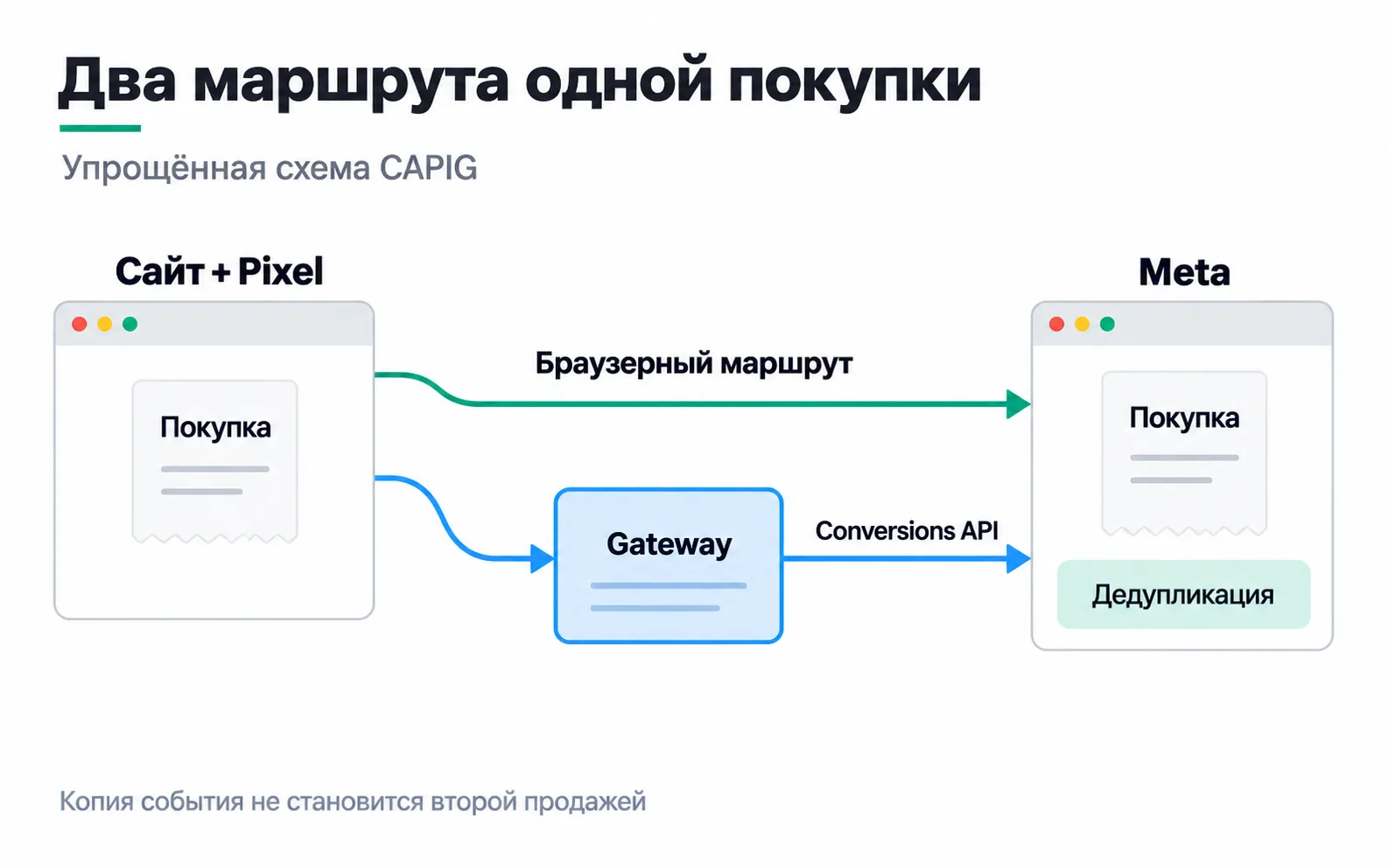
The Pixel on the site sends every event both to Meta and to the gateway, and the gateway forwards a copy to the Conversions API. Meta's gateway creates and passes the event_id key that merges the two copies by itself (gateway documentation). Stape says the same about its version: deduplication is set up automatically (deduplication in Stape's CAPIG). You do not configure keys for this route by hand.
That design comes with three limits. The gateway copies Pixel events along with their mistakes: if the Pixel counts a click on "Place order" as a purchase, the server route will faithfully send the same mistake a second time. The gateway only learns what the Pixel managed to send: if the buyer closed the tab before the thank-you page, the gateway stays silent along with the browser. And a payment that lands in the CRM five days after the order is something the gateway will never see, because it never happened in the browser.
Take a week at our shop after the gateway went live. With the one-click option the numbers would be the same, since it also copies Pixel events. The average order is 15,000 ₸, and customers pay either by card on the site or with Kaspi QR to the courier two to five days after ordering. The Pixel sends a Purchase from the thank-you page for every order placed:
| Payment method | Orders | Paid | Purchase from the Pixel |
|---|---|---|---|
| Card on the site | 112 | 112 | 112 |
| Courier on delivery | 28 | 21 | 28 |
| Total | 140 | 133 | 140 |
Meta counts as purchases the seven orders that were turned down at the door, about 105,000 ₸ of revenue that never existed. Another 21 payments reached Meta before the money did: when the order was placed, the shop did not know whether the customer would pay. The gateway will not fix this, it will only send a copy of each of the 140 events.
The fix starts somewhere else. First, the Pixel sends Purchase only after a card payment and marks a courier order with a custom event of its own, for example CourierOrder. The courier payment has to reach Meta from the CRM via the server, with the order number in event_id. That cannot be done without code: it needs the freelancer or a developer, and the shop gets to it in the lesson on the Meta Conversions API. Until there is a developer, the gateway covers what the browser can see.
One click, your own cloud or Stape
You install Meta's gateway from Events Manager, with the Conversions API Gateway button under data connection platforms, and it is deployed in a cloud account owned by the business: AWS EKS, AWS ECS Express or Google Cloud. You pay Meta nothing for the gateway, only the cloud provider, or a partner if a partner runs it (gateway documentation). Stape offers CAPIG as a service on its own servers (CAPIG at Stape).
| One click | Meta's gateway in your own cloud | CAPIG at Stape | |
|---|---|---|---|
| Where it runs | Only the Pixel is needed | In the business's AWS or Google Cloud account | On Stape's servers |
| What it costs | Free | Cloud fees, from 30 dollars a month | From 10 dollars a month per pixel |
| Merging copies | Automatic (Meta) | The gateway creates and passes event_id (Meta) | The gateway creates and passes event_id (Stape) |
Prices were checked in October 2026, and they are an order of magnitude, not a quote. The one-click option is listed as free on Meta's comparison page. Meta gives the "from 30 dollars" figure in its gateway article and adds that it depends on region and traffic (about the Conversions API Gateway). On AWS EKS the cluster alone costs 0.10 dollars an hour, about 73 dollars a month (Amazon EKS pricing). Stape's 10 dollars a month is the plan for one pixel with up to 10 million events (CAPIG at Stape).
Whichever option you choose, register the cloud account or the Stape account to the client and the client's card, and take access for yourself. Otherwise, on the day you stop working with the shop, its server route stops along with your card.
Check the route stage by stage
One test purchase, five points. Meta itself names the middle three for checking the gateway: the browser, the gateway interface and Events Manager (monitoring Meta's gateway). If the event is missing at any point, do not move on until you find out why.
- The Pixel. The right event fires at the right moment and goes to the right pixel. For a card payment that is the page after the payment is confirmed, not the "Pay" button.
- Browser to gateway. In the developer tools, on the Network tab, the Pixel's request to the address of Meta's gateway (the
/eventspath) succeeds. At Stape the default address ishttps://gw.stape.io/unless you have set up your own. - The gateway. In the interface of Meta's gateway, the number of events received from the Pixel matches the number sent to the Conversions API. At Stape the event counter should not sit at zero, and data should show up on the Event Activity dashboard. Stape warns that the first data after connecting can take up to 30 minutes (testing CAPIG at Stape).
- Events Manager. The server events line follows the browser events line, and the Event deduplication tab shows which keys arrive (monitoring your Conversions API setup). The total on the dataset page shows both copies without deduplication, so after connecting it will roughly double (differences in event counts).
- The CRM. Payments in the CRM are reconciled with server Purchase events in Events Manager, kept apart from browser events, for the same period and under the same definition of a purchase. Ads Manager counts purchases after deduplication, but only those attributed to ads, so it will show fewer than the CRM.
Stape's gateway has a quirk with test events. Stape says a test event code cannot be added to the gateway's server route, so the Test Events tab shows only browser events (common CAPIG questions at Stape). An empty server section in that test does not mean something is broken. Look at points 2 to 4 instead, and do not push dozens of fake purchases into the production pixel just to see something: they end up in the statistics and in campaign learning.
What to hand over to the client
After launch, leave the client a document that lets any specialist repeat the check without you:
The last item pays off a month later, when the client asks why the ad account shows more purchases than payments. With the first-week table you can answer in five minutes.
Exercise: purchases doubled after connecting
A week after the gateway goes live, the dataset page in Events Manager shows 280 Purchase events. The CRM shows 140 orders and 133 payments for the same week. The owner writes: "CAPIG doubled our sales." What do you reply, and what do you check?
Sales did not change: the CRM has the same 133 payments. 280 is 140 events from the Pixel plus 140 copies from the gateway, and the dataset total shows them without deduplication. Whether the copies merged is visible in the Event deduplication tab and in Ads Manager, which counts purchases after merging. The real mistake is elsewhere: 140 is the number of orders, not payments. Purchase fires at checkout, and Meta counts as purchases the seven orders turned down at the door. You can write to the client along these lines: "Sales: 133. Events Manager shows 280 because it counts both the browser copy and the server copy of each purchase. The mistake is elsewhere: placing an order is being counted as a purchase, and we are fixing that."
Video: an introduction to CAPIG
A one-minute product overview from Stape. For setup, use the Meta and Stape guides linked above.