An online appliance store in Almaty is moving its tracking to server-side GTM. It gets about 150,000 visits a month, and the marketer does the simple sum: one visit, one request. Stape's smallest paid plan covers 500,000 requests a month, so the headroom looks threefold (plan limits are collected in the article on what server-side GTM really costs). On day fifteen Stape pauses the container, and events stop reaching GA4 and the ad accounts. The server was fine. The mistake was in the first line of the estimate. The store's numbers in this lesson are made up.
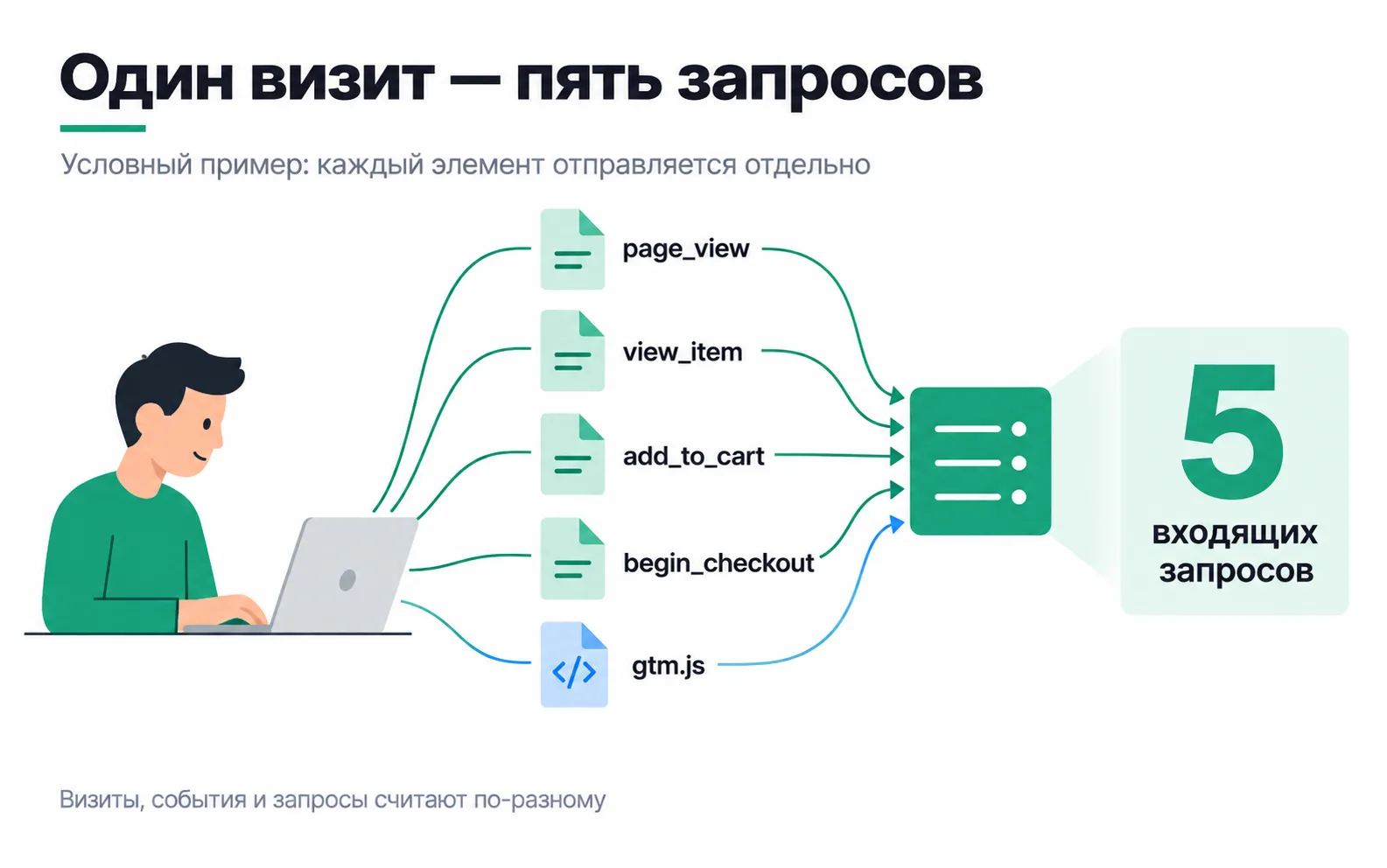
One visit, several requests
In the picture, a shopper opens the catalogue, looks at a fridge, adds it to the cart and starts checkout. That is four events: page_view, view_item, add_to_cart and begin_checkout, and in this example each one goes to the server as its own request. The fifth request is the gtm.js load. If the site fetches the GTM script through your server so that it loads from your own domain, that is a hit on the server too. One visit produced five requests, so 150,000 visits like it would already be 750,000.
Stape counts every incoming hit to the server container as a request, including script loads such as gtm.js and gtag.js and calls to Stape Store, its built-in storage (what Stape counts as a request). On the same page Stape offers a rough estimate: your GA4 events for the last 30 days plus 30%. The store had 150,000 sessions and 870,000 events last month, so expect about 1.1 million requests, seven and a half times what the marketer counted.
Visits differ: one person leaves after the first page, another scrolls through twenty products. So you don't guess requests per visit from a picture. You measure them on your own site, as in the task at the end of the lesson.
Now the pause makes sense. 1.1 million requests a month is about 37,700 a day. The store used up the 500,000 limit in 14 days and passed 550,000 on day fifteen. If usage goes 10% over the limit, Stape pauses the container, and it processes no requests at all until you upgrade or the next billing cycle starts. On the lower paid plans the pause is immediate; on the higher ones the first overage gets a one-time 30-day grace period. You avoid the pause by turning on the automatic upgrade to the next tier in the subscription settings (Stape's limits and pause logic).
Another provider may count something else, so before comparing plans, find out on its site what exactly it bills. On Cloud Run you don't pay per request at all. In Google's guide the instances run with always-allocated CPU (the --no-cpu-throttling flag), and under that model an instance is billed for as long as it runs, requests or not (Cloud Run billing models). There, as on your own server, the request count answers a different question: how much capacity to keep running.
Size by the peak, not by the month
1.1 million requests a month averages out to 26 a minute. Anything can handle that, but traffic does not arrive evenly. On Friday at 8 pm the store sends a WhatsApp broadcast and posts Instagram stories about a sale, and 12,000 visits come in within the hour. At the same 7.5 requests per visit that is 90,000 requests in the hour, or 1,500 a minute. In the first minutes after the broadcast, when people open the link all at once, the rate is several times higher.
The monthly volume tells you which plan to buy. Whether the server holds up depends on the peak. You take it from the past: the busiest hour of the last sale or campaign launch, in GA4 or in the GA4 export to BigQuery.
Google gives one benchmark: 2 to 10 Cloud Run instances handle 35 to 350 requests per second, and the real figure depends on how many tags the container runs and what they do (Cloud Run guide). 1,500 requests a minute is 25 a second, within two instances. The peak of the first few minutes is worked out separately, as when choosing where to host sGTM.
Who owns what
A server container has three areas of responsibility, and each needs a named person:
- The server. It runs, it is up to date, it survives the peak, the bill is paid.
- The event schema. Which events are sent, with which fields, and what counts as a purchase.
- Delivery. Events reach GA4, Meta and Google Ads, and the recipients accept them.
The choice of host changes only the first one:
| Cloud Run | Stape | Your own server | |
|---|---|---|---|
| Where the server runs | In the client's Google Cloud project | At Stape, in the client's account | On the client's VPS or cloud, for example AWS |
| Who runs the server | You or the client's admin: instances, updates, logs, budget | Stape provisions and maintains the server; you set up the container, domain and logs in its dashboard | The client's admin: the machine, the certificate, restarts, monitoring |
| Who owns the event schema and delivery | Whoever sets up the tracking | Whoever sets up the tracking | Whoever sets up the tracking |
The host does not know that purchase should fire after payment and not when the thank-you page opens. Neither Google nor Stape will notice that the order value has gone missing from the event. That is why the last row of the table is the same in every column.
Put the accounts in the client's name: the Google Cloud project and billing account, the Stape account. Ask for access for yourself. Stape has shared access to a workspace for this, with billing access granted by a separate checkbox (shared access in Stape). When the project ends, the server stays with the client, and nobody has to move the container off your card.
What makes up the bill
This lesson has no prices, because they change. Plans and the arithmetic are collected in the sGTM cost article. Here are the lines of the estimate that are easy to miss.
Instances. So that one instance failing does not cost you events, Google recommends keeping several running (--min-instances), but it gives different numbers: at least two in the Cloud Run guide, at least three in the server-side tagging overview. The upper bound, --max-instances, is your worst case for spend: Cloud Run only starts that many instances if they are needed.
The preview server. A separate service without which the container's preview mode does not work. Production traffic is handled by the tagging servers, and they forward preview requests to the preview server. It needs exactly one instance, with no autoscaling (manual setup guide). It is a separate line in the estimate.
Logs. By default Cloud Run logs every request along with its path and query parameters, and the server and tags can write their own messages to the console. Google warns that with heavy traffic, for example over a million requests a month, this adds noticeably to the bill, and recommends disabling request logging with a filter in the Logs Router. The store in this example, at 1.1 million requests a month, is right at that line. You don't have to switch it all off: the filter can exclude successful responses and keep entries with 4xx and 5xx codes. Those show you later when and where the server failed, without paying for every successful request.
Outbound traffic. The server forwards every event on, to GA4, Meta and other systems. AWS, in its own sGTM guidance, explicitly warns about charges for data transfer out to Google Analytics and to each third-party collector (sGTM on AWS).
Updates. Google recommends restarting the servers periodically so they pick up code updates, and updating at least with every major version (manual setup guide). On Cloud Run that means a new revision with the same settings. Behind this line are people's hours, covered below.
In Google Cloud, set up a budget with alerts to the client's email and yours right away. Just keep in mind that an alerts-only budget does not stop spending. Google says plainly that such a budget does not cap usage or spending, and the first email can take several hours to arrive after you create the budget (budgets and alerts). There is also a spend cap budget, and Cloud Run supports it. But once the cap is reached, the service is paused until the end of the period or until someone lifts the cap (spend caps). For a tagging server, a pause means events stop being collected. Whether to set a cap is the client's decision, made knowing that price.
People's time belongs in the estimate
Say an engineer's hour costs 12,000 ₸. Cloud Run in the client's project takes a day to launch: domain, instances, log filters, budget. That is 96,000 ₸. After that, a couple of hours a month for updates and handling alerts, another 24,000 ₸ every month. On Stape the provider brings up the server, and connecting it takes a couple of hours. In the sGTM cost article, the cheapest option on hardware is a VPS that also runs other services. But someone has to look after the machine, the certificate, restarts and monitoring. If the client has no admin, that person is you, and the hours belong in the contract.
Put these sums next to the prices in the sGTM cost article and see which is bigger: the difference between plans or the difference in hours.
The server answering is not delivery
The tagging server replies ok when you open its address with /healthy on the end (Cloud Run guide). Google recommends using that path as a liveness check: if the answer is not ok, the server gets restarted. On Cloud Run and on your own server, point an external uptime check at it from day one.
But ok only tells you the server is alive. The Meta tag may not have fired, Meta may have rejected an event with a bad field, and /healthy will never know. Delivery is checked separately: through outgoing requests and the recipients' response codes in the logs, and by reconciling purchases in the ad accounts with orders in the CRM. Stape has incoming and outgoing request logs for this, with outgoing logs behind their own toggle (Stape logs). That kind of control follows the rules of S2S monitoring.
Task: an estimate and owners for your project
Take a client's site or your own test site with the server container from the lesson on server-side GTM.
What you should end up with is a paragraph you can send the client. For the store in this lesson it would read: "We expect about 1.1 million requests a month. In the broadcast hour that averages 1,500 requests a minute, and the first minute is several times higher. The server runs on Stape in your account with automatic upgrade to the next plan turned on, and I am responsible for the events and delivery." The first minute is worked out separately, as in the lesson on where to host sGTM.
If the requests counted in preview, multiplied by visits, are far off the estimate from Stape's rule, find out why. Some events may reach the server without going through GA4, for example events only for Meta, or gtm.js may load through the server and never appear among GA4 events. Stape's rule is a rough estimate, the measurement on your site is more accurate, and the measurement is what goes into the estimate.
Video: comparing hosting approaches
Its prices may be out of date; current ones are collected in the sGTM cost article.