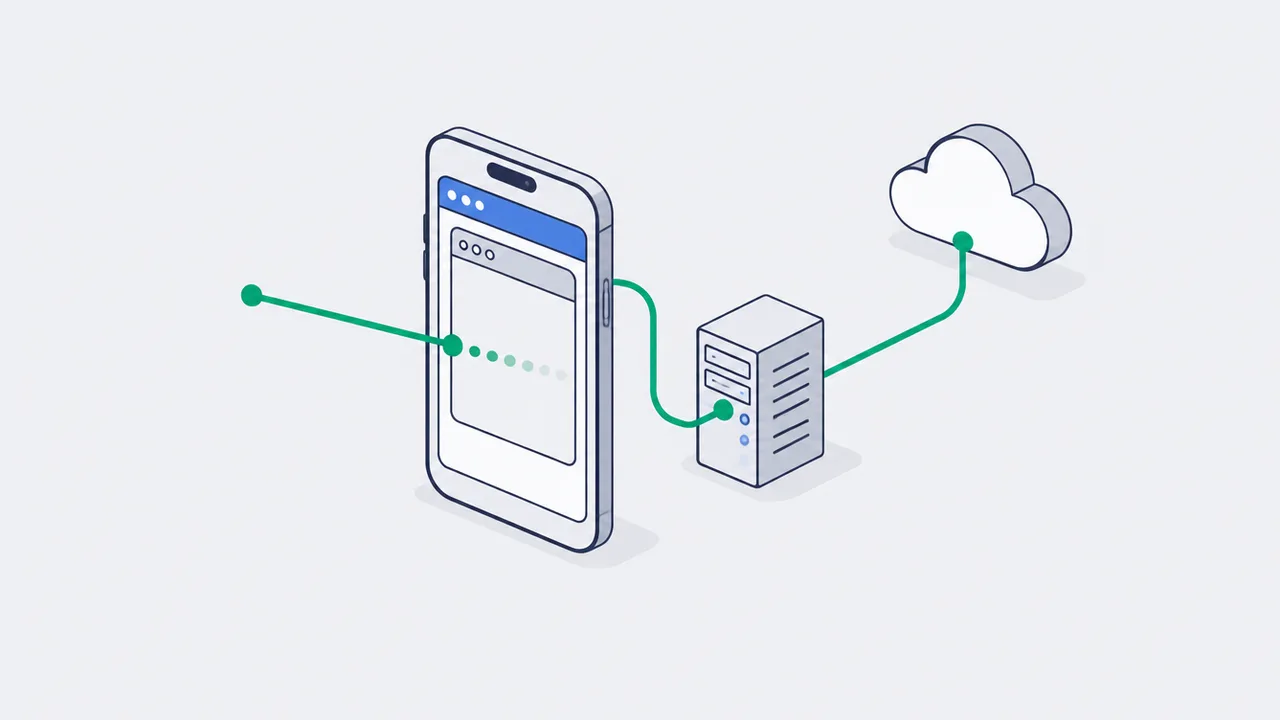
Pin the first click (ttclid, fbclid, UTMs) on your own server before any redirect, carry a click_context_id through the form, CRM and order, create one event_id per business event, and send Meta CAPI and TikTok Events API the same event_id the browser Pixel used. That makes four layers: landing bridge, first-party identifiers, browser pixel and server-side routing.
There is a classic complaint from performance teams: TikTok Ads and Meta Ads show clicks, GA4 shows sessions, the CRM shows leads, but the platform sees fewer conversions than the business actually got. It is especially common on mobile traffic from TikTok, Instagram, Facebook, and other apps where the user does not land in Safari or Chrome but opens the site inside an in-app browser.
The problem is not that TikTok or Instagram "do not let you track". The problem is that the old tracking stack was built on a naive assumption: the ad click, the page, the cookie, the Pixel, the form, the checkout, and the server event all live inside one stable browser context. Inside an in-app browser that assumption falls apart.
The right answer is not to forcibly kick the user out into the external browser and not to stack hacks on top of Pixel. The right answer is to lock down the first click in a first-party context fast, run a server-side event ledger, and send already-normalized events to Meta CAPI / TikTok Events API with the same event_id the browser sees.
Context: why a WebView breaks the usual model
An in-app browser is not a "bad Chrome". It is a separate layer inside the app. On iOS such browsers are usually built around WKWebView: Apple describes it as an object that displays interactive web content inside an app. It has its own navigation, settings, cookie management, and limitations that are not required to match the behavior of a full-fledged browser.
For marketing this means a simple thing: the user can start in one context, continue in another, and finish the purchase in a third. For example:
- Clicked an ad in TikTok.
- Opened the landing page inside the TikTok in-app browser.
- Tapped "Submit" and landed on a hosted checkout or a bank page.
- Returned to the thank-you page, where the Pixel loaded late or never received the original click ID.
- The CRM got the lead, but the ad platform could not confidently tie it to the click.
The team then sees a strange picture: utm_source=tiktok is in the CRM, ttclid was once in the URL, but by the time the purchase event fires it is gone. Or Meta Pixel sent a Lead, CAPI sent the same Lead with a different event_id, and Events Manager flags deduplication issues.
This is not a bug in one pixel. It is a systemic boundary problem: app WebView, site, third-party forms, checkout, backend, and ad APIs speak different languages.
Deep dive: where the signal actually gets lost
If you walk through the path from click to purchase, you can see the weak spot is not in one place. The signal can drop on any step where the team relies only on JavaScript in the browser.
Where the in-app browser loses the signal
The click, the form and the purchase live in different browser contexts
Click in TikTok / IG
in-app browser, not Chrome
its own cookie management
- ttclid
- fbclid
Landing bridge
the click goes straight to the server
first-party cookie
- /m/landing
- click_context_id
Form / checkout
a different domain and context
hidden field with the context
- click_context_id
Backend and CAPI
event after the CRM
event_id shared with the pixel
- event_id
- consent_state
Pin the click on the server before the first redirect.
A cookie in the in-app browser does not survive until the purchase - the server-side click_context record does.
1. The click ID arrived but was never pinned down
For TikTok the key parameter is ttclid. TikTok describes it as a click ID added to the landing page URL after an ad click that ties web events to the user's action in TikTok. When an event carries a Click ID, TikTok uses it for attribution, audiences, optimization, and measurement.
Meta has a similar role for fbclid, and for Conversions API the derived browser identifiers like _fbc and _fbp matter, plus matching parameters such as hashed email, phone, or external_id when collected legally with proper consent.
The mistake: the team reads ttclid / fbclid only on the frontend and hopes the cookie will survive until the purchase. Inside an in-app browser this is too fragile. The first click should be pinned down immediately:
This does not replace the Pixel. It is a safety layer. The server accepts the first click, validates parameters, sets a first-party cookie with a short TTL, creates a click_context record, and returns a normal page to the user without extra delay.
2. The form or checkout does not live where the click happened
The most common mistake in leadgen and ecommerce: the landing page is on one domain, the form is an embedded iframe, checkout is on a payment provider, and the thank-you page is on a third route. The JavaScript pixel can fire on the first screen, but the final event is created where the original click context no longer exists.
That is why click_context_id has to be carried as a business attribute, not as a "magic cookie":

landing page
/m/landing creates click_context_id

form hidden field receives click_context_id

CRM lead stores click_context_id
payment/order stores click_context_id
backend sends Lead/Purchase to CAPI and Events API
If the user continued in an external browser, the CRM still has to know which ad click started the session. If the user completes the purchase a day later, the backend still has to recover the original context from the database instead of expecting the WebView to hold all cookies.
3. The browser event and the server event describe the same conversion but have different IDs
Meta and TikTok both support a "Pixel + server API" pattern. But it only works if two copies of the same event can be deduplicated.
TikTok says it explicitly: if you send the same conversion through Pixel and the Events API, you need to pass event_id on both channels. Otherwise the platform sees them as two different leads or two purchases.
The rule is simple: event_id has to be created once, at the business-event layer.
Bad:
Good:
That is exactly why the event ledger matters more than a set of standalone tags. The ledger decides what an event is, what its canonical ID is, which consent state applies, which identifiers are available, and where the event may be sent.
Deduplication: one event_id per business event
The Pixel gives speed, the server gives reliability, the event ledger gives a single ID
Event ledger
canonical ID from the business
consent and identifiers
- order:{order_id}
Browser pixel
fast early signal
fbq + ttq
- eventID
Server event
after CRM confirmation
retry + idempotency
- event_id
- consent
Platform
dedup of the two copies
optimization without duplicates
- dedup by event_id
event_id is created once - at the business event level.
If GTM and the backend each generate their own UUID, the platform counts one lead as two.
The integration path: first-party bridge + event ledger
A reliable architecture for TikTok / Instagram in-app browser traffic has four layers.
Layer 1. Landing bridge
A lightweight endpoint on your domain that fires on the first screen and saves the ad context.
What we save:
| Field | Why we need it |
|---|---|
ttclid | Attribution and matching for TikTok |
fbclid | Original Meta click context |
_ttp | TikTok browser identifier, if available |
_fbp / _fbc | Meta browser identifiers, if available |
utm_* | Independent analytics and BI |
landing_url | Debug redirect chain |
user_agent | Matching and WebView diagnostics |
ip_country | Geo QA, do not store more than needed |
consent_state | What can be forwarded |
At this layer it is important not to collect extras. If the business is not allowed to send PII to an ad platform, it cannot "solve that on the server". Server-side tracking is not a way around privacy. Meta describes the Conversions API as a direct connection between a business's marketing data and Meta's optimization systems; responsibility for consent, data minimization, and exchange rules still rests with the business.
Layer 2. First-party identifiers
Instead of relying on third-party cookies, build your own first-party chain:
These identifiers do not all have to be available at the same time. What matters is that they gradually connect as the user moves down the funnel.
For simple leadgen the minimal model looks like this:
phone_hash and email_hash only appear after the form and only if there is a lawful basis for using that data for matching. Normalization to SHA-256 has to happen before sending to ad APIs but after internal validation and consent checks.
Layer 3. Browser pixel as a fast signal
The Pixel is still needed. It is fast, gives the platform early events, helps with page view and engagement, and in a normal browser often sends more context than the backend will see immediately.
But the Pixel must not be the single source of truth.
In the correct setup, the browser event:
And the backend sends the same event_id once the form actually reaches the CRM:
If the browser event did not make it, the server event still saves optimization. If both made it, the platform deduplicates.
Layer 4. Server-side routing
Server-side routing can be assembled in several ways:
- Google Tag Manager Server-Side.
- Direct integrations with Meta CAPI and TikTok Events API.
- A gateway pattern such as CAPIG for Meta and a separate Events API connector for TikTok.
- Event warehouse + reverse ETL for mature teams.
Google describes server-side tagging as an architecture made of a web container and a server container: the browser sends an event request to your server container, and the server container applies processing rules and forwards data to Google products or third-party endpoints. The key advantage here is not "bypass blockers", it is control: normalization, privacy filtering, validation, and reducing client-side load.
For an in-app browser this control is critical. You need a layer where you can say:
Engineering checklist for TikTok / Instagram traffic
1. Do not lose parameters on redirects
Every redirect has to preserve ttclid, fbclid, and utm_*. The riskiest ones:
- link shorteners;
- language redirects;
- geo redirects;
- trailing-slash redirects;
- jumps from a landing page into a quiz/form builder;
- jumps into checkout;
- "open in app" and deep links.
If a redirect is unavoidable, save the click context on the server first, then redirect.
2. Do not conflate attribution and optimization
GA4 may show one reality, the CRM another, TikTok/Meta a third. That is normal. They serve different goals:
- BI answers "what actually happened?"
- Ads Manager answers "what signal does the algorithm need?"
- The CRM answers "what became a sale?"
Do not try to force every system to show the same numbers. Instead, document a transparent mapping: which events go to reporting, which to optimization, which only to internal analytics.
3. Do not send raw sensitive data
An in-app browser tempts teams into "let's send more user data so matching goes up". That is bad logic.
You may send only what is:
- allowed by your consent state;
- needed for a specific purpose;
- normalized and hashed if the platform requires hashing;
- free of medical, financial, legal, or other sensitive event detail.
For example, a clinic cannot put a value like "oncology consultation" in content_name. A bank cannot send the loan type together with personal identifiers without separate legal review. The server-side layer must be able to strip such fields before sending.
4. Test the WebView itself, not a desktop preview
Checking it in Chrome DevTools does not prove that TikTok / Instagram traffic works.
Minimal QA matrix:
| Scenario | What we check |
|---|---|
| TikTok ad preview → landing | ttclid is in the URL and stored on the server |
| Instagram ad → landing | fbclid / _fbc are available where expected |
| WebView → hosted form | click_context_id reached the CRM |
| WebView → payment → thank-you | order_id is linked to the original click context |
| Browser Pixel + server event | the same event_id |
| Consent rejected | advertising identifiers were not sent |
| SPA navigation | PageView and custom events do not depend on reload |
For Meta use Events Manager Test Events. For TikTok use Events Manager diagnostics and check Event Deduplication. On your side keep a dedicated event_delivery log that shows what was sent to each destination and with what status.
What to do next
For marketers:
- Stop judging TikTok and Instagram by the browser Pixel alone. Look at the stack: click ID coverage, server event coverage, dedup rate, match quality, and CRM revenue.
- In every campaign brief, require URL macros:
utm_*,ttclidfor TikTok, and preservation of Meta click context for Instagram/Facebook. - Do not demand that GA4, Meta, and CRM "match". Demand an explainable difference between systems.
For analysts:
- Build a
click_contextstable and start measuring the share of sessions wherettclid/fbclidis lost before the lead or purchase. - Add QA metrics:
event_id_match_rate,server_event_latency,click_context_join_rate,dedup_coverage. - Separate events for BI from events for optimization. Not everything that is useful for the business needs to be sent to ad APIs.
For engineers:
- Build a
/m/landingendpoint that fires before any redirects or third-party forms. - Generate
event_idat the business-event layer, not separately in GTM and the backend. - Move sending to Meta CAPI and TikTok Events API into a single event gateway with consent filtering, retry queue, and idempotency.
- Test WebView scenarios on real devices. Do not accept a desktop Tag Assistant check as the final verification.
The in-app browser does not need to be "beaten". It needs to stop being treated as an ordinary browser. The moment the first click becomes a first-party record and the event becomes a server contract, TikTok and Instagram traffic stops being a black box and becomes a manageable performance channel again.
Sources
FAQ
Does moving tracking server-side remove the need for consent?
No. It changes the transport, not the legal basis. Meta describes the Conversions API as a direct connection between a business's marketing data and Meta's optimization systems - consent, data minimization and the platform's data rules stay the business's responsibility.
Where exactly does the signal get lost inside an in-app browser?
Three places. The click ID arrives but is never pinned to a first-party record. The form or checkout lives somewhere other than where the click happened. And the browser event and the server event describe the same conversion with different IDs, so the platform counts it twice instead of deduplicating.
Which redirects break click IDs?
Link shorteners, language redirects, geo redirects, trailing-slash redirects, jumps from a landing page into a quiz or form builder, the hop into checkout, and "open in app" deep links. If a redirect is unavoidable, save the click context on the server first, then redirect.
Which Meta identifiers should a server-side Lead or Purchase event carry?
The derived browser identifiers _fbc and _fbp, plus matching parameters such as hashed email, phone or external_id when they were collected legally with proper consent. Include fbc/fbp in the Meta CAPI payload only when they exist, do not send advertising identifiers if ad_storage consent is not granted, and normalize to SHA-256 after internal validation and consent checks.
Seeing this in your own funnel?
Two weeks, fixed scope, read-only access. You get the findings and a 90-day roadmap whether or not we work together afterwards.