A grocery delivery app launches an Instagram ad for strawberries: the ad shows the product and the price, and a tap should open its product page (the IDs and figures in this lesson are made up). Two days later support forwards a screenshot from a chat: someone tapped the strawberries, installed the app and landed on the home screen. They didn't go looking for the strawberries. The marketer opens the same link on his own iPhone and the product page is right there. But he has had the app for a year, and the person in the screenshot didn't have it at all. Those are two different routes, and they break in different places.
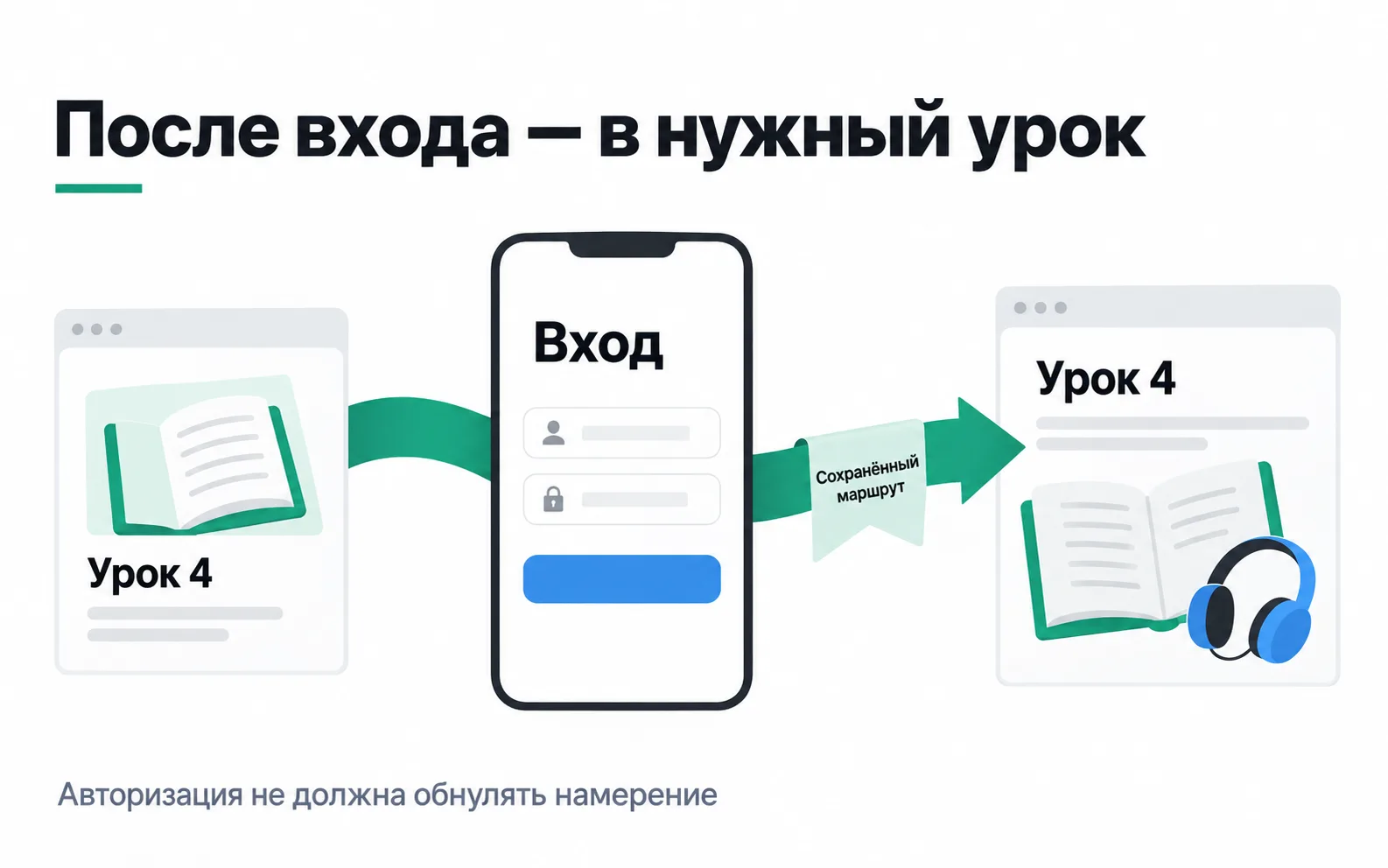
Three stretches of the route
A deep link opens a particular screen inside an app. A deferred deep link serves someone without the app: they go through the store and the install, and on first launch they see the same product page. On the way the link crosses three stretches, and each one has a different owner.
| Stretch | Who owns it | Where it breaks |
|---|---|---|
| The link opens the installed app | iOS and Android: a Universal Link and an App Link | No file on the domain, the address was typed into a browser, the source app doesn't support these links |
| The link survives the install | The MMP or the ad network's SDK | Install more than 15 minutes after the click, a click in Meta, an iPhone with tracking declined |
| The app shows the product page | The developer | Address or sign-in screen, the product isn't available in the delivery zone, an unknown ID in the link |
So when someone says "the deep link doesn't work", the first question is always the same: did they already have the app? The answer tells you which row to look in.
The link: what to agree with the developer
The grocery app builds its links in OneLink, AppsFlyer's link service. The link carries deep_link_value, which says which screen to open, and deep_link_sub1-deep_link_sub10 for the details. AppsFlyer recommends agreeing on a value scheme up front so the marketer can make new links without a new release (working with OneLink). The grocery app's scheme looks like this:
product is the screen type and 4521 is the strawberries' catalogue ID. Tomorrow the marketer swaps in the watermelon's ID and doesn't need the developer for it. With the same scheme, category opens a section and promo opens an offer page.
For the link to open an app that is already installed, the domain and the app have to vouch for each other. On iOS that takes an apple-app-site-association file on the domain and an applinks entry in the app; on Android it takes App Links and an assetlinks.json file. For a onelink.me subdomain AppsFlyer publishes both files itself once the link template has redirection turned on for people who already have the app (iOS setup). The developer adds the domain to the app, and there are two traps here:
- App Links are verified against the SHA256 fingerprint of the signing key. An app on Google Play is signed with Play's key, so the fingerprint comes from the app signing page in Play Console, not from a test build (Android setup). With the test build's fingerprint, links work for the developer and open the browser for customers.
- You can change the OneLink subdomain at any time, but every link already sent out with the old subdomain stops working.
If the links go through your own domain, you publish the files. Apple and Google have similar rules: HTTPS, no redirects, a separate file on every subdomain (Google's requirements, Apple's troubleshooting guide).
The app is installed but the browser opens
In that same technical note Apple lists the cases where a universal link opens Safari even though the setup is correct:
- The address was pasted into the address bar. That is navigation inside the browser, and it never opens the app.
- The person is already on the site and taps a link to the same domain: Safari assumes they want to stay in the browser. An "Open in the app" button on the site needs a separate subdomain.
- A third-party browser may not support universal links: that is up to its developer. AppsFlyer adds that not every app supports them either, social networks included.
- A tester once long-pressed a link and chose the browser. The iPhone remembers that choice for the domain, and from then on every link opens in Safari on that phone until someone long-presses again and picks the app.
- The file on the domain changed but phones don't see it. Since iOS 14 the file is served by Apple's CDN, and a device checks for updates about once a week. On a test phone it is quicker to reinstall the app.
Meta ads add a condition of their own: in regular, non-catalogue ads, Universal Links and App Links only work in campaigns where the app is chosen as the destination (AppsFlyer's Meta FAQ). A campaign with the Awareness objective (Meta ad objectives) will open the browser with the same link.
You can see the domain-to-app association on an iPhone in a minute. Paste the link into Notes and long-press it: if the menu offers both the app and the browser, the association is set up. Pick the app in that menu: whatever you tap, the phone will remember it for the domain.
No app yet: where the deferred deep link gets lost
On first launch the AppsFlyer SDK fetches the OneLink click data from the server and hands it to the app through Unified Deep Linking (UDL). For a new user UDL returns only deep_link_value and deep_link_sub1-deep_link_sub10; media_source and campaign come back empty (UDL for Android). The screen comes from the deep link response and the campaign from attribution, as in app analytics.
UDL fails to find the click in three cases (working with OneLink):
- More than 15 minutes passed between the click and the install. Someone tapped the strawberries on the bus and installed the app at home in the evening.
- The click came from a self-reporting network (SRN) such as Meta.
- The link has no
deep_link_valueordeep_link_sub1-deep_link_sub10: for example, an old link that passes the product in its own parameter such asproduct_id.
For the first and third cases AppsFlyer recommends a second handler, extended deferred deep linking: the app reads the link parameters from the attribution data on first launch. The developer has to make sure only one of the two methods handles the jump. With a click from Meta the second handler won't help, as explained below.
On an iPhone the second handler has a limit too. AppsFlyer warns that without an IDFA, deferred deep linking through attribution data may not work (ATT and SKAN in AppsFlyer), and the IDFA is empty for everyone who declined tracking.
Meta is a separate story. Deferred deep link values from Meta ads aren't in AppsFlyer's attribution data, and to get them apps usually add the Meta SDK (AppsFlyer's Meta FAQ). Meta itself requires its own SDK and advertiser ID collection to be switched on for deferred deep linking (deep links in app ads). On an iPhone without consent that identifier is empty. Test this case separately and decide in advance what the person will see if the product page doesn't open.
If the Meta SDK went in for the sake of deep links, don't send events to Meta from it: purchases already go there through AppsFlyer, and Meta doesn't deduplicate in-app events, so the purchase would be counted twice. And tell whoever sets up SKAN: only one SDK should update conversion values, or the reports will drift away from the schema. The lesson on SKAdNetwork deals with that.
Inside the app: the route has to survive the first launch
The link arrived and there is still no product page. On first launch the grocery app asks for an address, to work out which warehouse will deliver, and for a phone number to sign in. If the app opened the product page before those screens, the home screen replaces it once the address is entered. The picture shows the same thing with signing in to an app with lessons.
The order worth writing into the developer's task:
- The app validates the route: a screen type from the list (
product,category,promo) and a product ID. An unknown value leads to the catalogue or search, not to a blank screen. - The route is kept while the person enters the address and phone number.
- Once the address is known, the server says whether strawberries are available in that delivery zone. If not, the person sees the product page with a note and similar products, not an error.
- The route is deleted once it has been opened, otherwise every later launch will show strawberries.
- A link sets the screen but grants no rights. A link to order 2041 opens it only for its owner, and passwords, tokens and card details never go into links. The app also never opens an arbitrary address from a link parameter, or a link on your domain could send someone off to a stranger's site.
The test matrix
Before the strawberry ads went live, the developer and the marketer ran the link through nine states on two phones, an Android and an iPhone:
| State | What should open | What opened |
|---|---|---|
| App installed, link from Telegram | Product page 4521 | Product page |
| App installed, Meta ad with the app as destination | Product page 4521 | Product page |
| No app, link from Telegram, installed 5 minutes later | Product page after first launch | Product page |
| No app, link from Telegram, installed an hour later | Product page after first launch | Home screen: no second handler |
| No app, Meta ad | Product page after first launch | Home screen: no Meta SDK in the app |
| First launch with the address screen | Product page after the address | Home screen: the route was lost on the address screen |
| Strawberries not available in the delivery zone | Product page with a note and similar products | Loading error |
| Unknown product ID in the link | Catalogue | Blank screen |
| Address pasted into Safari's address bar | Website | Website, as expected |
The home screen opened in three rows, and each needs its own fix: a second handler for late installs, the Meta SDK for Meta ads, and keeping the route through the address screen. None of these bugs shows up with the app already installed: on the marketer's phone the product page always opened.
AppsFlyer's UDL guide describes how to test a deferred deep link:
- Register the phone as a test device, as in SDK acceptance testing, and turn on the SDK's debug mode.
- Delete the app.
- Tap the link, install the app and open it.
- Find the UDL result in the SDK log.
NOT_FOUNDmeans the link was lost before it reached the app.FOUNDwith the deferred flag but no product page on screen means it was lost inside the app. - Repeat with an install an hour later, on an iPhone with tracking allowed and declined, and with a Meta ad.
How many people reach the product page
A test on two phones shows the route works in principle. How many people actually get through it is a job for the data. For that, set up an event of your own, for example deep_link_open: there is no such standard event in Firebase or AppsFlyer, we made the name up for this lesson. The app sends it to product analytics when it receives a deep link, with the link parameters and an is_deferred flag taken from the isDeferred field in the UDL response. The product page already sends view_item.
Here is what one post in the service's Telegram channel brought in over a week, Android only: there AppsFlyer links the install to the link through the store referrer, so the whole route is visible.
| Step | Where to look | People |
|---|---|---|
| Installed from the link | AppsFlyer, source telegram | 400 |
| The app received a deferred deep link to 4521 | deep_link_open with is_deferred | 340 |
| Saw the strawberries' product page | view_item for product 4521 in the same session | 290 |
290 out of 400 reached the product page, 72.5%. For 60 people the app didn't receive the deep link or the event never reached analytics, and for 50 the link was lost inside the app. These numbers can't tell you why. The second handler hadn't shipped yet at that point, so for the first group find out how many installed more than 15 minutes after the click. For the second, find the screen their first session ended on.
For Meta ads on iPhone the first row will be incomplete: AppsFlyer will most likely record people who declined tracking as organic. All you can calculate is the share of received deep links that opened the product page, and the report should say plainly that the denominator is received deep links, not installs from the ad.
Exercise: a test matrix for your own app
Take a client's app or the delivery service from this lesson.
Now the situation from the start of the lesson, as an email from a client: "Someone tapped the strawberry ad and the app opened the home screen. Are the deep links broken?"
It is too early for yes or no; first find out whether the person already had the app. If they did, look at the first and third stretches: the universal link or App Link, the destination in the Meta campaign and the router in the app. If they didn't, look at the route through the install: did the app receive the link on first launch? If it did, the link was lost inside the app, on the address screen or on an unavailable product. If it didn't, find out where the click came from. From Meta, without the Meta SDK there will be no product page; if the company has signed Meta's Advanced Mobile Measurement (AMM) agreement, the app can only sort people by campaign name. After 15 minutes there is no deep link without a second handler either, and on an iPhone with tracking declined there may be none at all. In your reply, name both scenarios and what you tested in each: the installed app and the route through the install break for different reasons, and different people fix them.
Video: how deep linking works
An introductory video from AppsFlyer, in English.