At the end of October, once the September cohort is 30 days old, the product manager of a grocery delivery app brings some numbers to the team meeting. Of the 1,170 people who placed a first order, 50% of those with notifications on ordered again, against 19% of the rest. He already has his conclusion: ask for notification permission at first launch, and have the marketer send offers twice a week. It's the same cohort as in the lesson on in-app events, and the numbers are made up.
Who can receive a push at all
A push only reaches people who have allowed notifications, and Android and iPhone handle that permission differently.
Android. Since Android 13, notifications for a freshly installed app are off until the person grants the POST_NOTIFICATIONS permission. If the app targets Android 13 or higher, the team chooses when to ask; if it targets 12L or lower, the system asks on its own at first launch; and if the app was already on the phone before it updated to Android 13 and its notifications weren't turned off, the permission carries over automatically. Phones on Android 12 and lower have no such permission: notifications stay on until the person turns them off.
iPhone. iOS shows the system prompt once: the first request asks and records the answer, and later requests don't open the prompt again. After that the person can only change their mind in the phone's Settings. Apple advises asking at a moment when the person can see why the app needs notifications. There is also provisional authorization: notifications arrive quietly, with no sound or banner, only in Notification Center history, and they carry Keep and Turn Off buttons. A quiet "courier at the door" is useless, but for product picks it can work.
The Android developer guide names our exact case as a good moment to ask: the person has just ordered food delivery. For groceries, that is the screen after the first order, with the line "We'll let you know when the courier is at your door". At first launch the person hasn't ordered anything yet and has no idea why they'd want notifications, and on an iPhone there won't be a second prompt.
System permission is not consent to advertising. Under rule 4.5.4 of App Review, promotional pushes may only go to people who explicitly opted in through the app's own interface, and they must be able to opt out inside the app. So the settings need a separate "Offers and picks" switch. On Android it gets its own notification channel: since Android 8.0 every notification belongs to a channel, Google recommends a channel for each type of notification, and the person can mute offers while keeping order updates.
The opt-in rate is counted from the permission status. On every launch the app reads whether notifications are on (areNotificationsEnabled() on Android, getNotificationSettings on iOS) and sends the status to analytics as a user property. What to call it is up to the event plan from the lesson on in-app events. There can be more tokens in the database than people who will see a push: a customer may have two phones, Firebase advises treating a token as stale once the device has been offline for a month, and it deletes Android tokens that have been inactive for 270 days (managing FCM tokens). Look at the rate separately for iOS and for each Android version range, too: phones on Android 12 and lower have notifications on without ever being asked, and they inflate the overall figure.
When someone signs out, unlink the token from their account, or one person's push will land on a phone someone else is now using. And keep anything personal out of the push text: it shows on the lock screen, and the same rule 4.5.4 forbids sending confidential information in pushes.
Notifications and repeat orders by source
In the lesson on in-app events, the September cohort reached 1,170 first-time buyers by D30, and 440 of them (38%) ordered again. The same lesson explains why retention for a delivery app is measured by repeat orders. AppsFlyer doesn't know the notification status, so it is added to the same cohort in product analytics that already receives attribution, as in the lesson on mobile app analytics.
Notifications were turned on by 702 of the 1,170 first-time buyers, or 60%: 65% of those from Google, 60-61% from Meta and Apple Ads, 50% from TikTok. As in cohort analysis, the percentages are of the cohort's first-time buyers. It's tempting to link this to repeat orders: TikTok has the fewest of those too, 32% against 37-41% for the other networks. But with 190 buyers that gap is indistinguishable from chance, as the same lesson on in-app events shows. Nor would the overlap tell you why: both notifications and repeat orders may depend on the kind of people each network brings in.
The product manager split all 1,170 buyers by notification status. Of the 702 with notifications on, 351 (50%) ordered again; of the 468 without, 89 (19%). The gap is large, and with samples this size it isn't chance. But the app asks for permission after the first order, and the people who say yes more readily may be the ones who were planning to order again anyway. So 50% against 19% mixes two things, the effect of pushes and the fact that different people turn notifications on, and these numbers can't separate them. Asking at first launch will change who allows notifications, but how many orders pushes bring will still be unknown. Only a comparison with a random group that got no push can answer that.
Holdout: how many orders a push adds
A holdout is a random part of the audience that doesn't get the send. In every other way it matches the group that does, so the difference in orders between them is what the push added.
The team takes 6,000 customers who have notifications and offers switched on and haven't ordered for 7 days or more. Half of them, picked at random by customer ID, are left out of the send. The other half gets a push at 18:00 on Thursday, "Reorder your last basket", which opens the cart with their previous order (that kind of jump is set up with deep links). After 7 days the team looks at what share of each group placed an order. It counts the whole group: the people who opened the push selected themselves, and there is nobody to compare them with. A/B testing product features shows why the denominator decides the outcome.
| Over 7 days | Push | No push |
|---|---|---|
| Customers in the group | 3,000 | 3,000 |
| Opened the push | 750 | - |
| Ordered within a day of opening | 210 | - |
| Placed at least one order | 300 (10%) | 240 (8%) |
| Turned notifications off | 30 (1%) | 9 (0.3%) |
The campaign report will say 210 orders: that's how many people opened the push and ordered within a day. But in the no-push group, 240 out of 3,000 people ordered that same week without ever seeing the push. The push added 2 percentage points, about 60 extra buyers per 3,000, and they placed at least as many orders as there are buyers. The chi-squared calculator from the A/B testing lesson gives p of about 0.007, so the difference is unlikely to be chance. Its interval (the difference ± 1.96 standard errors) runs from roughly 0.6 to 3.4 points, or 17 to 103 extra buyers. With a sample this size you can't narrow it further.
The service keeps 1,000 ₸ per order (that margin was worked out in the lesson on mobile-first), so the send to 3,000 people brought in about 60,000 ₸. Sending costs almost nothing: Firebase Cloud Messaging is free. You pay for a push with your audience. In the push group 30 people turned notifications off, in the other group 9. The gap of 21 people, or 0.7% of the group, is the price of a single send. If order updates and offers share one channel, those people also stop getting "courier at the door".
In Firebase, the baseline group of a notifications experiment can be left without a message, but it splits installs (see the lesson on A/B testing product features), so a send from a CRM is better split by customer ID.
One test speaks only to one campaign. To see what all promotional pushes add together, a share of customers, say 10%, is kept away from them for a quarter, and their orders are compared with everyone else's. The planner on the calculators page sizes equal groups. Its per-variant number can serve as the size of the no-push group: with a 10/90 split that is more than enough.
Frequency and relevance
The marketer wants to push twice a week. The test above checked one send a week. A second send might add as many buyers again, or it might just pull the same orders a couple of days earlier, and that test can't tell which. The second send is tested as a third group against the same no-push group, watching two rows: extra buyers and people turning notifications off. 0.7% per send looks small, but if the rate holds, ten weekly sends will switch notifications off for about 7% of the audience, and every later offer will reach fewer people.
The frequency cap lives on the service's side:
- The cap is counted per person across all promotional sends together. If offers, abandoned carts and product picks are run by different people, each of them stays within their own limit while the customer gets three pushes in one evening. So every promotional push goes through a single queue that knows how many the person has already had this week.
- Service notifications (payment went through, courier at the door) don't count towards the cap, and no advertising goes into them either.
- Right before sending, the queue checks that the reason still holds. A "You left items in your cart" push is scheduled for 19:05, and at 19:00 the person places the order: there is nothing left to remind them about.
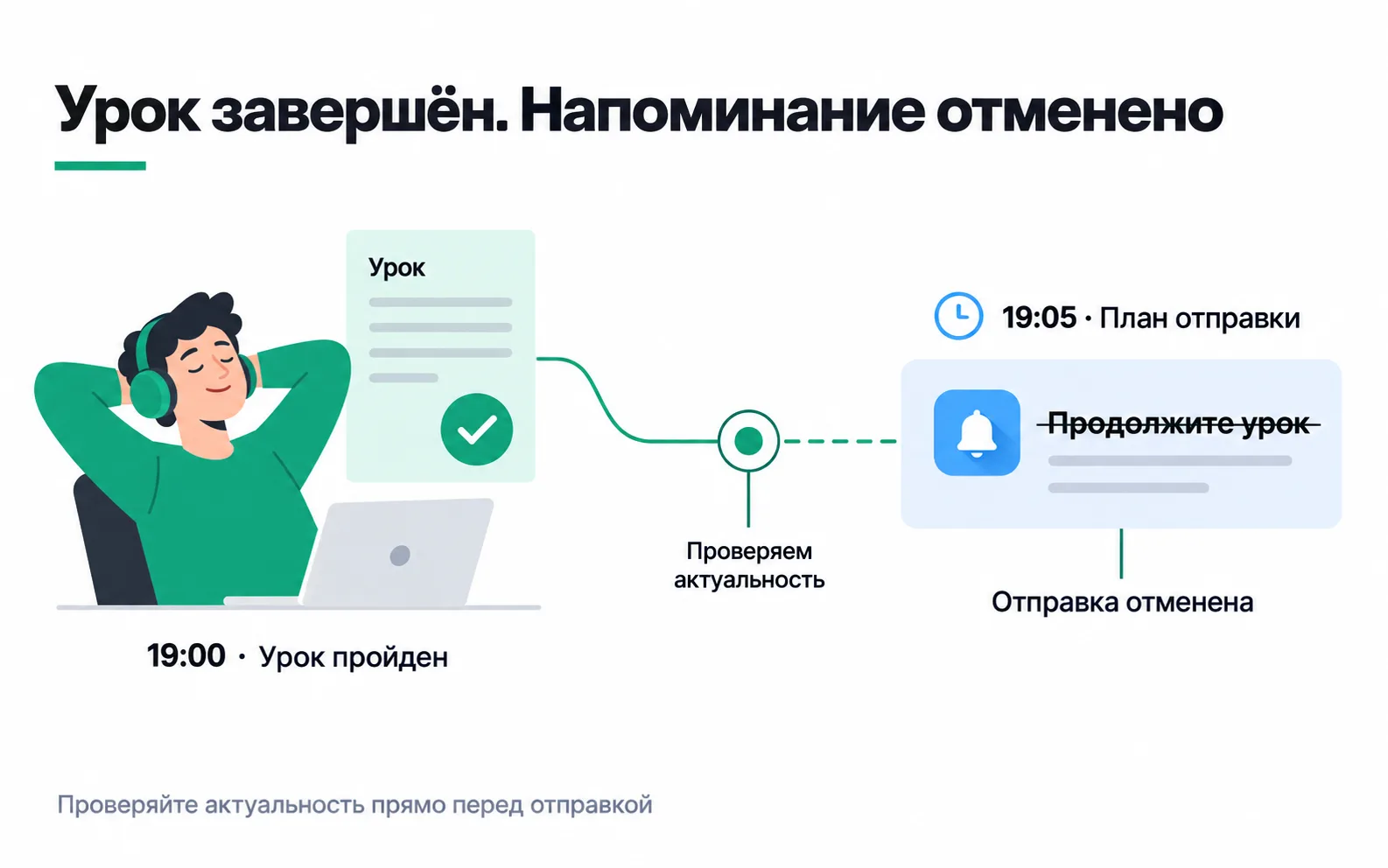
The picture shows the same principle in a lessons app. Your queue checks the reason, before the hand-off to Firebase: Firebase doesn't know whether the person has placed the order, and a response with a message ID only means it accepted the message for delivery. If the phone is switched off, a message with no lifespan set waits for it for up to four weeks. So set the lifespan explicitly: android.ttl for Android, the TTL header in webpush.headers for web, the apns-expiration header for iPhone. A cart reminder that turns up three days later only annoys people. Courier updates get a shared collapse key: of several pending messages with the same key, Firebase keeps only the latest, so when the phone comes back on the person sees just the current status.
Exercise: a holdout plan for your own app
Take an app you work on, or the delivery service from this lesson.
Now the situation after the test. The marketer writes to the owner: "The push brought in 210 orders, that's 210,000 ₸ of margin. Let's send it twice a week to the whole base." What do you reply?
210 is the number of people who opened the push and ordered within a day, and at least half of them would have ordered anyway: 8% of the no-push group ordered that week. There were about 60 extra buyers, with an interval of 17 to 103, which is roughly 60,000 ₸ per send to 3,000 people, not 210,000 ₸. Sending to all 6,000 will give about twice as much, since both halves were drawn at random from the same audience. But every send also switches notifications off for 0.7% of the people who get it. Run the second weekly send as a third group first: if it adds hardly any buyers while people turn notifications off at the same rate, all it does is shrink the audience for future offers.
Video: push scenario ideas
Ideas from AppsFlyer, in English. Put each one through a holdout before you trust it.