An online booking service for beauty salons in Almaty charges each salon 12,000 ₸ a month after a two-week free trial. Before a salon can take bookings, its administrator adds the stylists, the services and the schedule, then switches on online booking. The team built a step-by-step setup and showed it to half of the new salons for a month. On Friday the product manager posts in the team chat: "With the step-by-step setup, 75% of salons that opened the schedule switched on online booking, versus 50% without it. Shall we roll it out to everyone?" The numbers in this lesson are made up.
How a feature test differs from a landing page test
In the A/B test of a sign-up form, visitors are split by cookie, a person visits once or twice, and submits the form on that same visit. A product works differently:
- people log in to an account and keep coming back for weeks, from a phone and from a laptop;
- several people work in one account: a salon's administrator and stylists share one calendar;
- the result takes days to mature: a salon switches on online booking over the course of a week, not on the first login;
- the change meets people who are used to the old interface;
- mistakes cost more: a broken screen for a paying salon means support tickets and cancelled subscriptions;
- there are few new accounts: the service gets about 200 new salons a month, not thousands of visitors a week.
That is why a feature test brings in things the form test didn't have: the unit of assignment, the flag and the novelty effect, and there are more guardrail metrics. Sample size and the stopping rule are worked out the same way as there, so they aren't repeated here.
Who to split: the salon, not the session
The first decision in a product test is the unit, that is, what the service randomly sends to A or B. For the step-by-step setup, the options look like this:
| Unit | What happens |
|---|---|
| Session | The administrator sets up the salon over three or four visits and sees the step-by-step setup one time and the empty calendar the next. There's no way to attribute the switched-on booking to either |
| Device | The administrator works from a laptop during the day and a phone in the evening, and lands in both groups |
| User | The administrator gets the step-by-step setup and a stylist from the same salon gets the empty calendar, and they fill in one schedule following different instructions |
| Salon | Every employee of the salon sees the same variant on every device |
You split salons, and you count salons too: the result is 100 salons per group, not the 1,400 clicks their staff made. A large salon with ten stylists clicks more than ten small ones, but it is still one observation.
Experiment tools handle this differently. Amplitude Experiment recommends bucketing by user in most cases and by company ID in some B2B cases, so that everyone in a company sees the same variant. Firebase A/B Testing assigns by installation (the Firebase installation ID), so a person with two devices can end up in both groups, let alone the staff of one salon. For a test where the unit is the salon, it doesn't fit.
The feature behind a flag
A feature flag is a switch in the code. The step-by-step setup ships to everyone in a normal release, but the flag decides who sees it, and only group B salons do. Everyone else sees the old empty calendar. In GrowthBook, flags are the most common way to run an experiment.
A flag gives you three things. The first is a stable group. The tool works out the variant from the ID you pass it: GrowthBook hashes it together with the experiment key, so the same ID always gets the same variant. Pass the salon ID rather than the user ID, and the administrator and the stylists end up in the same group on any device.
The second is an off switch. If the step-by-step setup breaks, you turn the flag off and every salon sees the old screen without a new release.
The third is a cautious start. You can switch the test on for 10% of new salons first and, once it's clear nothing is breaking, widen it to everyone while keeping the 50/50 split. According to the same GrowthBook FAQ, salons already in the test stay in their groups. What you don't touch mid-test is the ratio between variants: change 50/50 to 70/30 and some salons move to the other group and see both variants.
One more condition: at the moment a salon is given a variant, an event recording that variant has to reach your analytics. Without it, you can't calculate the result by group.
A gradual rollout is not yet a test. If 10% of salons saw the setup last week and all of them see it this week, comparing the two weeks mixes the setup up with the season, the ads and everything else that changed that week. A test is two groups over the same days.
The plan before launch
| What | The team's decision |
|---|---|
| What changes | Step-by-step setup instead of an empty calendar for new salons |
| Unit | The salon, with the flag keyed on the salon ID |
| Who is in the test | Every salon that signs up during the test, split in half |
| Primary metric | Share of assigned salons that switch on online booking within 7 days of signing up. Currently 40% |
| Guardrail metrics | Support chat requests per 100 salons in the first 7 days. Share of salons that pay for a subscription after the free two weeks |
| When we count | Booking once the last salon has had 7 days; payment two weeks after it signed up |
| Decision | Keep the setup if more salons switch on booking and there are no more support requests or refusals to pay |
A guardrail metric is one you're trying not to hurt. The step-by-step setup could raise the share of salons with online booking and at the same time flood support with questions. Or salons could switch on booking and then not pay after the trial. Two or three guardrail metrics are enough: GrowthBook warns that adding every metric you have to a test leads to false positives from random variation.
The plan records the denominator of the primary metric: all assigned salons. A month later, that is what settles the argument in the chat.
What the first month showed
| Salons | A: empty calendar | B: step-by-step setup |
|---|---|---|
| Assigned to the variant | 100 | 100 |
| Opened the schedule | 80 | 40 |
| Switched on online booking | 40 | 30 |
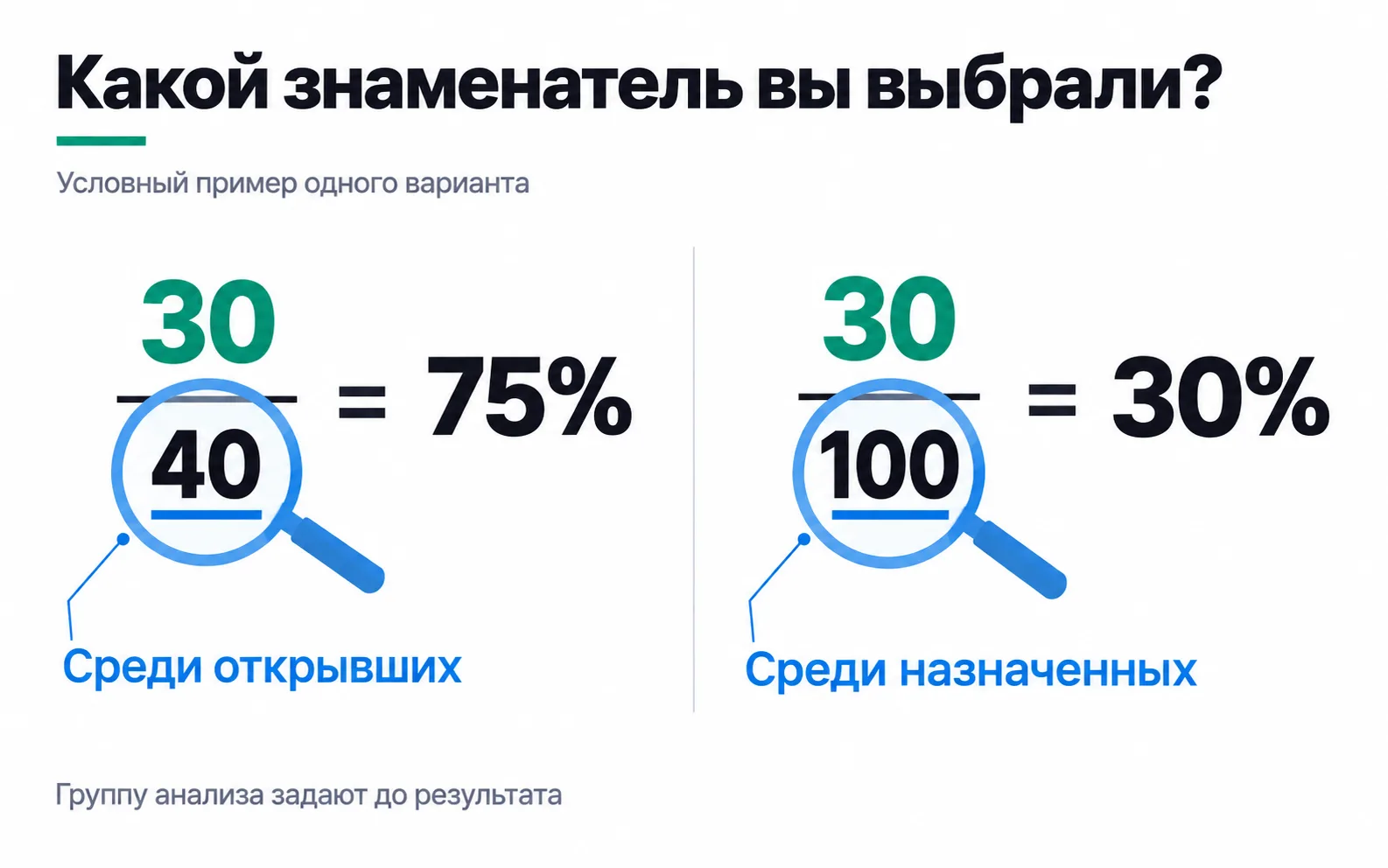
| Share among those who opened the schedule | 50% | 75% |
| Share among those assigned | 40% | 30% |
The 75% in the chat is the share among salons that opened the schedule. But in B only 40 salons out of 100 got as far as the schedule: the step-by-step setup first asks you to add stylists and services, and only then opens the schedule. Random assignment makes the whole groups of 100 salons comparable. The 40 salons that reached the schedule in B and the 80 in A were selected by the variant itself, and the table can't tell you how they differ.
Following the plan, we count from those assigned: 30% in B against 40% in A. With a hundred salons per group, a difference like that could be chance: the chi-squared calculator from the lesson on A/B tests gives p of about 0.14. These data don't let you claim the step-by-step setup is worse. But you can't call it the winner either: if the difference is real, the new setup costs the service 20 set-up salons out of 200 a month. There are no grounds for rolling it out to everyone, as the product manager wants.
You can narrow the analysis to those the change touched only with a condition that works the same in both groups and is logged in the control group too (triggered analysis at Microsoft), and "opened the schedule" won't do, because the path to the schedule differs between variants.
When there are too few salons
How many salons does the test need to spot a 10-point difference? On the calculators page, open the A/B test planner, the same one used for the sign-up form: baseline conversion 40%, minimum detectable effect 25% (that's from 40% to 50%), significance 5%, power 80%. The calculator shows 380 salons per variant, 760 for both. At 200 new salons a month, that's almost four months. With a hundred salons per group, the test will only catch a jump from 40% to 60%: set the effect to 50% and the calculator asks for 95 salons per variant.
When new accounts are scarce, you have several options:
- Run the test longer. If the decision can wait four months, the flag stays at 50/50 while salons accumulate.
- Don't split by session to get a bigger sample. On paper you'll have several times more observations, but one salon's sessions aren't independent, and the test will show confidence you don't have.
- If a test is impossible, release the feature behind a flag in stages: 10% of salons, then half, then everyone, while you watch the guardrail metrics and errors. Say so plainly in the report: "Released without measuring the effect; no errors and no rise in support requests."
And to see where salons get stuck, look at the setup funnel and call five administrators. Five conversations won't replace a test, but they will suggest what to test next.
The novelty effect
For the step-by-step setup it hardly matters: a new salon sees the setup for the first time in either variant and has nothing to compare it with. New users are unlikely to experience the novelty effect: it needs expectations of the product, and a new salon doesn't have any yet.
A change for people who are used to the product is another matter. As its next idea, the team wants to show 1,200 existing salons a "Free slots" button that sends clients tomorrow's open times. Suppose 45% of group B salons use the button in the first week and 15% by the third. If you decide from the first week that almost every other salon needs the button, the conclusion is inflated threefold.
What to do about it:
- run the test for at least three full weeks, even if you reach the sample size sooner: in a week or two you can't tell a burst of curiosity from an effect that will last;
- Statsig recommends looking at results by days since exposure: the total for the whole period hides whether the effect is fading;
- make the decision on the weeks where the effect has stopped changing.
It can go the other way too: people used to the old version push back against the change at first, and the effect is understated in the early weeks. So you look not at the first week but at where the curve levels off.
Exercise: a test plan for your own feature
You need a product with a logged-in account: a client's service, an app you work on, or the student area of an online school. Take one change the team wants to release and fill in a plan using the table above as a template.
If your unit came out as the user but several people work in one account, go back to the table of units: colleagues will see different variants and start confusing each other. If the denominator says "opened the new feature", you've repeated the 75% story. If the planner comes back with more than a year, a test isn't feasible: release behind a flag in stages and state in the report that the effect wasn't measured. And if you've ended up with more than three guardrail metrics, keep the ones whose decline would stop the release and watch the rest as context.
What you end up with is a half-page plan you can show the team before launch. That plan is what saves you from a "75%, shall we roll it out?" message on a Friday evening.
Video: the basics of A/B testing
An introductory video from Noukash on how an A/B test works, in Russian.