Every Monday the owner of an online analytics school gets the end-to-end report as a Google Sheet: spend from two ad accounts, leads and payments from the CRM. The CRM export lands in the sheet on its own every day at 18:00, while the marketer copies spend from the ad accounts by hand every Monday, which takes half an hour. The owner opens the sheet on his phone and hunts for the row he needs. He asks for "a proper dashboard that updates itself" and adds: "People I know say Power BI is the best." Before choosing anything, write down where the data comes from, who will read it and how often. The numbers in this lesson are made up.
Requirements first, tool second
For the school the list is short:
| What | At the school |
|---|---|
| Sources | Meta Ads (120,000 ₸ a week), Google Ads (80,000 ₸), GA4 with a generate_lead event, a CRM export of leads and payments into a Google Sheet every day at 18:00 |
| Readers | The owner, mostly on his phone; the marketer, who is also the author; the sales manager; a contract media buyer who has no reason to see the school's revenue |
| How often | A decision once a week; refreshing the data once a day is enough |
| Budget | As close to zero as possible |
All three tools draw bars and lines equally well. They differ in four places: which sources they connect to on their own, what each reader costs, how often data refreshes, and how the report reaches people.
One note on the name. In April 2026 Google gave Looker Studio back its old name, Data Studio; the address is now datastudio.google.com, and old links redirect automatically (the announcement in the docs). Guides and videos about Looker Studio still apply, since it is the same product. Looker, without the word Studio, is a different Google product.
Which sources connect on their own
The table is based on the connector lists for Data Studio, Power BI and Tableau:
| Source | Data Studio | Power BI | Tableau |
|---|---|---|---|
| GA4 | Google connector | Google Analytics connector, beta for GA4 | Google Analytics 4 connector |
| Google Ads | Google connector | Partner connectors only (Supermetrics, Windsor, Funnel) | No |
| Google Sheets | Google connector | Google Sheets connector | Via the Google Drive connector |
| BigQuery | Yes | Yes | Yes |
| Meta Ads | Partner connectors only | Partner connectors only (Supermetrics, Windsor, Funnel) | No |
For GA4 in Power BI you pick Implementation 2.0 when connecting, and it is marked as beta (the Google Analytics connector in Power BI). In Tableau the separate Google Sheets connector is marked as deprecated, so sheets are opened through Google Drive.
None of the three pulls Meta spend by itself. Both Data Studio and Power BI have partner connectors, and Google warns that such connectors may cost money (data sources and connectors). The free route is the same for all three: once a week, export the Ads Manager table to CSV and paste it into a separate tab of the same Google Sheet that receives leads from the CRM. The school has one ad account and one campaign, so this takes ten minutes on Monday. Once there are more ad accounts, compare the time spent on exports with the price of a connector.
What it costs
Prices as of October 2026, in US dollars, as listed on the vendors' sites.
- Data Studio is free for both authors and readers. The paid version, Data Studio Pro, costs $9 per user per month in one Google Cloud project, and the per-user price depends on the subscription length (Data Studio pricing). For that you get team workspaces, Google Cloud support if you have a separate support plan, and reports that belong to the organisation rather than to an employee (what Pro includes).
- Power BI Desktop is free, but it runs only on Windows 10 or later (Power BI Desktop requirements). To share a report, both the author and every reader need a Pro licence: $14 per user per month, paid yearly, or $24 for Premium Per User (Power BI pricing). Free readers are only possible in a Fabric capacity of F64 or larger, and that costs thousands of dollars a month (sharing Power BI reports, Fabric pricing). There is one more hurdle for a business that runs on Gmail: you can only sign up for Power BI with a work email; Gmail and Hotmail addresses are not accepted, and without a work address you have to set up Microsoft 365 first (signing up for Power BI).
- Tableau Cloud Standard costs $75 a month for an author (Creator), $42 for someone who edits existing reports (Explorer) and $15 for a reader (Viewer). The contract is annual and paid a year up front, and at least one Creator licence is always required. The Enterprise edition costs $115, $70 and $35 (Tableau Cloud pricing). The free Tableau Desktop Free Edition and Tableau Public do not work for a client: the first cannot publish reports, and in the second everything is open to anyone (Tableau pricing FAQ, saving to Tableau Public).
For the school that means one author and three readers:
| Data Studio | Power BI Pro | Tableau Cloud Standard | |
|---|---|---|---|
| Author | $0 | $14 | $75 |
| Three readers | $0 | $42 | $45 |
| Per month | $0 | $56 | $120 |
| Per year | $0 | $672 | $1,440 |
Any of these options also needs a Meta connector if you do not want to export spend by hand.
How often data refreshes
- In Data Studio you set the frequency separately for each source. Google Ads and GA4 refresh every 12 hours by default, and for Google Ads that cannot be changed. Google Sheets refresh every 15 minutes by default, and BigQuery can be set anywhere from minutes to 12 hours. An editor can refresh the data manually at any time; a reader only if the editor has turned that on in the report settings (data freshness in Data Studio). Reports built on GA4 are subject to Google Analytics Data API quotas, and when they are exceeded, charts show an error (the Google Analytics connector in Data Studio).
- Power BI with a Pro licence refreshes a model on a schedule up to 8 times a day; with Premium Per User or a Fabric capacity, up to 48 (data refresh in Power BI).
- Tableau Cloud refreshes extracts on a schedule no more than once an hour (refresh schedules in Tableau Cloud).
Any of the three is enough for the school, since it decides once a week. The bottleneck is not the BI tool but the CRM export: it reaches the sheet once a day, at 18:00, and until the next export the dashboard shows payments only up to 18:00, however often it refreshes. So that the owner does not mistake an empty evening for a disaster, the load time of each source goes in the dashboard header.
How the report reaches its readers
In Data Studio you share a report the same way as a Google Doc: by email address, in which case the reader has to sign in to Google, or by a link that opens without signing in (sharing a report). What a reader sees depends on whose credentials are set on the data source. With Owner's credentials, readers see the data through the owner's access and need no access of their own to GA4 or the sheet. With Viewer's credentials, every reader needs their own access to the source (data credentials in Data Studio). Hence the most expensive mistake: a report on Owner's credentials, shared by a link open to everyone, shows the school's revenue to anyone the link is forwarded to.
Two more things will come in handy for the school. Data Studio can email a PDF of the report on a schedule, say Monday at 09:00, although numbers and dates in that PDF always use US formatting (scheduled delivery). And in the free version a report belongs to whoever created it. So you create it in the school's Google account and add yourself as an editor: when the project ends, the report stays with the client.
The contract media buyer gets a separate report built on a tab without payments: spend, leads and their statuses before payment, such as "reached" and "booked a consultation". He gets view-only access.
Power BI does not let you share reports on a free licence. There is also Publish to web, but it opens the report to everyone without sign-in, including the detail data behind the charts (Publish to web). For a report with revenue in it, that is not an option.
Tableau, under ordinary role-based pricing, needs a Viewer licence for every reader. Access for readers without individual licences is sold as capacity-based pricing through the sales team (Tableau Cloud pricing). Tableau Public, as noted above, is open to everyone.
The tool will not fix the data model
To bring spend, leads and payments into one table, Data Studio blends sources: up to five of them are joined on a shared field, such as campaign name or lead number (how blends work). It is a table join, and it has the same trap as in a database: if one row on the left matches two rows on the right, the value on the left repeats.
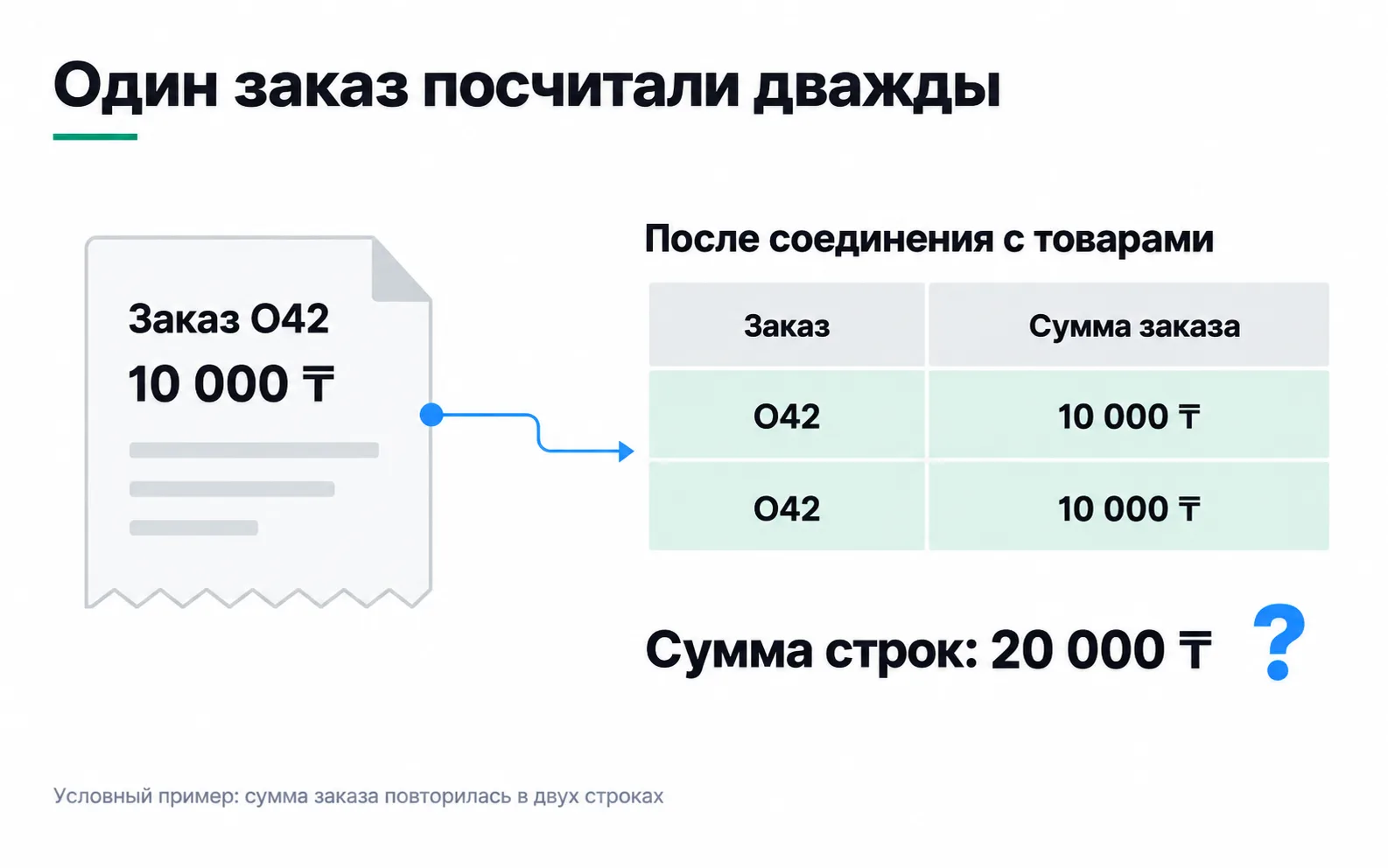
The school runs the same risk with payments made in instalments. In Data Studio a blend first groups each table by the dimensions selected in it, so payments with the same lead number add up to one row. But add the payment date or payment number to the payments table, and the lead has two rows again, and its amount doubles. In SQL, and when you use Merge queries in Power Query, this happens straight away. You fix the data before the join: bring payments down to one row per lead, payments minus refunds, as in the end-to-end report, and reconcile the totals with the CRM: 65 leads, 15 payments, 375,000 ₸.
The tempting shortcut is to add up only distinct amounts, SUM(DISTINCT ...) in SQL. It breaks the report in another way: two different students' payments of 25,000 ₸ merge into one, and revenue shrinks. What has to be unique is the lead, not the amount.
What to choose
- Data Studio, if the data lives with Google (GA4, Google Ads, Sheets, BigQuery), there are few readers and no BI budget. This is the school's choice.
- Power BI, if the company already works in Microsoft 365 with work email, reports are assembled from Excel and 1C exports, and there are enough tables and calculations to need a data model. Budget $14 a month per reader and a Windows computer for the author.
- Tableau, if the client already has licences and an analyst who works in it. Starting with it is expensive for a small business: an annual contract and $75 a month for the author alone.
Before you suggest a paid tool to a client, ask their accountant how the subscription will be paid: with a Kazakhstan bank card or by invoice.
Exercise: BI for your own client
Take a client, or your own project from the Start track, and put together on one page:
For the school that paragraph might read: "I suggest Data Studio. GA4 and Google Ads connect for free; leads and payments arrive from the CRM in a Google Sheet every day at 18:00, and the marketer adds Meta spend there every Monday. We create the report in the school's account, and the media buyer gets a separate report without revenue. The cost is $0; Power BI for four people would come to $672 a year." If a paid tool won in your calculation, look at what exactly you are paying for: a source that cannot be connected any other way, or a familiar name. In the first case, name that source in the recommendation; in the second, redo the numbers.
Video: getting to know Power BI
Ekaterina Rekhert's introduction, in Russian, is useful if the client does go with Power BI.