A grocery delivery service in Almaty and Astana gets about 10,000 app installs a month from Meta, TikTok, Google and Apple Ads. On Tuesday evening two people see its Instagram ad: Assel on an Android phone and Yerlan on an iPhone. Both install the app, and on Wednesday each places a first order for 9,000 ₸ (the people, dates and numbers in this lesson are made up). A week later the marketer opens the MMP, Google Play Console and App Store Connect, and every system tells a different story about these two. The setup is not to blame: Android and iOS give you different ways of finding out where an install came from.
One install, three dates
Downloading, installing and launching for the first time are different moments, and each report picks its own. In the AppsFlyer attribution model the install time is the first launch, ad networks use the time of the click or impression, and app stores use the download time. Adjust also counts an install only after the first open: if someone downloaded the app and never opened it, Adjust has no install.
Assel downloaded the app on Tuesday and opened it on Wednesday morning. The ad network and Play Console will put her install on Tuesday, the MMP on Wednesday. A weekly report hides this, but a daily one shows a loss that does not exist. So a reconciliation starts with the question of which moment each system counts, and in which time zone.
Android: Google Play passes the link to the app
On Android, an app can find out which link brought a person to the store. Google Play keeps the referrer parameter from the link to the app's page and, after the install, hands it over through the Google Play Install Referrer API, along with the time of the click on the link, the time the install began and the app version. The link for a post in the service's Telegram channel looks like this (the format of the referrer parameter comes from the GA4 article on app attribution):
Inside referrer sit ordinary UTM tags, just encoded: = becomes %3D and & becomes %26. Google keeps this data for 90 days, and it does not change unless the app is reinstalled, so the SDK reads it once, on the first launch.
MMP links run on the same mechanism: the person clicks, the MMP redirects them to the store, and the original click URL reaches the app inside the referrer. For AppsFlyer this is the primary attribution method on Android, and besides Google Play the referrer is passed by Huawei AppGallery, Samsung Galaxy Store and Xiaomi GetApps. An APK downloaded from a website never goes through a store, so there is nobody to pass a referrer.
Meta, Google Ads and TikTok do not use MMP links: they are self-reporting networks (SRNs). On the first launch, the MMP itself asks them, using the device's advertising ID, whether this person saw their ads (how AppsFlyer works with SRNs). On Android that ID is the GAID. Users can reset or delete it, and then the app gets a string of zeros instead. Assel's GAID is in place, so the MMP finds her click at Meta and credits the install to the campaign.
iOS: the App Store does not pass the link
There is no referrer on iOS: the AppsFlyer table of methods marks it as unavailable for iOS. The parameters of an App Store link never reach the app. Apple does offer campaign links with pt and ct tokens, but they show up only in App Store Connect reports, covered below.
For paid ads on an iPhone, that leaves three ways:
- the IDFA advertising ID: the network or the MMP matches it to the click, and that needs the person's consent to tracking;
- SKAdNetwork and AdAttributionKit: Apple itself confirms the install to the ad network, no consent needed, but the data arrives late and is not tied to a person;
- for Apple Ads (Apple Search Ads until 2025), the AdServices framework: the app gets a token on the device and uses it to ask Apple for the campaign (Apple Ads Attribution API).
ATT and IDFA: consent to tracking
Since iOS 14.5 an app has to ask for permission through App Tracking Transparency (ATT) before it tracks a person or reads the IDFA (Apple's rules on user data). Apple defines tracking as linking data from your app with data from other companies for targeted advertising or ad measurement, and also as sharing data with data brokers. Using the IDFA to find the Instagram click that led to an install is exactly that kind of linking.
Yerlan opened the app straight away on Tuesday evening and tapped "Ask App Not to Track" in the ATT prompt. Now instead of the IDFA the app gets all zeros, and Meta can find nothing with them.
There is no getting around a refusal. Apple forbids collecting device signals in order to identify the device uniquely (fingerprinting). A hashed phone number instead of the IDFA is no way out either: if it is used to match the install with another company's ad, that is still tracking, and it cannot be done without consent. Locking features for people who refused, or rewarding consent, is also forbidden: a discount on the first order for tapping "Allow" breaks App Review guideline 5.1.2(i). Explaining before the system prompt why the app wants permission is allowed.
Where to show the ATT prompt is the app team's call. To keep the SDK from sending the first launch before the answer comes in, it is set to wait.
Probabilistic attribution and its limits
When there is no ID, the MMP can estimate the link statistically, from matching timing and other signals. AppsFlyer calls this probabilistic modeling and says plainly that the output is a campaign report, not an identified device or person. Under AppsFlyer's attribution windows this method gets up to 24 hours, while the referrer and device ID get 7 days after the click by default.
At Adjust, on iOS 14.5 and later the probabilistic model works only for the app's own channels, cross-promotion and web-to-app flows where the person gave consent (Adjust's attribution methods). AppsFlyer also applies it to ad networks that work through its links (paid sources in the AppsFlyer model). For Meta and Google Ads on an iPhone, AppsFlyer lists two routes: the device ID with ATT consent, and SKAN. Yerlan gave no consent, so the MMP's install report will most likely show him as organic. The hedge is there because Meta, with Aggregated Event Measurement on, may send a modelled claim for such an install (AppsFlyer and Meta discrepancies).
Organic in an MMP means one thing only: the system found no qualifying touch under its rules. AppsFlyer itself notes, in the description of its attribution model, that organic installs, strictly speaking, are not attributed to anyone. If organic grows after you launch ads on iOS, compare it with the SKAN report before you credit ASO.
SKAN and AdAttributionKit in two paragraphs
Apple has its own attribution, with no tracking. The ad network receives a signed message (a postback) from Apple saying its ad led to an install. The first message goes out after the first conversion window ends, that is two days after the first launch, plus a random delay of 24 to 48 hours (AdAttributionKit conversion windows). It carries the value of the user's actions only when enough such installs have built up that no single person can be singled out (AdAttributionKit). No ATT permission is needed for this.
That is how Yerlan's install can still reach Meta, if the campaign works with SKAN. The MMP will show it in a separate SKAN report, with no name and no ID, and not for several days: in AppsFlyer the first window's data reaches the dashboard 80-128 hours after first launch. The lesson on SKAN and AdAttributionKit shows how to encode the first order into a postback and read incomplete reports, and the article on how SKAdNetwork really works explains how an MMP joins SKAN with the rest of the data.
What App Store Connect and Google Play Console show
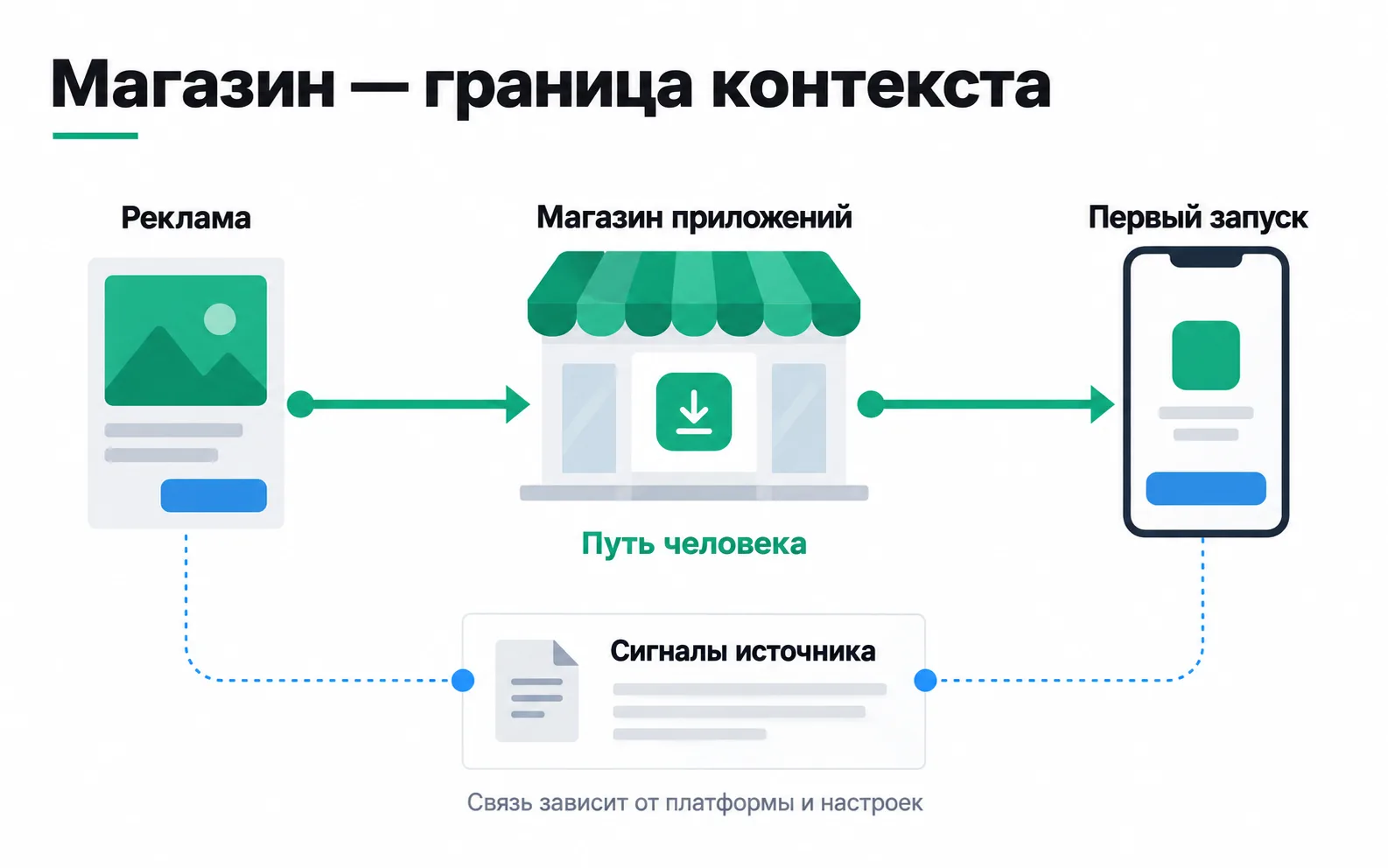
The stores see their own part of the path: the page view and the download. They know nothing about orders and little about ads.
App Store Connect's analytics show App Store impressions, product page views, first-time downloads and redownloads (metric definitions). Downloads are split by source type: App Store search, including ads in search results, App Store browse, a link from another app (App Referrer) and a link from a website (Web Referrer). Yerlan's download came from Instagram and will land in App Referrer. For your own channels you create a campaign link with a ct token, and the campaign appears in the report once it has brought first-time downloads from five different people. Sessions, active devices and crashes are shown only for users who agreed to share analytics with developers.
In Google Play Console the report sits under Grow users > Store performance > Conversion analysis (how the store listing report works). It shows store listing visitors, unique users who tapped Install, and CTR by traffic source: Google Play search, Google Play explore, Ads and referrals. For ads and referrals you can see the UTM source and campaign from links to the listing. Since July 2026 this report counts taps on Install rather than completed installs; the installs themselves remain on the section's overview page and in statistics. Play Console does not show Google Ads impressions or conversions; you look for those in the Google Ads account.
Both stores answer how many people downloaded the app and where they came to the listing from. Which campaign brought the first order, only the MMP together with the backend can tell you.
What each system will see
| System | Assel, Android | Yerlan, iPhone |
|---|---|---|
| Google Play Console | Install on Tuesday | - |
| App Store Connect | - | First-time download on Tuesday, source App Referrer |
| MMP, install report | Install on Wednesday, source Meta | Most likely an organic install on Tuesday |
| MMP, SKAN report | - | Install in the Meta campaign several days later, with no personal ID, if the campaign works with SKAN |
| Backend | First order for 9,000 ₸ | First order for 9,000 ₸ |
Of the 18,000 ₸ in first orders, the MMP will credit only Assel's 9,000 ₸ to Meta. Yerlan came from the same ad, but his order is most likely organic in the MMP, and the campaign gets his install, if at all, only in the aggregated SKAN report. Add up MMP organic and SKAN installs as if they were different people, and Yerlan is counted twice. So you tell the client plainly: on the iPhone, the MMP sees part of the installs from ads only in the SKAN report, and iOS ads are judged by both reports without adding them together.
Exercise: a source map for your own app
Take a client's app, or the app of a local business you want to pitch an audit to. You don't need access to their accounts; a list of the channels where the company advertises is enough.
For the grocery service the map comes out like this. Meta and Google Ads on Android are linked to the install through the MMP's query by GAID; on an iPhone with consent, by IDFA; without consent, through SKAN, plus Meta's modelled AEM claims. Apple Ads on an iPhone are recognised by the AdServices token. The Telegram channel gives a referrer on Android, and on an iPhone at best a probabilistic estimate for an owned channel plus a campaign row in App Store Connect. The column that matters most is "iPhone without consent". If it is empty, the client will see organic growing after the iOS ads launch and will not understand where it came from.
The three sentences for the client could read: "The stores count downloads, the MMP counts first launches and the ad networks count clicks, so the dates in the reports differ by a day or two. On an iPhone without consent to tracking, an install from an ad shows up in Apple's aggregated report, and the MMP may record it as organic. We will look for a setup error wherever the gap is bigger than these two reasons explain."
Video: the basics of mobile attribution
An overview from AppsFlyer, in English.