A phone repair shop in Almaty launched Google Ads with a single keyword, "phone repair", and a budget of 3,000 ₸ a day (the shop and all its figures are invented for the example). Two days later the money was gone and the phone had not rung any more than usual. The search terms report showed queries like "why won't my phone charge", "how to clean a charging port" and "phone repair technician vacancy". People were looking for an explanation or a job, and they landed on a page with a "Book a repair" button.
Google was not the problem. The campaign answered queries with very different goals using one ad. What follows is how to read intent from the words of a query, how to sort queries into groups and write an ad for each, and how to then build the campaign in the ad account.
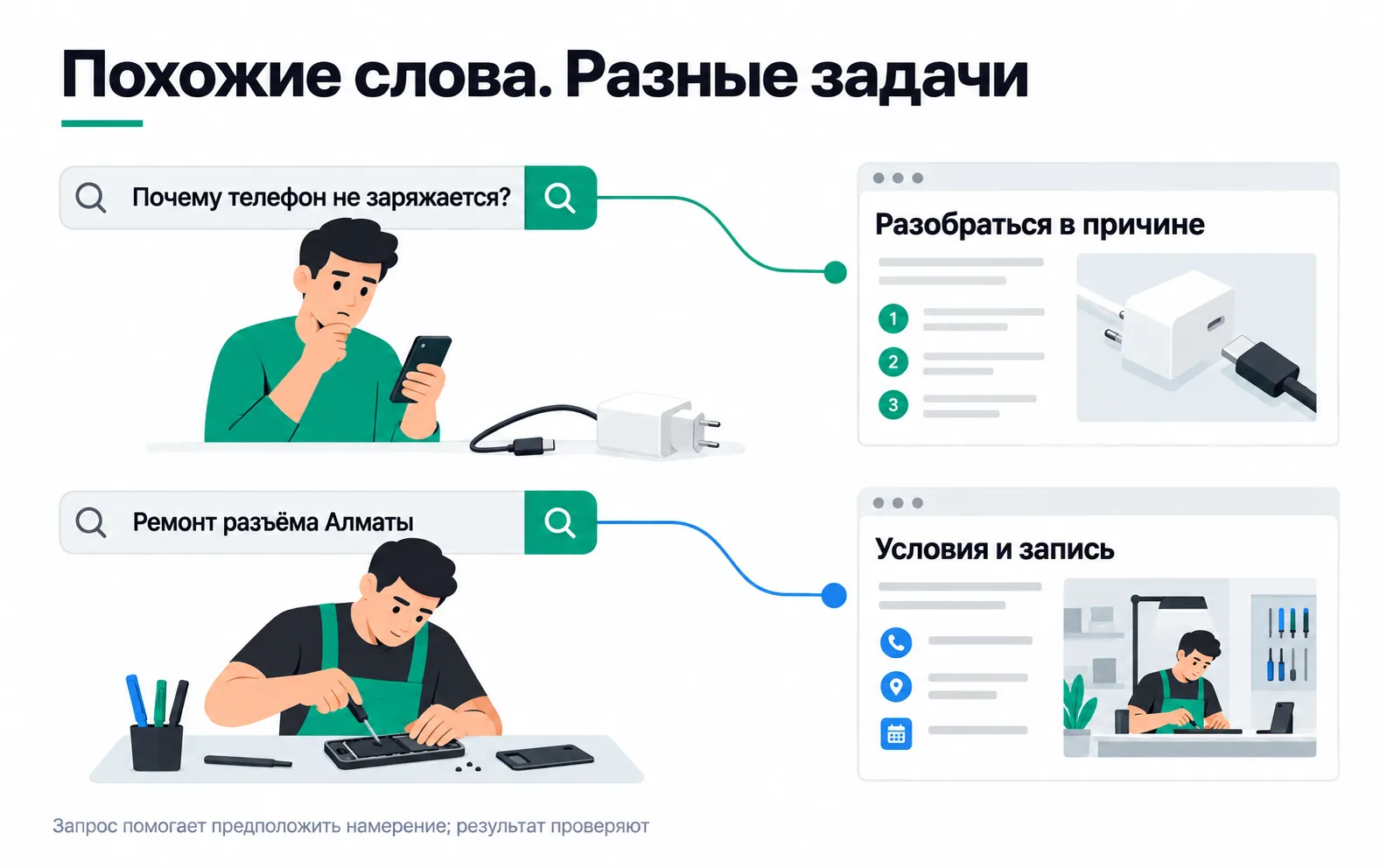
What a person wants when they type a query
Intent is the job a person opened the search to get done, and the words of the query give it away. "Repair", "replacement", a city name or "near me" come from someone looking for a technician. "Price" and "how much" come from someone who has already decided to fix the phone and is comparing shops. "How", "why" and "DIY" mean they are still trying to work it out themselves. And "vacancy", "course" or "buy a charger" are a different job altogether, one the repair shop does not do.
The logic is the same in any niche. For a company that fits windows, "order window installation" is close to a finished sale: the person needs a price, a date and someone to come and measure. "How to install a window yourself" comes from someone who plans to do it with their own hands. They have no use for a lead form. If you advertise to queries like that at all, send them to a different page, such as a how-to guide with a section on when you really do need a professional. And judge those clicks separately from queries with "order" in them.
Informational queries are not worthless: some of the people reading about the causes will come in for a repair later. But on 3,000 ₸ a day the shop pays for people looking for a repair right now first and leaves the article for later.
Reading intent from the words is a guess, and the search terms report is how you confirm it: it shows which queries actually triggered impressions and clicks. Google hides rare queries for privacy reasons, so you will never see a complete log of searches there.
How to collect queries and sort them into groups
There are three places to find queries when you start. The first is the Keyword Planner in Google Ads: it is free, suggests variations and shows monthly searches and top-of-page bid estimates per click. The main features open up once you have finished creating the account and added billing details. The second is the client's WhatsApp chats: people write "charging socket", not "USB Type-C connector", and the ad should speak their language. The third is the same search terms report, once the campaign is running.
An ad group is a set of queries answered by one ad and one page. Read the ad while plugging in each query from the group in turn. If it answers the wrong question for even one of those people, the group needs splitting.
Here is how the shop sorted ten queries. They are written the way people type them: lower case and without accents.
| Query | Intent | Group | What we do |
|---|---|---|---|
| charging port repair almaty | Find a repair shop | search_repair | Ad about port repair, repair page |
| type-c port replacement | Find a repair shop | search_repair | Same |
| phone not charging repair | Find a repair shop | search_repair | Same |
| iphone port replacement price | Find out the price | search_price | Ad with the price, page opens at the price block |
| how much to replace charging socket | Find out the price | search_price | Same |
| urgent phone repair near me | Get it fixed today | search_urgent | Ad with the repair time and the address |
| phone repair in an hour | Get it fixed today | search_urgent | Same |
| why won't my phone charge | Work it out alone | - | Do not advertise |
| how to clean a charging port | Work it out alone | - | Do not advertise, add "clean" as a negative |
| phone repair technician vacancy | Find a job | - | Add "vacancy" in every form as a negative |
Only launch search_urgent if the technician really can fix a phone within the hour. If the queue is three days long, that ad will bring in people you have to turn away, and you pay for every one of their clicks.
Match types: which queries a keyword catches
You set the keyword; the person types the query. How far Google may stray from the keyword is decided by the match type:
| Type | How to write it | What it catches |
|---|---|---|
| Broad match | charging port repair | Queries related in meaning, even without the keyword's words. Google also looks at other signals, such as the content of the page |
| Phrase match | "charging port repair" | Queries that include the meaning of the keyword, including narrower ones |
| Exact match | [charging port repair] | Queries with the same meaning or intent |
Broad match is the default: a keyword with no quotes or brackets is broad. Exact match does not mean literal: [charging port repair] can trigger the ad for "charging socket repair", because the meaning is the same.
Google recommends pairing broad match with Smart Bidding, which learns from conversions. A new campaign has no conversions yet, so for its first test the shop uses phrase and exact match. That keeps the budget from drifting into neighbouring topics and leaves fewer surprises in the search terms report.
Negative keywords
Negative keywords cut off queries that belong to a different job. You enter them in the negative keyword list one per line, without a minus sign.
For Russian this is the main trap. Negative keywords do not match close variants: Google asks you to add singular and plural forms and synonyms yourself. According to Google's help, capitalisation and misspellings are handled automatically, though the same page warns that a misspelled variant can slip through, so watch the search terms report during the first week. Russian nouns change their endings, so the word for "vacancy" in one form does not block its other forms. The shop added all three forms of it, plus two forms of the word for "work".
Be careful with ready-made negative keyword lists from the internet. If a list contains every form of the word "free", you will block "free phone diagnostics almaty", and the shop does run diagnostics for free. The same goes for "how": "how fast can you replace a port" comes from someone who has already decided to get it fixed.
A responsive search ad for each group
A search ad is assembled from parts. You supply up to 15 headlines and up to 4 descriptions, with a minimum of 3 headlines and 2 descriptions, and Google builds combinations from them to fit the query. A headline can be up to 30 characters, a description up to 90, plus two display path fields of 15 characters each. Cyrillic counts as one character per letter: characters count double in some languages, for example Chinese, Japanese and Korean.
Since Google builds the combinations, every headline has to make sense on its own and next to any other. You can pin a piece of text to a position, for example "Headline 1", and it will always show. Pin only what the ad cannot run without: if every position has something pinned, the remaining headlines and descriptions will not show at all.
The shop's ad for the search_repair group (the real ad is in Russian; the English version below follows the same limits):
| Part | Text | Characters |
|---|---|---|
| Headline | Charging port repair | 20 |
| Headline | Type-C port replacement | 23 |
| Headline | Phone repair in Almaty | 22 |
| Headline | New port in 40 minutes | 22 |
| Headline | Free diagnostics | 16 |
| Headline | 3-month repair warranty | 23 |
| Headline | Message us on WhatsApp | 22 |
| Description | New charging port in 40 minutes while you wait. Free diagnostics, 3-month warranty. | 83 |
| Description | Send your phone model on WhatsApp and we will quote the price and time before you come in. | 90 |
In the search_price group the main headline is the price: "Port replacement from 8,000 ₸". In search_urgent it is the time: "Fixed in 40 minutes". The price in the ad has to match the price on the page. If the site says "from 12,000 ₸", a headline with 8,000 ₸ will bring in people who leave after the first thing the manager says.
Building the campaign in Google Ads
The settings below are for the shop's first test: Almaty, three groups, 3,000 ₸ a day for two weeks. If you are following the Start track, you do not have to launch it: the campaign plan is already the deliverable.
The account
Create an account without a campaign, as Google recommends, and give it the same time zone as GA4 and your CRM, or the daily numbers will not match.
Objective and campaign type
You create a search campaign from the Campaigns menu with the plus button. Choose the Leads objective and the Search campaign type. Even if you pick the option to create a campaign without a goal, Google will require at least one conversion goal. For leads, that conversion is created from the generate_lead key event if the site already sends it to GA4. Name the campaign following the tagging rules, in lower-case Latin letters: port_repair.
Bidding
For a first test with no conversion history, choose Clicks, which is the Maximize clicks strategy. Set a maximum cost-per-click limit so that one expensive query does not eat the daily budget. Take a starting figure from the Keyword Planner, but do not set the limit too low: Google warns that the strategy may then not work properly. Once enough leads have come in, switch to Conversions.
Networks
In the Networks section, untick both boxes. "Include Google Display Network" sends your ads to sites and apps where nobody searched for anything, and those impressions get mixed into your reports with search (how Display expansion works). "Google search partners" is on by default, and Google does not tell you which partner sites showed the ads. A first test needs Google Search alone, where you can open any results page and look at it yourself.
Locations
Choose Almaty. Under Location options the default is "Presence or interest", which means the ads also reach people who are only interested in the city. The shop needs someone who is in Almaty right now and can bring the phone in, so switch to "Presence". You will get fewer impressions, as Google warns, but for a business with a street address that is fine.
Language
From September 2026 Google is removing the language setting from Search campaigns and matches ads by the language of the ad and of the query. Kazakh is not on the list of Google Ads languages, and Google's policies prohibit ads and landing pages in an unsupported language. So write the ads and the landing page for Google Ads in Russian.
Groups, keywords and ads
Create the groups from the table. In search_repair the shop put three keywords: phrase match on "charging port repair", exact match on "type-c port replacement" and phrase match on "charging socket replacement", all written in Russian; the other groups get keywords that fit their queries. Add the negative keywords, without a minus sign (all three forms of "vacancy", two forms of "work", and "clean"), at campaign level so they apply to every group. Each group gets one responsive search ad with the final URL of the right page.
UTM tags go in the ad group's Final URL suffix, and auto-tagging stays on:
For the other two groups only utm_content changes: search_price and search_urgent.
Budget
The average daily budget is 3,000 ₸. Google may spend up to twice the daily budget on a single day, so up to 6,000 ₸, but no more than the daily budget times 30.4 over a month: 91,200 ₸ here. A two-week test will cost roughly 42,000 ₸. When everything is filled in, click Publish.
The first week: reading the search terms report
Every couple of days, open the Search terms report under Insights and reports and go down the list. Queries that belong to another job go into negative keywords. A relevant query that landed in the wrong group is a reason to add a keyword to the right one. A query that does not match the keyword letter for letter is not a mistake in itself: with exact match, Google also shows the ad for queries with the same meaning. It is a mistake when the meaning is different.
Do not switch off a relevant query because of three to five clicks without a lead. That volume tells you nothing, and a person might message on WhatsApp first and come in a day later, while in the ad account their click stays without a lead. A query that clearly belongs to someone else's job, like a vacancy, can be excluded straight away without waiting for spend.
Exercise: 10 queries, groups and ads
The exercise is done when the 10 queries are sorted into groups by intent, every group you advertise to has an ad, and the rest have a decision written down: a negative keyword or "do not advertise".
If the ad answers "how much to replace the charging socket" with "Book a repair" and says nothing about the price, the query is in the wrong group. If "urgent" and "price" ended up in one group, the ad has to choose which to say first, and the group is better split. Negative keywords in one form let all the other forms through. And check the promises in your headlines against how the shop actually works: write "in 40 minutes" only if the technician can manage it, or you will be paying for clicks from people you then let down.
Video: match types
The video, in Russian, shows match types in the ad account; take the campaign settings from the sections above.