The appliance store in Almaty from the lesson on S2S tracking of payments receives payment notifications from its payment service (the numbers in this lesson are made up). Back before the switch to an outbox, its handler recorded the payment in the CRM, sent the purchase to Meta and only then answered the payment service. One day the CRM was slow, the payment service gave up waiting and resent the notification for order T-287, and the CRM ended up with two payments for T-287: 72,000 ₸ instead of 36,000 ₸. Meta dropped the second purchase because both carried event_id T-287, but nobody had built the same protection into the CRM.
Two things had to be fixed: the order in which the handler accepts a notification, and the way it handles repeats. We will walk through the fixed handler on the next order from the lesson on S2S tracking: T-310 for 48,000 ₸ and its payment notification, E17.
What a webhook is
A webhook is an HTTP request that a system sends to your address on its own when something happens on its side: a payment went through, a refund was issued, a manager moved a deal to another status. The other way to learn about changes is polling, where your server asks the API every few minutes whether anything is new. A webhook is not the opposite of an API but part of it; the other side simply makes the first move.
The store has two such senders. The payment service reports payments and refunds. The CRM reports on deals: amoCRM sends a status_lead event when a deal changes status (amoCRM webhooks), and in Bitrix24 an outbound webhook does the same job (Bitrix24 webhooks). The subscription to these events is set up through the two CRMs' APIs.
A notification does not have to carry all the data. Bitrix24, for example, sends the deal number in data[FIELDS][ID], and the handler reads all of the deal's fields with a separate API request. "Instant" is not a promise here either: the sender has its own queues and retries, so delivery time is something you measure, not something you promise a client.
Store first, answer second
The sender does not wait long for an answer. Stripe's documentation spells this out in detail: return a 2xx before any long processing starts that might not fit into the timeout, and process the events themselves through an asynchronous queue (Stripe webhooks). Their example is practically about our store: you return the 200 before the invoice is marked as paid in the accounting system.
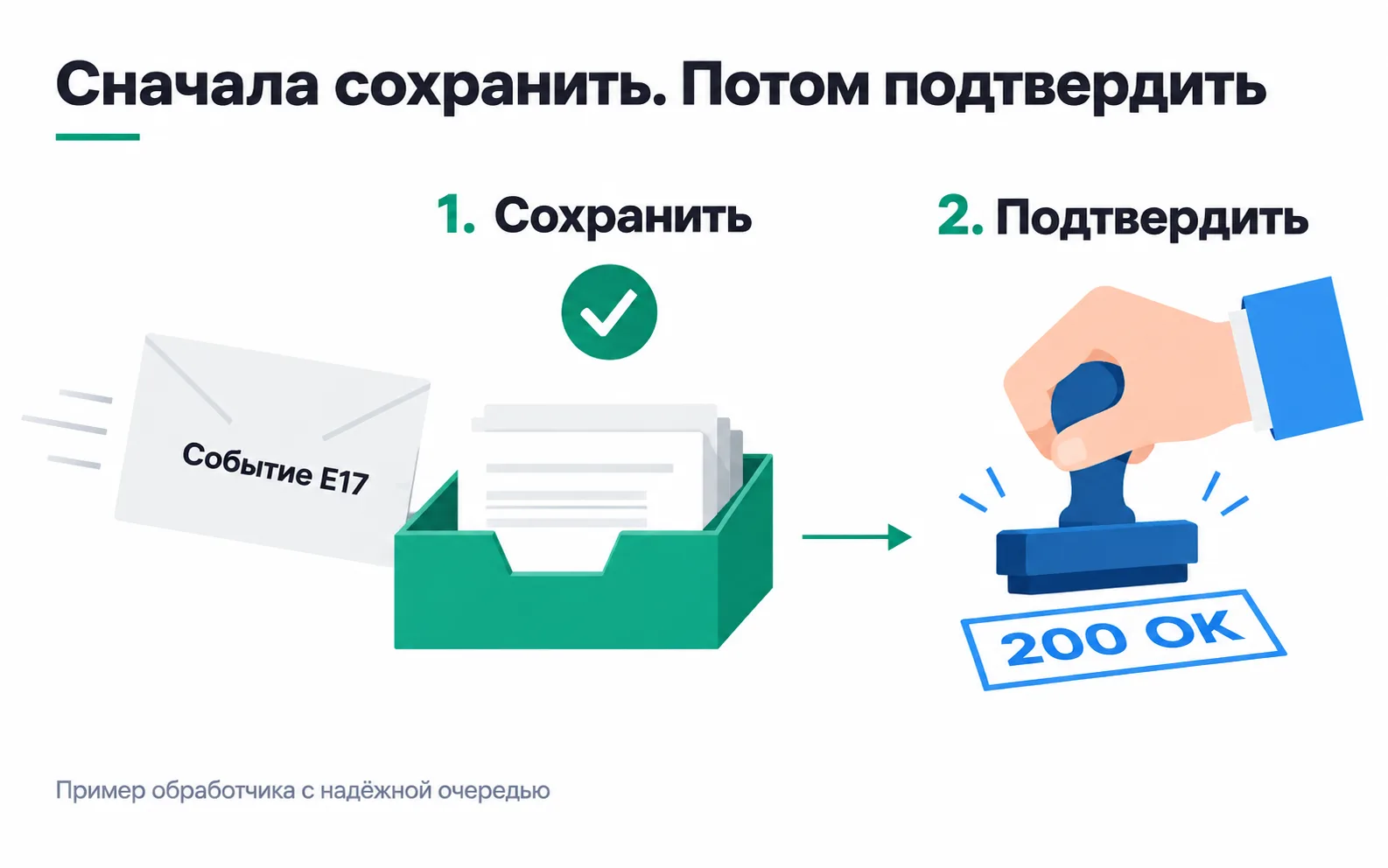
After the fix, the store's handler works like this:
- It checks that the request came from the payment service (more on that in the next section).
- It looks at the event type. The store needs payments and refunds; it is better not to subscribe to anything else at all, and Stripe advises the same.
- It writes E17 into the table of incoming events. The event ID column has a unique index, so the database will refuse a second row with E17.
- It answers 200.
- A separate worker picks E17 up from the table and, in one transaction, sets order T-310 to "paid", adds outbox rows for Meta and the CRM, and marks E17 as processed. From there the outbox rows go out as described in the lesson on S2S tracking.
The first four steps are fast because neither the CRM nor Meta takes part in them. If the CRM drags its feet again, it is the separate worker that waits, while the payment service already has its answer.
If the database is unavailable at step three, you must not answer 200. To the sender, 200 means "accepted", and it will not repeat the notification: the payment disappears while the monitoring dashboard stays green. An error response (5xx) makes the sender deliver it later, once the database is back up.
Who actually sent the request
The handler's address is open to the whole internet. If the server trusts any POST request that says "payment succeeded", an order can be "paid" without paying. HTTPS encrypts the channel but says nothing about who is on the other end, so you identify the sender in the way the sender itself describes:
- Stripe signs every notification. The
Stripe-Signatureheader carries the send time and an HMAC SHA-256 signature of the string "timestamp.raw body", keyed with the endpoint's secret. If your framework parsed the JSON and rebuilt it, the bytes change and the signature no longer matches. The timestamp is part of the signed string, so it cannot be swapped, and that is what makes the age check work: Stripe's libraries reject signatures older than five minutes by default, so an intercepted request cannot be replayed an hour later. - Bitrix24 puts
auth[application_token]into its outbound webhook. The handler compares it with the token in the webhook settings, and if they differ, the request is not trusted. - The amoCRM webhook description mentions no signature (amoCRM webhook format). Such a notification is treated as a signal that "something changed on the deal", and the status is read again through the API before anything is credited.
A signature confirms the sender, not the contents of the order. So, as in the lesson on S2S tracking, the server also checks the amount, the currency and the order state: the 48,000 ₸ in the notification has to match the 48,000 ₸ on T-310.
Keep secrets out of logs. The Bitrix24 token, the signing secret and an inbound webhook address with its secret code do not belong in an access log, a screenshot for support or the team chat.
A repeat is the same event, not a new payment
The sender cannot see what you did with the notification. It only sees your answer, and if the answer does not arrive in time or comes back as an error, it sends the notification again. In live mode Stripe keeps retrying for up to three days with growing pauses. amoCRM waits no more than two seconds for an answer; after a failure it retries in 5 minutes and again 15 minutes later, and if the reply was a server error (499 or 5xx), twice more, after 15 minutes and after an hour (amoCRM webhook format). More than 100 invalid responses in two hours, and the webhook is switched off. And Stripe also warns that the same event occasionally arrives twice.
So the handler has to recognise a repeat and not do the work a second time. It recognises it by the event ID the sender assigned: the event's id field at Stripe, E17 in our store. And the processing is made idempotent: however many times E17 arrives, T-310 has one payment of 48,000 ₸. Sometimes Stripe even creates two events with different ids for one action. They are recognised by the object ID in data.object together with the event type, which is why the payment is also tied to the payment service's transaction number.
When fixing a handler like this, it is easy to make one of two mistakes. The first is to switch off retries at the sender so that there are no duplicates. Then the first network glitch, or the minute while the server restarts, costs you a payment, and that is exactly what retries exist for.
The second is to look for E17 in the table first and only then insert the row. If two requests with E17 arrive at the same moment, both see an empty table and both insert. The database itself has to catch the duplicate: the event ID has a unique index, the second insert fails, and the handler reads that error as "already seen" and answers 200.
Outside your database there is no transaction any more. You cannot save the "E17 processed" mark and the payment record in the CRM in one transaction: the CRM may have recorded the payment while its answer never reached your server. So the external call carries a key of its own, one the recipient can use to recognise a repeat. Meta drops repeated server events with the same event_name and event_id. In the CRM, the payment is recorded together with the payment service's transaction number, and before creating it the worker looks for a payment with that number. AWS says the same in its description of the transactional outbox pattern: a message can leave the outbox twice, so the recipient has to remember what it has already processed.
The event key and the order key
T-310 is the order number, E17 is the event number. One order can have several events: a payment, a partial refund, a full refund. If the handler recognises repeats by order number, it will throw away the refund for T-310 as "already seen".
The event time will not do as a key either. Stripe notes that the created field holds the time in seconds and different events can share it, so it tells you neither the order nor whether an event is a repeat. If the sender provides no event ID, the key is built from whatever uniquely describes the fact.
amoCRM is exactly that case. A status-change notification has the deal ID and the old and new status, but no event ID. If the store's rule is one payment per deal, the key is the deal ID together with the "Paid" status. Then a manager can make a mistake, move the deal back and move it to "Paid" again, and there is still only one payment.
On the way out, each recipient has its own key. The purchase goes to Meta with event_id T-310, because under the rule from the lesson on S2S tracking there is one purchase per order. Which key belongs to which event and recipient is written into the event card, in the "Repeat" row, as in the lesson on event specifications.
Events arrive out of order
Stripe says plainly that events can arrive in a different order from the one in which they happened. Here is what could happen to order T-322: the store's server spent ten minutes restarting, the first delivery of the payment notification failed, and the payment service scheduled a retry. In those minutes the customer changed their mind, the store issued a refund, and the refund notification arrived before the retry of the payment notification. If the handler simply sets the order status from the latest notification to arrive, T-322 goes back to "paid" and Meta receives a purchase whose money has already been returned.
There are two ways to protect yourself. You can keep the order's history and not apply a notification if the order already has a later event. Or, on every notification, you can ask the sender's API for the current state: Stripe recommends exactly that for fetching missing objects. For a payment and a refund the second way is safer: the API answers with the order's current state, whatever order the notifications arrived in. For T-322 the API answers "refunded", and no purchase goes to Meta.
Store the event time and the receipt time separately. The business and the ad platforms need the first; the second tells you how long the notification took to arrive.
When processing fails
The separate worker can stumble too. Temporary errors, such as a CRM timeout or an overloaded API, are retried with growing pauses and an attempt limit. Permanent ones, such as an unknown field or revoked API access, are pointless to retry: the notification goes to the review queue, and that queue needs an owner. A queue with no owner turns into a quiet loss of payments; S2S monitoring is how you notice it growing.
The review queue and the logs get the event ID, the type, the order number, the time and the error code. The full notification body with the customer's phone number and address has no place there.
Handler checklist
Exercise: your project's sender
First, a short problem. E17 has been stored, but the 200 got lost on the network, and the payment service sent E17 again. What should the handler do: answer with an error because that ID already exists, or credit the payment again?
Neither. Inserting a second row with E17 fails on the unique index, the handler realises it is a repeat and answers 200. An error response would make the sender keep retrying E17, for up to three days at Stripe, and crediting it again would produce exactly the extra payment from the start of the lesson. Meanwhile E17 may still be waiting for the separate worker: a receipt record means "accepted", not "all done".
Now take the payment service or CRM of your own project or a client's, find its documentation on notifications and fill in the last column:
| Question | Stripe | amoCRM | Your sender |
|---|---|---|---|
| How to identify the sender | Signature in the Stripe-Signature header | No signature in the description; the deal status is read again through the API | |
| How it retries delivery | For up to three days with growing pauses | After 5 and 15 minutes; on 499 or 5xx, again after 15 minutes and an hour | |
| Is there an event ID | Yes, the id field | No, only the deal ID and statuses | |
| Is ordering promised | No | The description does not say |
An empty cell after you have searched the documentation is a question for the sender's support before development starts; this is not a place for guessing. If there is no event ID, write down right away what the key will be made of. If no signature is described, decide which API request the handler will use to confirm the event. The completed table is the first page of the brief for the developer. It is also worth showing to the client when they ask why accepting payments took more than one evening.
Video: webhook and API request
A short introduction from Merion Academy (in Russian): how a webhook differs from an ordinary API request.