While testing an integration for an online school in Almaty, you create contact C7 and two independent purchases, D101 and D102, for 25,000 ₸ each. Only 25,000 ₸ reaches the report. The developer deduplicated sales by customer ID and treated the second purchase as already counted. The records and numbers are illustrative; the course price comes from the school in the lead measurement plan.
The failure sits between correct records: the CRM has two deals, the payment records have two payments, and the import leaves only one. Fixing it means identifying the person, the lead and the payment separately, then describing how each passes through the integration.
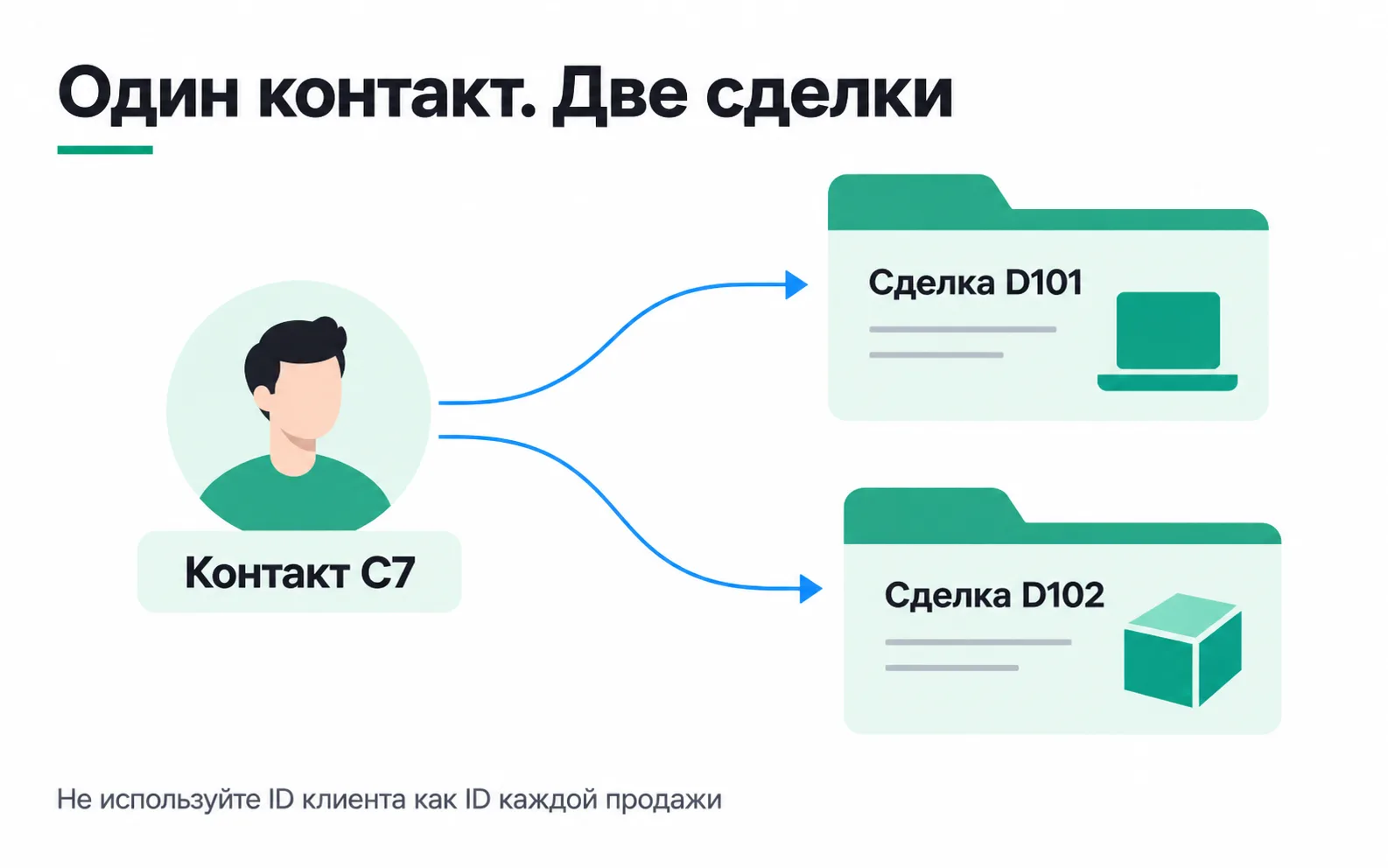
What links to what
A contact holds information about a person. A deal represents one sales opportunity with its own stage and outcome. One deal can have several payments, and one payment can produce several notifications.
The following table works for our test; afterwards, map its rows to the fields in your chosen CRM.
| Object | Example records | What they identify |
|---|---|---|
| Contact | C7 | Who is buying |
| Deal | D101, D102 | Which of the two sales the manager is handling |
| Payment | P501, P502 | Which two transactions the payment records confirm |
| Notification | E801, E802 | Which messages the handler received |
P501 belongs to D101, P502 to D102. Both payments link to C7. If E801 arrives twice, there is still only one P501. If P502 arrives afterwards, it is another payment, even though the customer is the same.
An ID needs its source context. Record 101 in two CRM accounts can refer to different deals. The integration's register therefore stores the system, account and record ID, plus the mapping from old to new IDs when contacts are merged.
Getting a website lead into the CRM
The lead register stops relying on manual copying once the website server creates the contact and deal through the API. Accepting this part requires three results: the lead is saved, its CRM ID is available, and the campaign tags are stored with that lead.
First, the server needs access. An amoCRM integration authorises with OAuth 2.0: the access token lasts one day (OAuth in amoCRM), the refresh token lasts three months and can be exchanged for a new pair only once (amoCRM step-by-step authorisation). Save the new pair as soon as the exchange completes: if it is lost, the integration has to be connected again. Since February 2024, amoCRM also lets an external or private integration issue a long-lived token valid from one day to five years, with no refresh token. In Bitrix24, your own server can connect through an incoming webhook; its address and permissions are covered below.
In amoCRM, a deal and its contact are created in one POST /api/v4/leads/complex request: up to 50 deals at a time, each with at most one contact and one company (amoCRM deal methods). The method looks for duplicates only among records already created, and only if duplicate control is enabled for the integration. In Bitrix24, deals are created with crm.item.add: development of the older crm.deal.add method has stopped. Stage and field names such as "Paid" and "Course programme" may be account settings in your project; the developer needs their actual identifiers from this CRM, rather than numbers copied from someone else's example.
The developer links the local lead ID to the CRM deal ID. If a request has to be retried after a timeout, the integration must find the record already created and continue with it. Creating a deal on every retry is dangerous: the manager ends up working with two cards for one enquiry.
A form submitted again a couple of minutes later and a graduate making a new enquiry six months later need different rules. The first calls for one current lead; the second may need a new deal under the existing contact. Agree the rule with sales and test it on the form. A matching phone number is not enough to discard every future enquiry.
Keep the lead's source with the deal
The school tags ads using the shared UTM scheme, with campaign course_start. Available tags are saved with the lead when the form is submitted. A Bitrix24 deal has standard fields for them, utmSource, utmMedium, utmCampaign, utmContent and utmTerm (deal fields in crm.item.add); the older method calls them UTM_SOURCE, UTM_MEDIUM, UTM_CAMPAIGN, UTM_CONTENT and UTM_TERM. Otherwise, navigating to another page or a manager transferring the contact can leave the sale without its advertising context.
A person's history might say "first came from Instagram", while their new enquiry followed another campaign. Keep the first contact source, the lead source and the chosen attribution model separate. Updating a contact field must not rewrite all that person's earlier deals.
If the tags did not arrive, the source stays unknown. The integration does not label every WhatsApp enquiry "Instagram" or demand an advertising click ID for an organic lead. Sending a payment to Google Ads or another ad account needs a separate specification for identifiers and eligibility. The ad event does not receive the entire customer card.
Which status counts as a payment
Before setting up the exchange, the school owner and the person responsible for payments agree where confirmation of money received comes from. A manager may have moved a deal to the "Successfully completed" stage (amoCRM system status 142) after a contract was signed. A payment report needs a confirmed payment with an amount, currency, time and transaction ID.
In our test, those are P501 and P502 for 25,000 ₸ each. The integration copies the payment facts from the payment records and links them to deals. The deal value field may hold the expected price; it cannot automatically be treated as cash received.
Reopening D101 does not create another P501. If the customer makes a second independent payment on the same deal, it has a different transaction ID. A refund is recorded separately too and changes the total under a documented rule. The specification therefore needs examples of full payment, partial payment, a refund and an erroneous stage change, even if the first test contains only two purchases.
What arrives through an API and a webhook
With an API, your service requests or changes a record. A webhook comes from the CRM when something changes there. They are two parts of one integration: the notification signals a change, and a request reads the data needed to process it.
amoCRM publishes webhook management methods and subscription events. Choose subscriptions for the job: a deal stage change, for example, is not the same as a confirmed payment. The amoCRM notification format has no separate event ID for a status change, so the handler assigns a number such as E801 itself. Identify the payment by the stable key of the fact itself, P501 in our test.
Bitrix24 names directions from the CRM's point of view:
| Mechanism | Who initiates the request | Its job in our design |
|---|---|---|
| Incoming webhook | Our service calls Bitrix24 | Call the REST API with the access granted |
| Outgoing webhook | Bitrix24 calls our handler | Report that a record has changed |
The Bitrix24 local webhook documentation gives the incoming webhook address as https://<portal>/rest/<employee ID>/<secret code>/<method>.json. Requests to it run with the rights of the employee who created the webhook, limited to the permissions selected for it. The secret code in the address works like a password, so keep that address on the server, out of browser code, ordinary logs and client screenshots.
A notification may contain only the deal ID, so the handler reads the required fields through the API. The source is verified differently in each CRM. A Bitrix24 outgoing webhook carries auth[application_token], which is compared with the token in the webhook settings. The amoCRM webhook documentation describes no signature, so the notification is not taken on trust: the deal is read again through the API before the result is saved.
Message delivery and payment accounting
How a handler accepts a notification, recognises a retry and keeps a payment when a response is lost is covered in the webhook lesson. For a CRM, one point matters: recognise a retry by the payment fact's key, P501, not by the customer ID C7, or the second purchase disappears as it did at the start of this lesson.
If the handler writes a technical field back to the CRM, the change may trigger another webhook. Subscription and processing rules distinguish a manager's changes from the integration's own technical writes so the exchange does not loop.
Finding a gap after an outage
Notifications support a quick reaction, while scheduled reconciliation helps locate missing records. When reading a list, the developer follows every response page and records the range successfully processed. Time boundaries, overlapping intervals and the available history are chosen from the API documentation, rather than from the number of records on the first page.
The current status and the history answer different questions. If a deal became paid at 10:00 and cancelled at 11:00, a request at 12:00 may show only the cancellation. Recovering both operations requires a payment and refund ledger or a change history. One current-state request cannot recreate a missing log.
The reconciliation record compares IDs and amounts. Losing D102 for 25,000 ₸ and adding an extra D101 for 25,000 ₸ leaves the total unchanged. The report therefore needs lists of missing, extra and mismatched records, with someone responsible for each discrepancy.
Access errors need a separate signal too. If the employee who granted access changes or permission is revoked, an empty report must not look like a day without sales. Reproduce an access denial during acceptance, then assign someone to receive the production alert and restore the connection.
Task: an integration acceptance record
Take a form and CRM from your project. You need test access that allows you to create and change records.
For C7, the acceptance record must show P501 and P502, totalling 50,000 ₸. Two notifications for P501 increase deliveries, not payments. C7's new purchase remains in the report because it has its own payment fact. If the amount matches but the IDs do not, the integration has not passed acceptance.
The client's deliverable is a set of records that can be traced from the form to the money, plus instructions for an outage. A list of connected services is little help when a sale disappears from Monday's report.
Video: an amoCRM integration example
An example of connecting to amoCRM through Python. As you watch, note where the author stores the access and refresh tokens and what the code does when the access token expires after a day.