In early November the owner of an IELTS prep centre exports payments from the CRM and works out how much the students of each intake paid on average. For the August intake it comes to 112,500 ₸ each, for the October one 45,000 ₸. The conclusion writes itself: in October the ads brought the wrong people. But the October students have only had the chance to pay for their first month, because their second month has not started yet.
Cohort analysis compares people of the same "age": the first month of the August students with the first month of the October ones. We will build the centre's cohort table from its payments, work out a student's LTV and find when the advertising pays back. The course and the economics come from the ad scaling plan: 45,000 ₸ a month for three months, and the centre keeps 16,000 ₸ a month per student. The figures are an example.
The cohort: who is in it and what counts as a return
A cohort is a group of people who share an entry point. For the centre it is the students who first paid for the course in the same calendar month. A student stays in their cohort however many months they pay: an August student who paid for September is still an August student.
Before you count anything, write down four rules:
- Entry: the first payment for the course.
- Return: payment for the next month of the course.
- Age: M0 is the month of the first payment, M1 the next calendar month, M2 the month after that, the last month of the course.
- Cut-off: 31 October, with every month before it complete.
For the August cohort M1 is September; for the September cohort it is October.
What you count as a return changes the numbers. In product analytics the choice is made in the report itself: Amplitude, for example, in its retention settings separates a return in exactly the chosen period (Return On) from a return in that period or later (Return On or After). That is why the rules are written down next to the table. Without them, two analysts working from the same payments will get different percentages.
The centre's cohort table
| Cohort | Students | M0 | M1 | M2 |
|---|---|---|---|---|
| August | 20 | 100% | 80% | 70% |
| September | 15 | 100% | 73% | not yet |
| October | 12 | 100% | not yet | not yet |
A row is one cohort, and its age grows to the right. To compare cohorts, read down a single column. M0 is 100% everywhere because the first payment is the entry into the cohort: it follows from the definition and says nothing about retention being perfect.
Take one cell: August, M1. Of the 20 students who first paid in August, 16 paid for their second month in September.
Retention M1 = 16 who paid for month two / 20 students in the cohort = 80%.
M2 shows 70%: 14 of the same 20 paid for the third month. The denominator stays at 20, not 16. Divide by 16 and the students who left after the first month drop out of the calculation, turning 70% into almost 88%.
You count people, not payments. A student who paid for September in two transfers still counts once in the numerator.
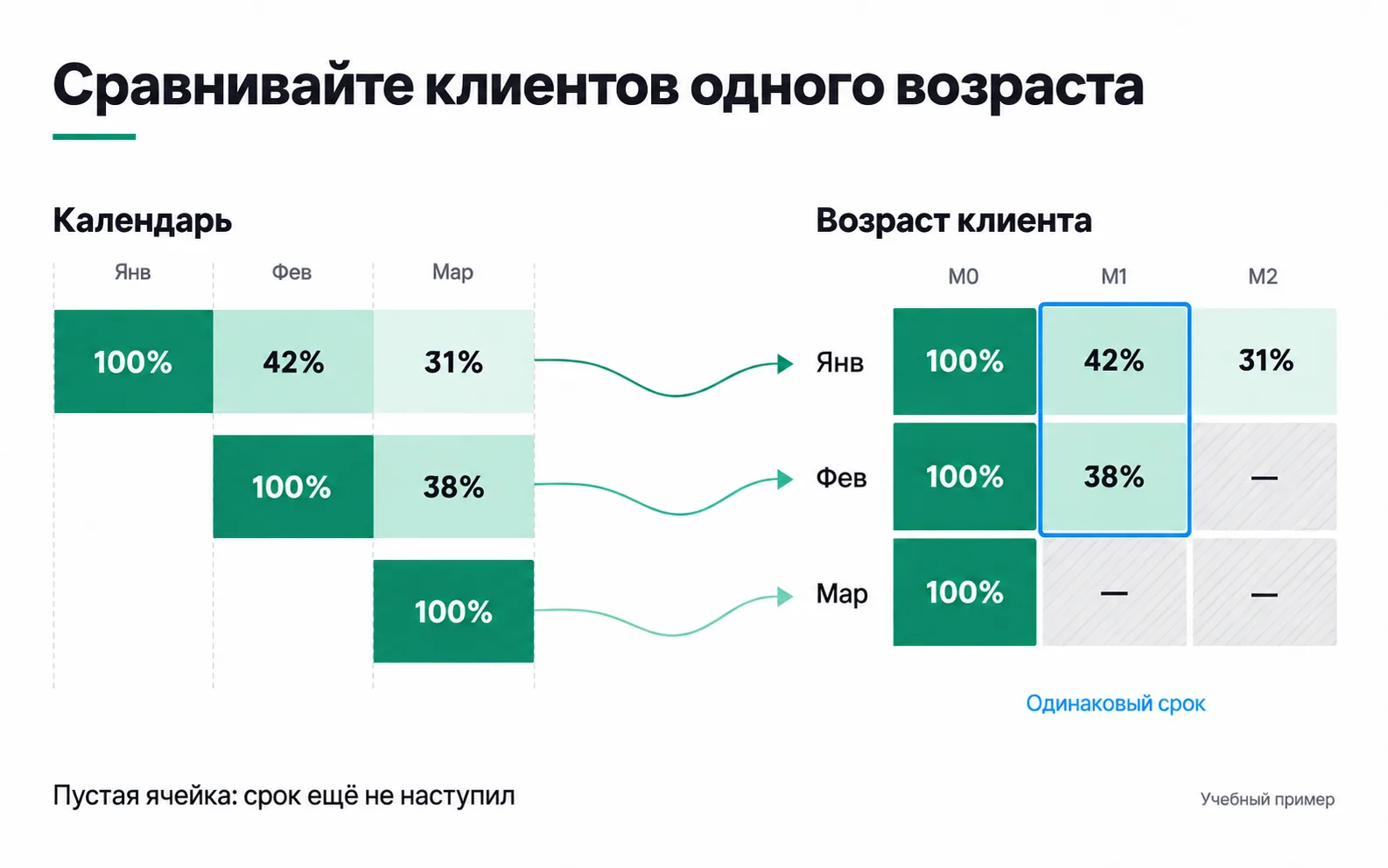
The picture shows the same technique on a shop's cohorts: on the left the customers are laid out by calendar, on the right by age, so that M1 of the January and February cohorts ends up in one column.
"Not yet" is not zero
The September cohort reaches M2 in November. On 31 October that month has not arrived, so the cell says "not yet". Put 0% there and the table claims that none of the September students paid for their third month, when nobody knows that yet.
The same goes for a month still in progress. With a cut-off of 15 November, the October cohort's M1 would be only half counted. Such a month is either left out of the comparison or marked as incomplete. In the cohort table tool you leave that cell empty: empty means "the period has not arrived", while 0 means nobody came back.
Same age first, then size, margin and mix
Back to the owner's export. The 112,500 ₸ for the August students is 45,000 ₸ times an average of 2.5 paid months: the cohort is at M2 and the course is over. The 45,000 ₸ for the October students is age M0. In M0 there is no gap, and there cannot be one: everyone paid for the first month. The October students can be compared with the August ones on M1 in early December; for now only the September cohort is comparable on M1.
The same mistake turns up in days. A new cohort has been watched for 7 days, an old one for 90, and on cumulative revenue the new customers look worse. In 7 days a student at the centre can pay for one month; in 90, for all three. Compare day 7 of the old cohort with day 7 of the new one, and the 90-day total only once the new cohort is 90 days old too.
Once the age is aligned, three checks remain before you call one cohort worse than another.
Size. At M1 the August cohort has 80% and the September one 73%. That is 16 of 20 and 11 of 15. Had one more September student paid for month two, it would be 12 of 15, the same 80%. In a cohort of 15, one student moves the share by almost 7 percentage points; in a cohort of 12, by more than 8. The table cannot tell a one-person gap from chance.
Margin. What the centre keeps is contribution, so a cohort's value is measured in contribution. But if the October cohort's contribution is lower, look at the terms first: a discount on the first month lowers both revenue and contribution, while a teacher on a higher rate lowers only contribution. Those are the centre's decisions, not the students' behaviour, and the advertising is not to blame for them.
Mix. See where each cohort came from. If almost all the October students came from a new Instagram test and the August ones from graduate referrals, you are comparing channels, not months. A change in cohort mix can pull the overall percentage down even when it rises inside every group.
From retention to money: a student's LTV
Retention shows people. To get to money, multiply them by the contribution: 16,000 ₸ for each paid month. The August cohort:
| Month of the course | Paying | Cohort contribution | Cumulative | Per student in the cohort |
|---|---|---|---|---|
| M0 | 20 | 320,000 ₸ | 320,000 ₸ | 16,000 ₸ |
| M1 | 16 | 256,000 ₸ | 576,000 ₸ | 28,800 ₸ |
| M2 | 14 | 224,000 ₸ | 800,000 ₸ | 40,000 ₸ |
LTV (lifetime value) is the contribution one acquired customer brings over their whole time with the business. For the course that is three months: 800,000 / 20 = 40,000 ₸ per student. The retention row gives the same result: 16,000 × (1 + 0.8 + 0.7) = 40,000 ₸.
The denominator holds all 20 students, including those who left after the first month. Divide by the 14 who finished and you get 57,143 ₸, and the centre would be ready to pay more for acquisition than an average student brings in.
Here LTV is based on contribution, not revenue, and only over the three months that have already passed. If graduates later buy an intensive course, that is a separate calculation, and it goes into LTV once those payments show up in the data.
Now compare it with the plan. The centre's plan assumed 48,000 ₸ per student, on the basis that everyone finishes. The August cohort gives 40,000 ₸. If the owner still wants to spend half on advertising, the limit per student drops from 24,000 to 20,000 ₸. That is his call, but now he makes it from his own payments rather than an assumption. In early December, when the September cohort finishes the course, recalculate LTV on the September cohort: twenty students from one intake are too few to change the limit for good.
Payback shows up in the cohort too. Say the centre pays its current limit, 24,000 ₸, per student. After the first month each student in the cohort has brought 16,000 ₸, 8,000 short of the acquisition cost. After the second, 28,800 ₸: the advertising has paid back, with 4,800 ₸ to spare. After the third, 40,000 ₸, 16,000 ₸ above the acquisition cost. Even counting those who left, the advertising for the August students came back in the second month. Contribution here is the same as in unit economics: the student's payment minus the variable costs of teaching them, that is, the teacher and the materials.
Payback in the calculator
The CAC payback calculator does the same calculation for a single customer. CAC (customer acquisition cost) is what it costs to acquire one paying customer. CAC payback is how many months it takes for the customer's contribution to cover that amount.
The tab was built for a shop, so its fields use shop terms. For the centre an "order" is a monthly payment. Open the E-commerce marketplace tab and enter:
- CAC:
24000. - AOV:
16000. The average order value field gets the part of the payment the centre keeps straight away. - Gross margin:
1, so the calculator does not subtract the costs a second time. - Discount drag, Last-mile / order, Storage / order and Return rate:
0. - Orders / yr · Y1:
3. The calculator counts first-year orders in full, so for a course shorter than a year this field gets all of the student's payments. - Customer lifespan:
0.25, the length of the course in years. The arrows on this field move in steps of 0.5, so type the value in: the calculator accepts it.
The calculator will show an LTV of 48,000 ₸, LTV : CAC of 2.0× (the student's contribution is twice the cost of acquiring them) and a CAC payback of 2 mo. The exact value is 24,000 / 16,000 = 1.5 months, and the calculator rounds to whole months. For the centre that is also the answer in cash: payments come once a month, the first brings in 16,000 ₸, the second takes it to 32,000 ₸, so the acquisition cost comes back with the second payment.
Here the lifespan affects only the payback. The calculator divides LTV by the lifespan in months to get the average monthly contribution, then divides CAC by that. With 0.5 it would spread the same 48,000 ₸ over six months and show a payback of 3 mo, although LTV would not change: with any lifespan up to a year, all first-year orders go into it.
Exercise: a payback paragraph for the owner
Take a business from your own niche or, if you have no client yet, the centre from this lesson. Enter the cost of acquiring a paying customer, the monthly contribution and the number of months the customer pays. Then write one paragraph for the owner: which numbers you used and after how many months a customer pays back what it cost to acquire them. Explain every term in the owner's words.
For the centre, the paragraph could read like this:
Say advertising costs you 24,000 ₸ per student, which is your limit. The course lasts three months, and from each month, after paying the teacher and for materials, you keep 16,000 ₸. So the advertising money comes back with the student's second payment: after the first you have 16,000 ₸, after the second 32,000 ₸, and everything they pay after that goes to rent, other fixed costs and profit. On paper that is a month and a half; the calculator rounds it up to two. A student who leaves after the first month does not pay back the advertising: of the 20 August students, four left that way.
The paragraph is done when it has the numbers you entered, the payback period from the calculator, and no term left unexplained.
There are four easy places to go wrong in this paragraph. The first is taking CAC from the ad account. CPL in the test was 896 ₸, but that is the price of a lead, not a student: at the centre roughly one lead in twelve gets as far as paying. The second is putting the whole payment, 45,000 ₸, into AOV. The calculator will show an LTV of 135,000 ₸ and a payback of 1 mo, because nobody subtracted the teacher's pay. The third is leaving the shop fields as they are: a 7% discount, 1,800 ₸ last-mile delivery, 600 ₸ storage and 18% returns. The centre has no delivery and no warehouse, yet the calculator will come up with an LTV of 27,990 ₸ and a payback of 3 mo. The fourth is jargon: if "LTV : CAC" or "unit economics" is left in the paragraph, the owner will trip over it, so explain it or take it out.
Video: another explanation of cohorts
This introductory walkthrough connects cohorts to delayed demand and repeat purchases.