An online analytics school in Almaty is preparing a new version of its carousel ad about the course syllabus for the November cohort. It will run as a new ad, carousel_program_nov, and that name goes into the tag reference list first, so leads from the new carousel don't mix with the results of the old carousel_program. The designer is busy with the course page, so the marketer generates three slides himself in one evening. The first is the cover: a young woman at a laptop. The second, "What you'll build on the course": a screen with a report. The third is a chart from a course assignment in which students analyse a week of the school's leads: 40 from Instagram and Facebook ads and 20 from Google. The school's numbers are made up.
In the morning the owner looks at the slides and takes the woman for a student, though she doesn't exist. The screen on the second slide shows a report with widgets the course never covers. On the third the axis starts at 15, so Google appears to bring in a fifth as many leads as Meta, when the real figure is half. For an analytics school a crooked chart in an ad is worse than a typo: it is a mistake in exactly what the school teaches.
Every image has its own job
The carousel's three slides do different jobs, and the rules differ too:
| Slide | Job | Can it be generated | What to check |
|---|---|---|---|
| Cover | Stop the scroll | Yes, as long as it doesn't pose as a student or a class | Whether anyone in shot looks like a real person, and whether they're captioned as a graduate |
| The report a student will build | Show the product | No, only a screenshot of the real report from the course | Whether it matches what the student will build |
| Leads chart | Show data | No, the chart is built from the table | Axis from zero, labels, numbers |
A simple rule: generate what sets a mood, never what serves as evidence. The cover promises only "this is about analytics". The report and the chart promise that the course teaches exactly this and that the numbers are exactly these.
The brief for an image
Image models jumble and shift letters: OpenAI's documentation, as of October 2026, says plainly that the model can still struggle with precise placement of text and elements and doesn't always keep a consistent style across generations. So the headline goes onto the cover afterwards, in an editor, and the model draws only the background. The brief for the school's cover:
A photorealistic scene for an ad cover, 4:5 format. Evening, a kitchen table, a laptop, a notebook and a cup of tea beside it. No person in the frame, only hands on the keyboard. The screen shows a blurred spreadsheet with no readable figures or logos. Leave the top third of the frame empty for the headline. No text in the image.
Every line of this brief prevents something. "No person, only hands" removes the invented student. "No readable figures" stops the model from drawing data someone might take seriously. "No logos" keeps other people's brands out of the frame. Meta recommends 4:5 for the feed, as for other ad creatives.
Before generating, decide where it will happen. In Midjourney everything you create is visible to other users and can be remixed by them by default. In Stealth mode on the Pro and Mega plans Midjourney promises to make best efforts not to publish your work, but it gets a perpetual licence to everything you upload, so a photo of the teacher doesn't go there (Midjourney terms).
Charts are built from data
Let's work out what happened on the third slide. Meta 40, Google 20, a ratio of 2. The axis starts at 15, so the visible bar heights are 40 − 15 = 25 and 20 − 15 = 5. Their ratio is now 5. Viewers take in the height before they read the labels, so what they carry away from the ad is "Google barely works".
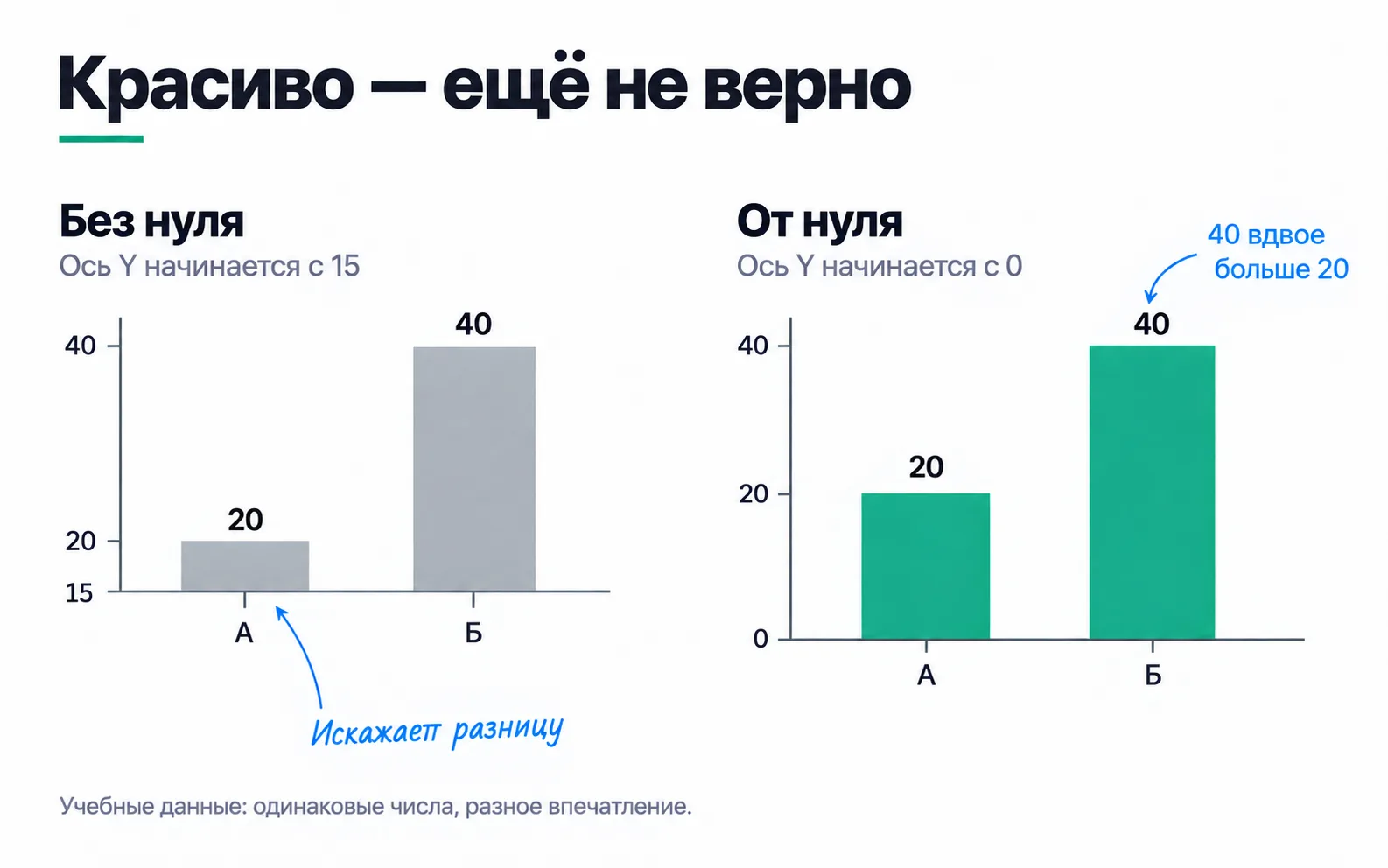
An image model draws something that looks like a chart. It computes nothing from the numbers, and nothing makes it keep the bars in proportion. So the chart is built in Google Sheets or Data Studio from the same table as the assignment, with the axis at zero, and only then does the designer put it into the school's colours. Colours and fonts can change; the geometry can't.
The zero rule applies to bars, where length shows magnitude. A line chart showing change by day can start its axis above zero if that is labelled. But in an ad carousel a line chart with a cut axis also reads as "a sharp rise", so it's safer to keep zero there too.
The slide is seen on a phone, where it takes up the width of the screen. Axis labels are unreadable there, so the numbers go in large type right on the bars: "40" and "20". Before publishing, open the carousel in the phone preview and see whether each number can be read.
The product in the picture is the real one
The generated "report" on the second slide looked better than the real one: pie charts, neon figures, a world map. None of that is in the course. Someone who buys the course for that report will see their own table in Data Studio two weeks later and decide they were misled.
So the slide gets a screenshot of the report students actually build on the course, with made-up client names in the practice data. If the screenshot looks dull, it can sit inside a laptop frame, but what is on the screen stays untouched. The screenshot is taken from the new interface, which already says Data Studio, as in the student guide.
What follows is our reading of the laws; this is not legal advice. A generated picture of a "course result" is also a promise, and the Law "On Advertising" treats false claims about expected results as unreliable advertising (Art. 7(2)(6)). A report the student won't build on the course falls under it.
People: generated and real
The generated woman on the cover is not a student, and captioning her "Dana, spring cohort graduate" is out of the question: that would be an invented review, even if the text beside it is accurate. That's why the brief replaced the woman with hands: there is no invented student on the cover any more. As we read it, swapping her out does not remove the need for a label (more on the hands below). A photorealistic person who doesn't exist counts as a synthetic result under Kazakhstan's Law "On Artificial Intelligence": the image is created by AI and imitates a person's appearance (Art. 1(4)). It may be distributed only with machine-readable marking and a visual or other warning that the user can perceive; techniques that make it hard to perceive are not allowed (Art. 21(2)).
A real teacher is a different matter. His photo is personal data: the Law "On Personal Data and Their Protection" lists a face image among the identifiers (Art. 6), and it may be published only with consent (Art. 7(3)). The Civil Code also forbids using a person's image without their consent (Art. 145(1)). Consent to a photo for the course page doesn't cover a scene AI invents around his face: "the teacher at the whiteboard in front of a full room" is an event that never happened. An image like that needs separate consent that names generation, plus an AI label. Filming a real class is simpler.
Rights and labels
Who owns a generated image depends on the tool's terms, and each tool's terms are different. Whether the image is protected by copyright at all depends, under the Law "On Artificial Intelligence", on a human's creative contribution (Art. 23(1)).
Machine-readable marking often arrives with the file. Images from ChatGPT carry Content Credentials (the C2PA standard) and an invisible SynthID watermark, but Content Credentials are lost when you take a screenshot or convert the file. So the ad gets the original file, not a screenshot: platforms use these signals for their own labels as well.
The visible warning you add yourself, as a clearly visible caption in a corner: "Image created with AI". By our reading, a faint five-pixel font is exactly a technique that makes the warning hard to perceive. The school's cover shows photorealistic hands on a keyboard: as we read it, that already depicts a person, and until there is official guidance it is safer to add the label here too, as in the lesson on AI in content. With a whole photorealistic person or a "class", the picture clearly fits the definition, and the label always goes on.
Exercise: three images for your own ads
First a warm-up on the school's numbers. The model drew one more slide, Google versus Telegram: 20 and 9 leads, with the axis starting at 5. How many times taller does one bar look than the other, and what is the real ratio?
Then take three images you plan to put into ads for your own project or a client's.
Warm-up: the visible heights are 20 − 5 = 15 and 9 − 5 = 4, so to the eye Google is 3.75 times Telegram. In reality it is 20 / 9, about 2.2 times. The distortion is smaller than on the slide with the axis at 15, but the error is of the same kind, and the fix is the same: zero on the axis.
In your own images, look hardest at the ones you put under "product" and "data". If such an image was generated, it isn't edited but replaced with a real one: a screenshot, a product photo, a chart from the table. With a "generated person" there are two options: keep them with an AI label if they don't pose as a customer, or take them out of the frame, as the school took out the woman and kept the hands. The school still put the label on the cover with the hands.