Your first week on a project for an online analytics school. The course costs 25,000 ₸, Instagram ads take 120,000 ₸ a week, and you got access on Friday (the numbers in this lesson are an example). On Monday you open last week's reports: Ads Manager counted 46 leads, GA4 40, and the CRM has 34 with the ad tag. Two weeks later the accountant will tell you that six of these people paid for the course.
Four numbers about the same ads, and they would differ even if everything were set up correctly. Each system counts its own thing by its own rules, and each has its own owner. Until you know who counts what, every conversation with the client about results turns into an argument over whose report is right.
Four sources and what each one counts
| Source | What it counts | Who runs it | The school's number for the week |
|---|---|---|---|
| Ads Manager | Leads Meta credited to the ads under its own rules | The ad account belongs to the school; the media buyer works in it | 46 |
| GA4 | generate_lead events on the site and where each visit came from | The school's property; the event is set up by the marketer or an analyst | 40 |
| CRM | Leads with a phone number and what happened to them next | Sales managers; the head of sales decides what each status means | 34 |
| Payments | Money that actually reached the account | The accountant or the owner: a Kaspi, bank or payment provider statement | 6 |
Google search is the same story: its own conversions in Google Ads, its own in GA4, its own leads in the CRM. Each ad account credits a lead to its own ads, so numbers from two ad accounts are never added up. One of the school's students came to the site from an Instagram post, found the school on Google six days later, clicked the ad and submitted the form. Meta recorded the lead as its own, so did Google Ads, and in the CRM it is one lead.
Each source also has its own unit: an event firing, a lead, a person, a payment. One person can submit the form twice, a lead may never turn into a payment, and one customer can pay in two transfers. The picture shows the same idea on round numbers: form submissions, leads and paying customers are three different figures, and the payment rate depends on what you put in the denominator.
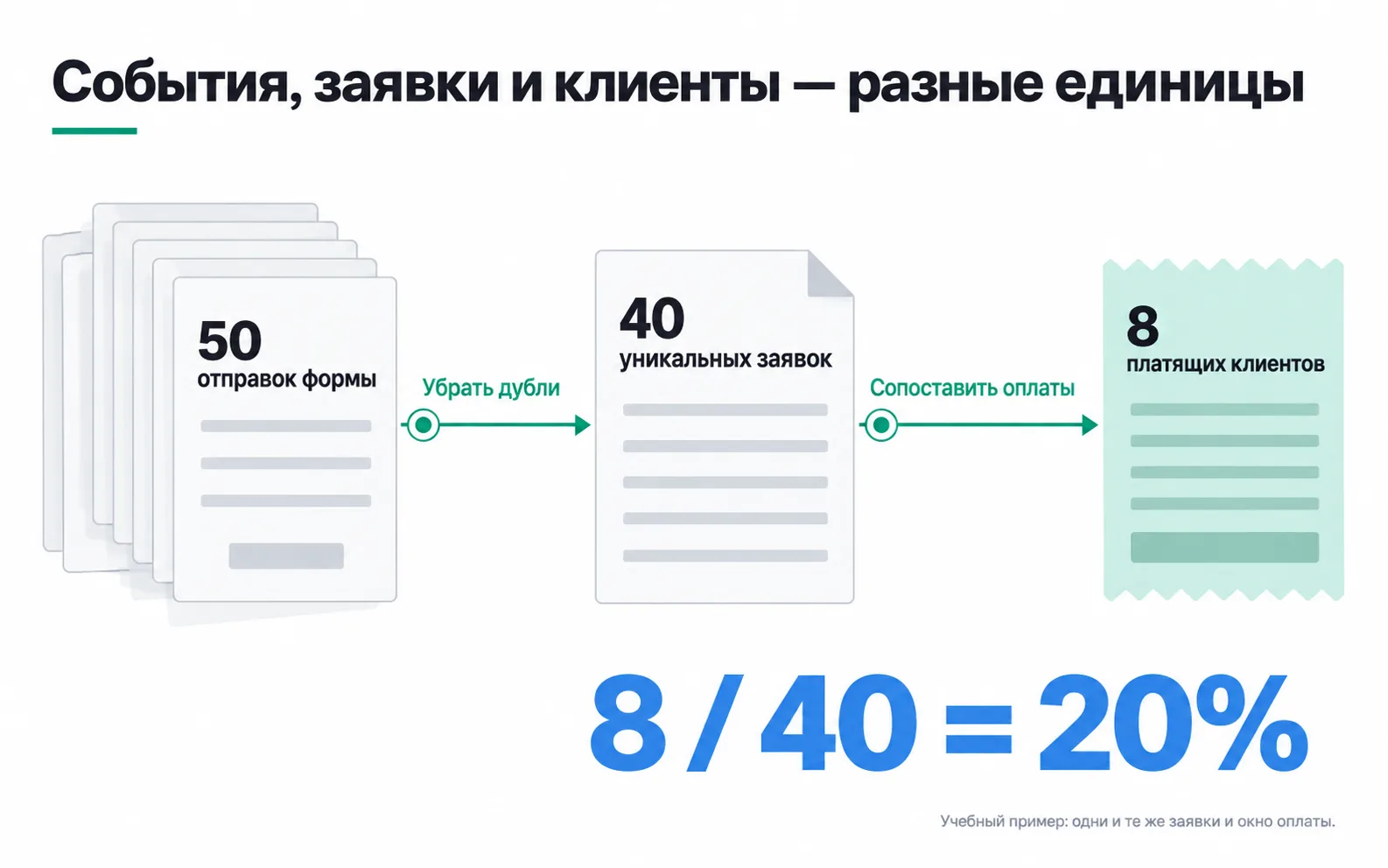
Why the numbers do not match
The ad account and GA4: 46 and 40. By default Meta credits a lead to the ads if the person clicked an ad in the seven days before it or saw one in the past day. Say a student sees a post, finds the school on Google the same day and submits the form: Meta records the lead as its own, while GA4 gives it to search, because they calculate attribution by different rules. And people who declined analytics in the cookie banner may not show up in GA4 at all.
GA4 and the CRM: 40 and 34. GA4 counts how many times the event fired; the CRM counts how many leads were saved. Extra events come from repeat submissions, colleagues' test leads and a tag that sits on the button instead of on the server's response. At the school, a step-by-step reconciliation of GA4 against the CRM found exactly the last of these: the event was firing on the button click. Links without tags are a separate problem: GA4 may record such a visit as (direct) / (none), meaning traffic with no clear source, and in the CRM the lead's source field stays empty.
The CRM and payments: 7 and 6. Some students pay by Kaspi transfer, and the manager sets the "Paid" status by hand once the money arrives. In the CRM seven leads have that status, while the statement shows six payments: one manager set it when the person had only promised to pay on Friday. It also happens the other way round: a student paid in two transfers, and the statement shows two payments from one person. Timing gets in the way too. The lead came in last week, the money two weeks later, and it will not appear in "this week's" report. So payments are checked against the statement, not the status, and tied to the week the lead came in.
Who runs each source and how to get access
Every number needs an owner: someone who knows how it was produced and will fix it if it is wrong. The ad account and the GA4 property belong to the client, and you get working permissions in them, as in the first month of a project. Whoever set up the GA4 event is responsible for it, and on your first project that is most likely you.
The CRM is filled in by managers, and the head of sales decides what each status means. A marketer needs read access or a weekly export: lead number, date, tags, status. Without it you only see leads through the eyes of the ad account.
Payments are the hardest source to get access to, and that is fine: nobody will let you into the bank. Ask the accountant for an export with the date, the amount and the lead or deal number, if it can be included. You do not need card numbers or IINs. Keep phone numbers and emails where they already are, in the CRM. They are never sent to GA4: Google prohibits passing personal data to Analytics, including in the page address.
Which number answers which question
Arguing over which source is right gets you nowhere: each one answers its own question.
- Which ad brings leads more cheaply? Look at Ads Manager: within one ad account every ad is counted by the same rules.
- And which one brings people who pay? That is the CRM: payments are broken down by the leads'
utm_content. - Where do people come from, and where do they leave the site? GA4 will show you.
- How many leads came in, and how many of them were qualified? The CRM knows.
- How much money came in? Only the payment statement shows that.
Shares and conversion rates are calculated within one chain. The school's payment rate is 6 out of 34 leads in the CRM, about 18%. Divide 6 by the ad account's 46 and you get 13%, but the denominator holds leads by Meta's rules and the numerator holds people from the statement. That number exists in no system, and a month later nobody will remember where it came from.
A four-row table for one week is enough to start. A dashboard makes sense once it is clear who counts what; otherwise it just shows you incomparable numbers faster. Tying each payment to the click that led to it is the job of end-to-end analytics. And how many sales the ads added beyond those that would have happened anyway, none of the four sources will show: that takes an experiment with a group that did not see the ads.
Exercise: a source map for your own project
Take a project where you have at least one login: the test site from the Start track, a friend's business or a client's.
If the payments row is still empty, agree on a weekly export now, not on the day of the first report. If two numbers match to the unit, check whether one system takes its data from the other: the CRM may receive leads straight from a Meta instant form, and then it is one number recorded twice. If you have no answer to one of the "why" questions, write that down and note whom to ask: the source's owner. For a test site with no client, fill in the CRM and payments rows with what you would ask the client for.
Video: the data-driven approach
The video is in Russian.