In the week 2 test an IELTS prep centre in Almaty ran three ads, and the third one, "What a lesson looks like" with a photo from a lesson, got 2,000 of the 12,000 impressions and a single lead. That says almost nothing about the "process" angle itself: Meta split the impressions between the ads, and this one got few. The owner wants to test the angle properly and show a lesson as it happens: "Let's shoot a Reel of a teacher going through someone's speaking." The teacher recorded the first take herself: two minutes to camera on why the centre's method beats the rest. It is neatly shot, but there is no lesson in it and no feedback on anyone's speaking, and the opening seconds go on "Hi everyone, my name is...".
Here is how to turn the same idea into a video ad: a three-beat script, shooting on a phone, captions, one master file for Reels, TikTok and Shorts, and reading the report once the video has run for two weeks. The centre's numbers in this lesson are illustrative.
A three-beat script: question, action, result
A 30-40 second video ad is easiest to build from three parts. The question is a situation the viewer recognises as their own. The action is what you do about that situation in front of them. The result is what changed and what the next step is. The angle is the same as the lesson banner's, the "process" angle from three angles on one offer: the viewer sees what a lesson looks like. Only now they see the lesson itself instead of a photo of the classroom.
The centre's 35-second script:
| Beat | Seconds | On screen | Text overlay |
|---|---|---|---|
| Question | 0-3 | A student answers a speaking question and stops mid-sentence | "4-second pause. Fluency points lost" |
| Action | 3-25 | The teacher stops the answer, explains why the pause costs points and gives a phrase that fills it | The phrase itself and "A linking phrase instead of a pause" |
| Result | 25-35 | The student answers the same question again and the pause is gone. The last frame is the offer | "First trial lesson free, a three-month course, a manager will message you on WhatsApp" |
The first second shows the viewer's problem. A logo intro gets scrolled past before anyone learns what the video is about. The platforms' own metrics show how long the opening lasts. Meta counts 3-second video plays as a separate metric, and TikTok's creative best practices say to introduce what the video is about in the first 3 seconds and put the hook in the first 6.
The result shows only what happened on camera: the viewer saw the second answer without the pause with their own eyes.
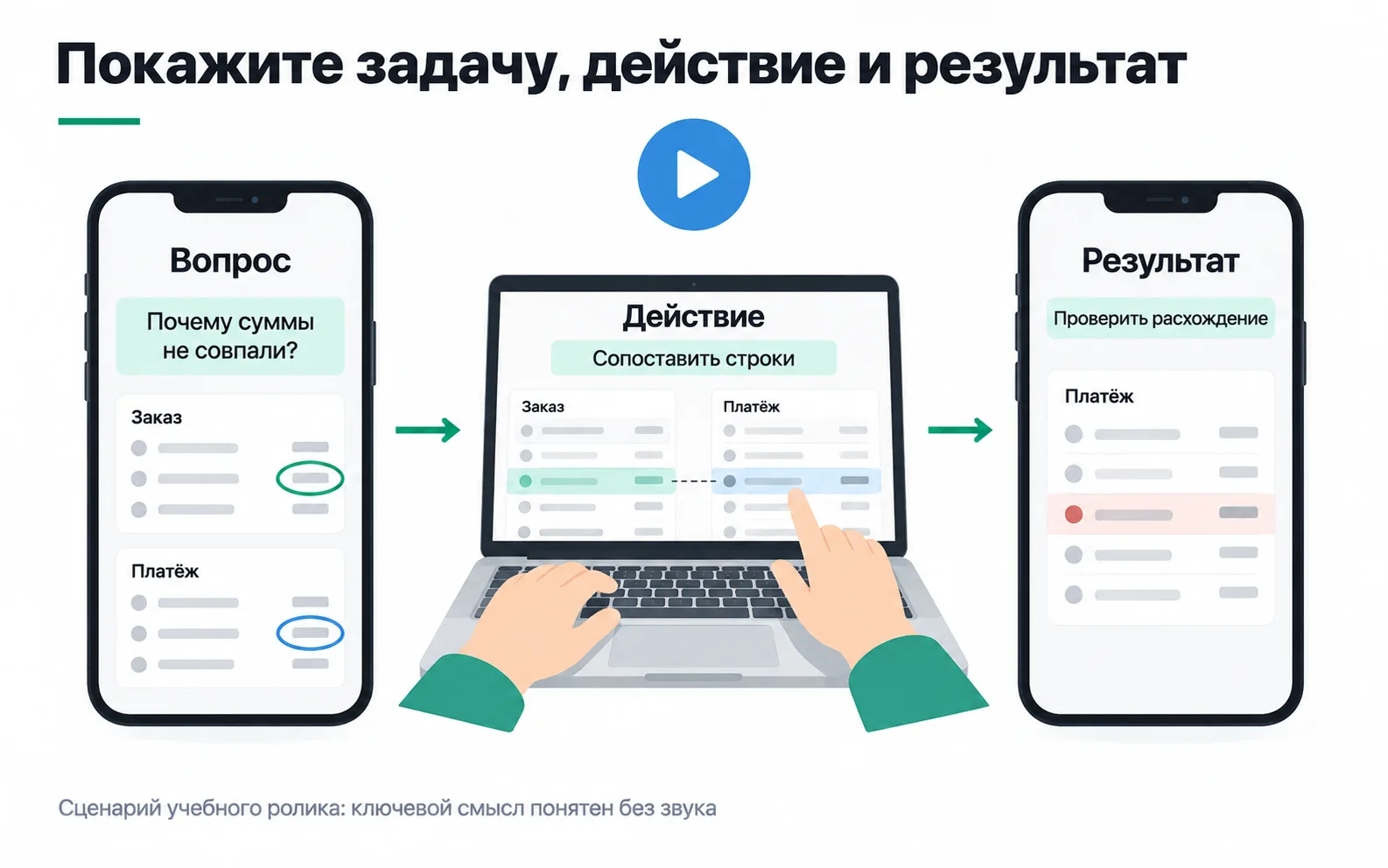
The picture uses the same structure in a different niche: a video about reconciling orders and payments, where the question is "Why don't the amounts match?", the action is matching the rows and the result is the discrepancy found.
Shooting on a phone
You don't need a studio. A phone, a tripod and a lavalier mic are enough.
- Vertical. Reels ads only run as full-screen vertical video (ad formats on Instagram). Shoot 9:16 at 1080 × 1920, the recommended resolution for Instagram Stories ads, which TikTok and Shorts accept as well.
- Sound. The video lives on speech, so the mic matters more than the camera. Clip the lavalier on the student and record the teacher in a second take or on a second mic. A classroom with the door shut beats a corridor.
- Light. Face the window. With the window behind you, the face turns into a dark blob.
- Close-ups. If the teacher writes the phrase on a board or a screen, film it separately in close-up. Small writing on a board can't be read on a phone.
The student on camera means her face and voice in an ad. Get her consent in writing before the shoot, covering the same points as for student testimonials: where the video will be shown, for how long, and whether it can be cut.
Captions and the safe zone
The video has to work without sound: someone on a bus or in a meeting won't turn it on. So the speech goes in as subtitles burned into the video, and the key points, "4-second pause" and the linking phrase, also go in as large text. Auto-captions in editing apps get English phrases and numbers wrong, so read them through in full.
Keep text and faces away from the edges. In Reels and Stories the edges of the frame are covered by the interface, such as the profile icon and the call-to-action button, and Meta asks you to keep text, logos and key details out of there. Ads Manager has a safe zone guardrail toggle that outlines the safe area in a yellow frame. If the ad carries a disclaimer, such as a legal note in small print, Meta recommends leaving the bottom 40% of the frame free of text and logos (safe zone in Reels). Before you publish, open the preview on a phone and make sure the "Learn more" button doesn't cover the linking phrase.
One master file for Reels, TikTok and Shorts
A 35-second vertical video suits all three platforms. The requirements were checked against the help pages on 13 October 2026:
| Where it runs | Format | Length | What to watch |
|---|---|---|---|
| Reels ads from Ads Manager | Full-screen vertical | Up to 15 minutes | No licensed music: original audio or royalty-free music, such as Sound Collection (Reels ads) |
| Boosting a Reel from the Instagram app | 9:16 | Up to 90 seconds | No licensed music, third-party effects, GIFs, product tags or interactive stickers, and the Reel hasn't been posted to Facebook (boosting Reels) |
| TikTok in-feed ads | 9:16 recommended, at least 540 × 960 | Up to 10 minutes | File up to 500 MB (video ad specs), music from the Commercial Music Library, not the general sound library |
| YouTube Shorts | Vertical | Up to 3 minutes | Views have been counted differently since 31 March 2025, see below (about Shorts) |
You shoot once and edit several versions. Music rules differ the most: a licensed track from Instagram's music library can't go into an ad, and TikTok ads take music from TikTok's Commercial Music Library. A video built on speech doesn't need music, which settles the question. In Ads Manager, name the ad according to the tagging reference, for example lesson_video, and that name lands in the utm_content of every lead.
What the video report shows
In Ads Manager, open Columns and choose Video engagement (video ad metrics). You get:
- 3-second video plays: how many times the video played for at least 3 seconds;
- ThruPlays: played to the end or for at least 15 seconds;
- Video plays at 25%, 50, 75, 95 and 100%: how many times playback reached that point, including people who skipped ahead;
- Video average play time.
The video replaced the lesson banner in the ad set and ran for two weeks. Here is its row from the report and from the lead list:
| Metric | Value | Share of 3-second plays |
|---|---|---|
| Spend | 9,400 ₸ | |
| Impressions | 9,800 | |
| 3-second video plays | 3,900 | 100% |
| Plays at 25%, about 9 seconds | 2,300 | 59% |
| ThruPlays, 15 seconds | 1,100 | 28% |
| Plays at 50%, about 17 seconds | 1,000 | 26% |
| Plays at 95% | 640 | 16% |
| Link clicks | 120 | |
| Leads | 7 | |
| Replied on WhatsApp | 5 | |
| Came to the trial lesson | 2 |
Read the table as an editing map. Of 3,900 plays longer than three seconds, 2,300 reached the ninth second and 1,000 reached the seventeenth. Between seconds 9 and 17 more than half of those still watching left. In the script that is the middle of the action, where the teacher explains why a pause costs points. 640 of 1,000 reach 95%: in the second half people leave less often than in the middle.
The report shows where people leave, not why. The centre's guess is that the long monologue in the middle is the problem. In the second version that part is cut in half, and instead of talking about the pause the video shows it on screen with a timer. Whether the guess holds will show in the second version: what share of 3-second plays reaches the start of the result and the 95% point. In the shorter video the 25% and 50% points will fall on different seconds. Don't look for a benchmark for the 3-second play rate: compare your own videos with each other.
The plays can't tell you whether the video pays for itself. For that you count the people who came to the lesson. Two people for 9,400 ₸ is 4,700 ₸ each, against the 8,000 ₸ limit from the scaling plan. With one person it would have been 9,400 ₸, above the limit, so the conclusion rests on a single person. Nor can the video be compared with the banner from the week 2 test: the weeks differ, the spend differs, and the banner got too few impressions. The centre keeps the video, edits a second version with a shorter middle and looks at how many people it brings to a lesson over a month.
YouTube numbers can't be compared with these directly. Since 31 March 2025 a Shorts view is counted every time a Short starts or replays, with no minimum watch time, and the old count is shown in YouTube Analytics as Engaged views. Shorts views and Meta's 3-second plays are different metrics, TikTok has definitions of its own, and they don't go into one table without a note.
Exercise: a three-beat video for your own project
Take the project you made creatives for, or any business whose process can be filmed: a lesson, a repair, an order being made.
Watching it muted shows straight away whether the script is ready: if the first three seconds don't make clear what the video is about, editing won't save it. Compare the last frame with the landing page: the offer in the video should match word for word what the person sees after the click.
The biggest drop between neighbouring points in the report is where the next version starts: look at what is on screen in those seconds. And if people watch to the end but nobody submits the form, the edit isn't the problem: check whether the ending has an offer and where the button leads. And if two or three people reached the next step, tell the client exactly that: there isn't enough data yet.
Video: shooting short formats
A walkthrough of shooting short videos on your own.